How to Verify Emails in BigCommerce
BigCommerce stores collect a customer email at every checkout and account signup. Over time those lists accumulate typos and inboxes that no longer exist. Verifying your exported BigCommerce customer list with VeriMails removes the bad addresses so order and marketing emails reach real customers.
Export or pull the BigCommerce customer audience you plan to mail, verify the CSV with bulk verification, and bring back only the rows that fit your send rules. Valid contacts can feed store newsletters or ESP syncs, while invalid and disposable rows should stay out of campaigns. Compare the flow with the Shopify guide if you manage multiple stores.
Why Verify Your BigCommerce Contacts
BigCommerce stores depend on email for the full customer lifecycle. Order confirmations, shipment tracking, account messages, abandoned cart reminders, and marketing campaigns all rely on the address a customer supplied. When that address is invalid, the message never lands, and the impact reaches beyond a single missed email.
Order confirmations are non-negotiable
An order confirmation or shipping notice is the customer's evidence that the transaction worked. If it bounces, the customer is left uncertain, support volume rises, and trust in the store erodes. Verifying the email BigCommerce holds for each customer keeps transactional mail arriving where it is expected.
Abandoned cart emails turn into recovered revenue
Abandoned cart sequences are among the strongest-performing emails a BigCommerce store sends, because the recipient already showed clear purchase intent. That recovered revenue only appears when the email reaches a live inbox. A checkout typo turns a recoverable cart into a hard bounce, and the recovery flow never has a chance to run.
Deliverability protects every campaign that follows
Mailbox providers such as Gmail, Yahoo, and Outlook monitor your bounce rate. Once it climbs out of the healthy range, they can begin throttling your mail and routing more of it to spam. Email addresses decay every year as customers change jobs and abandon old inboxes, so a BigCommerce list that was clean last quarter is not clean today. Verifying before a major send keeps your sender reputation strong.
Marketing budget reaches customers who exist
If you sync BigCommerce customers into an email platform that bills by contact, every dead address costs money with no possible return. A focused email list cleaning pass before the sync means your spend covers customers you can actually reach.
What VeriMails Checks
VeriMails runs a layered set of checks on every address in your BigCommerce export and returns a clear result. The email verification walkthrough explains how those deliverability checks work before a customer list reaches a campaign.
It starts with syntax validation, which catches malformed addresses produced by checkout typos. It then runs MX and DNS checks to confirm the customer's email domain exists and is set up to receive mail. The decisive test is a live SMTP handshake, where VeriMails connects to the receiving mail server and confirms whether that exact mailbox accepts mail, without sending anything to the customer.
Three more checks classify the harder cases. Catch-all detection identifies domains configured to accept mail for every address, so you know when an individual mailbox cannot be confirmed. This is detection of a server configuration, not a quality score. Disposable detection flags throwaway inbox providers, which appear when shoppers use a temporary address to claim a promotion. Role-based detection spots shared addresses such as info@ or sales@ that are usually not the right target for a marketing list.
Pricing for BigCommerce Users
You can start with no commitment. Every new VeriMails account includes 100 free verification credits, with no credit card required, and those credits never expire. That free balance lets a smaller store clean a starter list or any store trial the workflow, and the pricing page helps forecast cost before seasonal exports.
For a full customer base, credit packs start at 10,000 credits for $19, which is $0.0019 per email, and scale up to 5 million credits for $1,499. Because credits never expire, a BigCommerce store can buy a pack, verify the list ahead of a seasonal campaign, and keep the rest for the next one. Stores that verify on a regular cadence can choose a monthly subscription instead, with annual plans from $12.50/month when billed yearly. One credit covers one verified address, so a BigCommerce customer export of any size has a clear, predictable cost.
Workflow Visual
Use this flow to clean BigCommerce customer email data before it moves into marketing or retention campaigns for an ecommerce workflow.
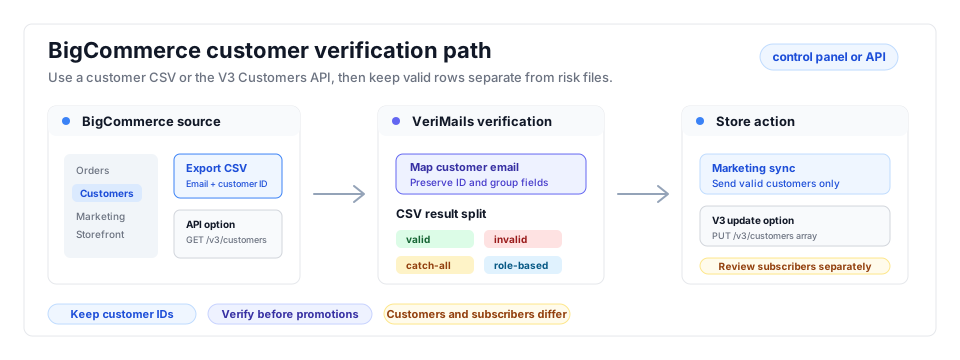
- Export scope: Choose the customer export template that includes Email and the fields your marketing platform needs; store operators cleaning multiple platforms can compare the Shopify workflow.
- Matching field: Keep customer ID, name, and order context so bulk verification results can be reconciled with store records.
- Result action: Use valid customers for campaigns and suppress invalid, disposable, and risky addresses from promotions before they affect the bounce rate benchmark you track.
Step-by-Step
Export or pull your customer list from BigCommerce
In control-panel workflows, export customers with the template that preserves email, customer ID, customer group, and any fields your marketing tool needs. For automated or server-side workflows, use the BigCommerce V3 Customers API and the VeriMails Email Verification API to keep customer checks close to the import process. Keep subscribers separate from customers when newsletter signups are stored outside customer accounts, and compare the export row count against the customer group count before uploading.
Create a free VeriMails account
Sign up for VeriMails. You get 100 verification credits free with no credit card required, enough to test the process. If your store's list is larger, choose a credit pack or monthly plan that covers your customer count before you upload.
Upload the CSV to VeriMails
Open the bulk verification workflow and drag in the CSV exported from BigCommerce. The uploader automatically detects and maps the email column, so you can leave the other columns from the Bulk Edit template in place. Larger customer exports run as asynchronous bulk jobs. Before starting, confirm the mapped email column and keep the untouched store export for rollback.
Review valid, invalid, catch-all, and risky results
When the job completes, VeriMails sorts every address into clear categories: valid and safe to mail, invalid and certain to bounce, catch-all where the server will not confirm the mailbox, and risky addresses such as disposable or role-based. Review the invalid rate by customer group and acquisition source, then spot-check high-value rows before they are suppressed.
Bring the cleaned list back
Download the filtered results. Use the valid addresses for your marketing sends, and suppress or remove the invalid ones in your email tool or in BigCommerce so they never get another campaign. QA the import by confirming accepted-row counts, duplicate handling, and a sample of customer IDs before sending the next promotion.
BigCommerce Cleanup Checklist
Use this operator table before customer exports feed promotions, retention campaigns, or an ecommerce marketing platform sync.
| Check | What to do | Why it matters |
|---|---|---|
| Customer scope | Export the customer group, date range, or segment that matches the campaign or sync target. | Keeps cleanup focused on customers who are about to receive marketing or lifecycle mail. |
| Columns to keep | Preserve email, customer ID, name, customer group, order context, and opt-in or consent fields. | Lets the cleaned file reconcile with store records and downstream marketing lists. |
| Valid audience | Use valid rows for campaigns, retention workflows, and CRM imports. | Transactional and promotional messages reach customers with working inboxes. |
| Suppression file | Use invalid and disposable rows as the suppression input for the marketing tool or store-side cleanup. | Prevents customer typos from bouncing repeatedly across seasonal campaigns. |
| Review queue | Keep catch-all, role-based, and high-value customer rows in a separate review file. | Protects deliverability while giving valuable B2B or repeat customers a second look. |
Frequently Asked Questions
Related Guides
Try VeriMails Free
100 free credits on signup. No credit card required. Put this guide into practice today.
Start Free