Protect checkout, customer accounts, cart recovery, and campaign deliverability by verifying customer email addresses before bad data spreads through your store.
We ran 24K Shopify and popup subscribers through VeriMails before a sale. It found 1,900 bad addresses we were still paying to email, and Klaviyo engagement improved right away.Rafael C. — Retention Manager at DTC Home Brand, Switzerland
An e-commerce store depends on email at almost every important moment: account creation, checkout, order confirmation, shipping updates, password resets, cart recovery, review requests, loyalty programs, winback campaigns, and customer support. If the address is wrong at capture, every later workflow inherits the same problem.
VeriMails is most useful when it acts as a quality gate before a bad address becomes a customer record. A typo like gmial.com, a disposable inbox, or a mailbox that no longer exists should not be treated the same as a verified customer address. The goal is not to add friction to every checkout. The goal is to catch clear failures early and keep marketing data clean enough that your store can keep sending confidently.
For Shopify and other hosted platforms, start with the workflow in the Shopify email verification guide. For custom storefronts, use the email verification API at account creation or before saving a checkout email. For existing lists, use bulk verification before importing subscribers into Klaviyo, Mailchimp, Omnisend, or your CRM.
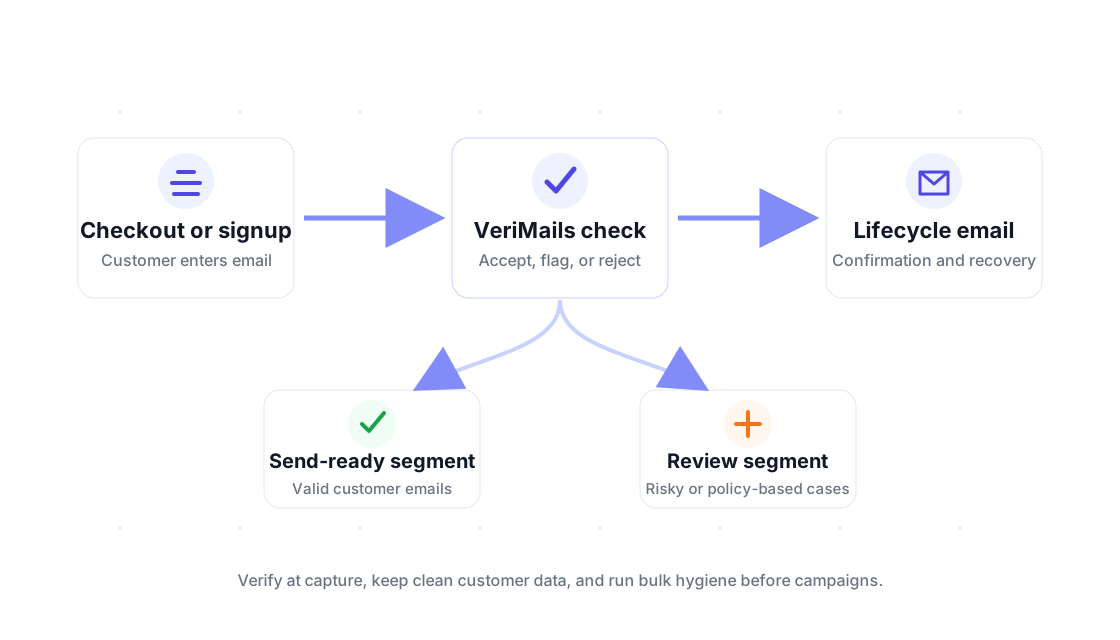
From checkout validation to list hygiene, VeriMails keeps your customer data clean and your transactional emails delivered.
Verify email addresses the moment a customer registers or checks out. Return a clear error before form submission if the address is invalid, disposable, or has syntax errors.
Disposable email services like Mailinator and Guerrilla Mail are a common vector for promo abuse and fake accounts. Block them automatically at registration before they enter your system.
Order confirmations, shipping notifications, and password resets are mission-critical. A clean email list keeps your transactional sending infrastructure healthy and out of spam filters.
Cart abandonment campaigns only work if the email address is real. Verify addresses during checkout to make sure your recovery sequence reaches actual shoppers.
Run your entire customer database through bulk verification to identify stale, invalid, and undeliverable addresses before your next campaign or re-engagement series.
Most email service providers charge by list size or email volume. Removing invalid and unengaged addresses reduces your monthly bill and improves engagement metrics — both for pricing and deliverability algorithms.
Use real-time checks where a customer enters an email, then use bulk hygiene where teams manage existing lists.
Run a verification check before the address is saved. If the result is valid, continue silently. If the address is obviously malformed, disposable, or invalid, ask the shopper to correct it with plain customer-facing text.
Only load verified customer emails into high-volume automations. Keep risky and catch-all results out of the default recovery audience until they are reviewed or handled with a lower-risk policy.
Before Black Friday, product drops, holiday promotions, or reactivation campaigns, export the customer list, verify it in bulk, and import clean segments back into your email platform.
A store should not treat every verification category the same way. The safest checkout policy is usually strict on clear failures and practical on edge cases. Invalid and disposable results are the easiest to block or ask the customer to correct. They rarely help with order communication, and they make abandoned-cart, review, and loyalty flows less reliable.
Catch-all domains require more context. A catch-all result means the domain may accept mail broadly, so the address is harder to confirm with the same certainty as a normal mailbox. For a low-risk order confirmation, you may still need to send the message. For a promotional broadcast, it is smarter to segment catch-all results separately and test smaller volumes before adding them to the main audience.
The same logic applies to imported customer lists. If an address is valid, keep it in the normal audience. If it is invalid, suppress it before the next campaign. If it is risky, catch-all, or unknown, move it into a review segment. This keeps the primary list cleaner without forcing your team to delete every uncertain record immediately.
Syntax errors, disposable addresses, and invalid mailboxes should trigger a correction message before checkout or account creation continues.
Use only valid and approved records for cart recovery, launch announcements, review requests, and promotional broadcasts.
Keep catch-all and risky results separate so your team can decide whether to send, suppress, or retest based on campaign importance.
Email verification should make the store easier to operate, not just add another status field. Track hard bounce rate, disposable signup attempts, cart recovery deliverability, order-confirmation support tickets, and the size of your suppressed segment after each bulk clean. Those metrics tell you whether bad email data is being caught early enough.
For deliverability, use bounce-rate thresholds as an operating guide. Under 3% is healthy, 3-5% needs cleanup or attention, and above 5% is high risk. A store that sends to an old customer database, imports giveaway leads, or runs seasonal reactivation should verify before the campaign goes out instead of waiting for the ESP to report the damage later.
For data quality, compare signup and purchase records before and after the verification gate. If the number of obvious typos and disposable addresses drops, your customer support, marketing, and analytics teams all benefit. If risky segments are growing, that is a signal to review the source of the traffic, not just the email list.
Compare VeriMails vs ZeroBounce and VeriMails vs Emailable before you clean a customer list for a major send.
For store workflows, connect verification to Shopify or Klaviyo before checkout data and campaign audiences drift.
Checkout typos used to sit in our list for months. Now we clean before every major campaign, keep the valid buyers, and stop paying our ESP for addresses that cannot receive mail.Anika C. — E-Commerce Director at Subscription Retailer, Belgium
Start with 100 free credits. No credit card required.