Email Verification for Agencies
Verify client lists during onboarding, campaign prep, and CRM cleanup with one shared workflow for bulk files, API checks, and client-ready reporting.
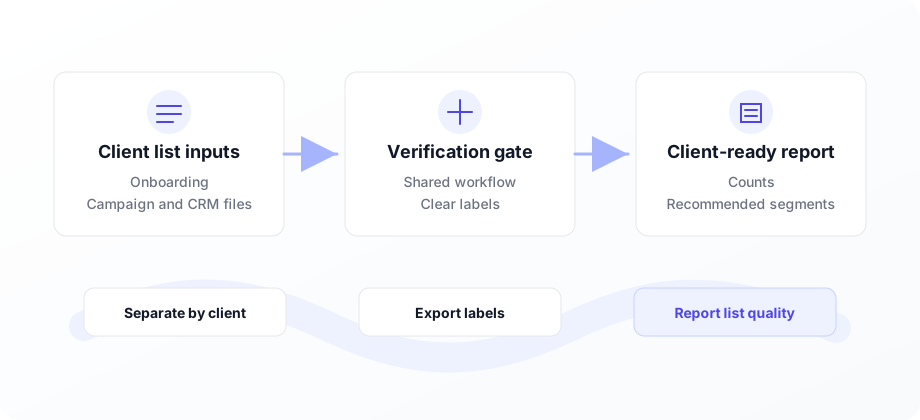
The short version: verify first, then send.
Agencies use VeriMails to verify client lists before campaigns, imports, and deliverability reviews. Run separate jobs for each client, share one credit balance, and deliver clear status labels.
Agency email verification use cases
Apply the same verification standard across every client account.
| Agency workflow | List to verify | Client deliverable |
|---|---|---|
| New client onboarding | CRM export, newsletter list, lead database | List-quality audit with valid, risky, invalid, and catch-all counts. |
| Campaign launch | Email campaign audience or cold outreach list | Suppression file and clean segment for the sending platform. |
| Lead generation delivery | Leads collected for a client | Verified list with status labels and recommended next action. |
| Ongoing retainers | Monthly list refreshes and reactivation segments | Recurring hygiene report that keeps deliverability conversations concrete. |
Agencies inherit email data from many sources: client CRMs, event lists, newsletter exports, lead generation forms, and campaign databases. Each source carries a different level of quality, and the agency is usually expected to turn that list into performance quickly.
Email verification gives the team a consistent intake step. Before a list reaches a sending platform, VeriMails labels the records that are valid, invalid, risky, disposable, role-based, or catch-all. That turns list quality into a concrete client conversation instead of a vague deliverability concern.
Use bulk verification for client CSVs and the verification API for intake forms, landing pages, and campaign-prep systems. For a deeper agency workflow, read email verification for agencies or compare volume options on pricing.
Built for agency list operations
Manage verification across clients without adding separate tools for every account.
Multi-client jobs
Run verification jobs for multiple clients from a single account and organize files by project or campaign.
Bulk client lists
Upload client CSVs for onboarding audits, campaign prep, CRM imports, and recurring cleanup.
Shared credit balance
Use one credit pool across client work so account management stays simple.
Downloadable reports
Export labeled results that can be handed to clients or imported into their sending platform.
API automation
Add verification to client intake forms, landing pages, CRM cleanup flows, and campaign-prep systems.
Client-safe segmentation
Turn verification results into a suppression policy, review queue, and approved campaign segment.
Agency verification workflow
From client intake to client-ready output.
Upload client list
Receive a CSV from your client or pull it from their CRM. Upload to VeriMails and map the email column in seconds.
Run verification
Process the file as a background verification job and review the status breakdown by client or project.
Deliver results
Download the labeled CSV, create a suppression policy, and hand the approved segment to the campaign team.
Client reporting module
For each list, report total records, valid count, invalid count, risky count, catch-all count, disposable count, and the segment you recommend sending to first.
What to clean before a client campaign
Start with the list your client is about to use, not the perfect list they wish they had. Pull the CRM export, the webinar attendees, the purchased opt-in file, and the old newsletter segment into one verification job. Keep valid addresses for launch. Suppress invalid addresses before they hit the sending platform. Put catch-all and risky rows into a separate review segment so your account team can decide whether the upside is worth the bounce risk.
That split makes reporting easier. You can show the client exactly how many records were usable, how many were removed, and why the campaign size changed. Pair the cleaned audience with the cold email verification workflow, compare verification cost on the pricing page, and send the approved file to the tool your client already uses. VeriMails keeps the cleanup work simple enough to repeat on every new engagement.
If you manage several clients, create the same cleanup checkpoint for each account: intake file, verified file, suppression file, and launch file. That naming discipline keeps strategy, delivery, and reporting aligned when multiple campaign managers are moving quickly.
For retainer clients, repeat that cleanup every time the source list changes. New imports, event scans, and reactivated CRM segments should all pass through the same check before campaign setup, so list quality does not depend on which strategist prepared the file.
That makes the cleanup easy to audit, repeat, and explain.
Frequently asked questions
Common questions from agencies using VeriMails.