Clean CSV email lists before they reach your campaigns
Upload a CSV, verify every email address, preserve your original rows, and download results your team can filter, segment, and import back into the tools you already use.
Bulk email verification for lists that already exist
Most teams do not start with a perfectly clean list. Contacts arrive from CRMs, enrichment tools, conference exports, product signups, newsletter forms, partner lists, and spreadsheets maintained by different teams. By the time a campaign is ready, the file often contains typos, old addresses, duplicates from prior workflows, disposable addresses, and domains that need a more careful sending decision.
VeriMails bulk email verification is designed for that reality. Upload a CSV, choose the column that contains email addresses, and run the job before the list is used for outreach, lifecycle messaging, recruiting, account management, or CRM cleanup. VeriMails preserves rows and adds verification results, so your downloaded file remains useful for spreadsheet filters, CRM imports, and team handoffs.
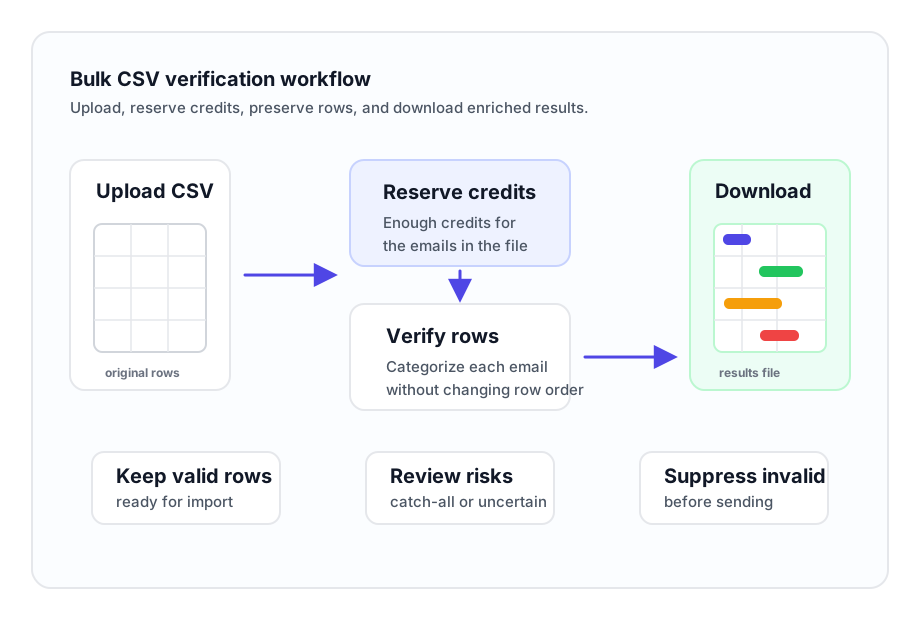
If you need verification inside a product or automated data pipeline instead of a file upload, use the email verification API. For teams cleaning full lists, the bulk workflow keeps the process simple: prepare the file, reserve the credits, verify the rows, and download the results.
What the bulk workflow helps you control
Use a cleaned results file to make better decisions before sending, syncing, or assigning a list.
CSV-based list cleaning
Work from the file format your team already exports from CRMs, outreach tools, spreadsheets, and data providers.
Row preservation
Keep rows intact so verification results can be matched back to names, companies, owners, segments, and source fields.
Upfront credit reservation
Bulk CSV jobs require enough credits for the number of emails and reserve those credits upfront before processing begins.
Deliverability categories
Separate valid, invalid, risky, disposable, and catch-all results before a list moves into sending or sales workflows.
Downloadable results
Download the completed results file and use it in spreadsheet tools, CRM imports, marketing lists, or internal review queues.
Campaign preparation
Clean lists before cold outreach, newsletters, recruiting sequences, product announcements, and reactivation campaigns.
The bulk job rules are explicit
Know what happens before a file is processed, so operators can plan list cleaning without guesswork.
Use the results file as an operating tool, not just a report
A verified CSV should help your team decide what happens next. After a bulk job finishes, use the downloaded results to keep good addresses in the main workflow, remove invalid rows, review risky or catch-all results, and tag records that need a different sending policy.
Because rows are preserved, the results can stay connected to the fields that matter: account owner, source, company, persona, campaign, region, consent status, or lifecycle stage. That makes it easier to import the enriched file back into a CRM, split a campaign by deliverability category, or send a subset to a teammate for manual review.
For more context on how verification categories are determined, see how email verification works and the result code documentation.
Typical post-verification actions
- Keep valid rows in the primary campaign or CRM import.
- Exclude invalid and disposable addresses from sending queues.
- Review risky and catch-all rows before assigning them to a campaign.
- Preserve the verification status beside the original contact record.
- Export separate files for sales, marketing, recruiting, or operations teams.
How bulk CSV verification works
The workflow is built for operators who need a clean result file without building a custom integration.
Upload and map your file
Upload the CSV and choose the column that contains the email addresses. Keep the original fields that your team needs for filtering, ownership, and imports.
Confirm credits and start
Make sure the account has enough credits for the number of emails in the file. VeriMails reserves the credits upfront and starts the job.
Download and segment
When the job finishes, download the results file. Filter by verification status and use the enriched rows in your next campaign, import, or review workflow.
When to choose bulk verification instead of the API
Bulk verification is usually the right choice when your team already has a file and wants to clean it before a business process starts. That includes a launch list, a CRM export, a dormant customer segment, a recruiting database, a trade show file, or a spreadsheet collected from multiple sources. The CSV workflow is simple for non-developers and produces a file that can be inspected before it is used.
The email verification API is a better fit when verification needs to happen continuously inside software, such as signup validation, backend imports, or automated enrichment flows. Many teams use both: the API protects new addresses at the point of capture, while bulk verification cleans historical files and campaign lists.
If you are preparing cold outreach specifically, the cold email verification workflow can help you think through suppression, segmentation, and campaign hygiene before sending.
Useful next pages
Plan your list-cleaning workflow and connect bulk verification to the rest of your email quality process.
Bulk Email Verification FAQ
Common questions about cleaning CSV email lists with VeriMails.
How does VeriMails bulk email verification work?
Upload a CSV, choose the email column, confirm that you have enough credits for the number of emails, and start the job. VeriMails verifies the list and provides downloadable results.
Do bulk CSV jobs require credits upfront?
Yes. Bulk CSV jobs require enough credits for the number of emails in the file, and credits are reserved upfront for the job before processing begins.
Does VeriMails preserve my original CSV rows?
Yes. Bulk verification preserves rows so the downloaded results can be matched back to the original list, including fields such as name, company, owner, source, or segment.
What do I get after a bulk verification job finishes?
You get downloadable results with verification fields added to your original rows, including deliverability categories and useful flags for filtering, review, and imports.
Clean your next CSV before you send
Upload a list, verify the addresses, and download results your team can use in campaigns, CRMs, and review workflows.