VeriMails vs Validity BriteVerify
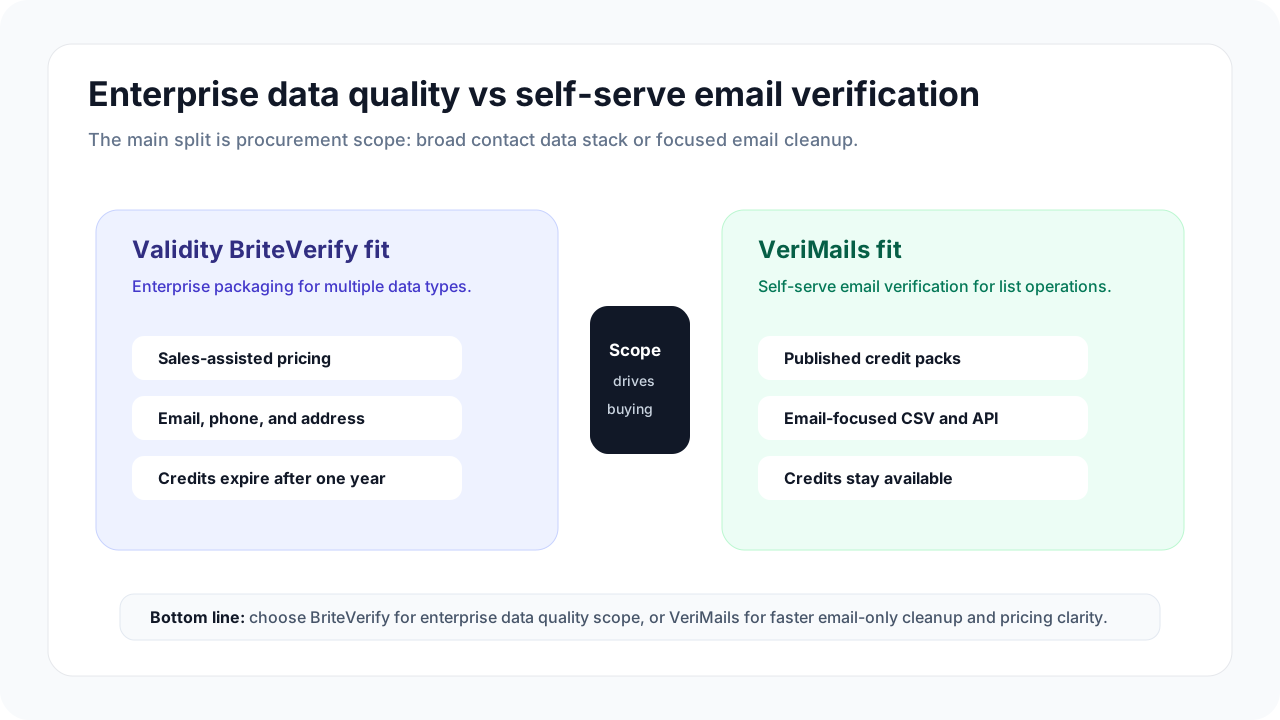
Both VeriMails and Validity BriteVerify help teams avoid bad email data before they send. The practical difference is buying and workflow fit. VeriMails is built for teams that want to clean an email list quickly. BriteVerify is a better fit when email verification is part of a broader contact-data program across multiple systems.
Want the full credit table in one place? Check VeriMails pricing before you choose a pack.
At a Glance
| Category | VeriMails | Validity BriteVerify |
|---|---|---|
| Best fit | Teams that want a clean email list quickly | Teams that want a broader contact verification program |
| Buying path | Self-serve credits and plans | Flexible pricing with contact or demo calls to action |
| Credit policy | Verification credits stay available until used | Pricing FAQ says credits expire one year after purchase |
| Bulk list cleanup | Upload CSV, verify, review, export | Bulk verification for larger datasets and ongoing list cleanup |
| API checks | Focused email verification API | API options for contact verification workflows |
| Integrations | API and workflow use cases for verification | Salesforce, marketing platform, and Validity ecosystem fit |
| Buyer effort | Lower: clean a list and move on | Higher: evaluate package, terms, systems, and stakeholders |
Comparison Visual
What This Means for Buyers
Most teams comparing email verification tools are trying to answer a simple question: can we clean this list before it hurts a campaign? VeriMails is designed around that job. Start with credits, upload a CSV, verify the list, review the groups, and export the file your team can use.
BriteVerify can make sense when the question is bigger than one email list. Validity positions BriteVerify around email, phone, address, API, batch verification, and integrations. That scope can help an organization standardize contact data across systems, but it also makes the buying decision less like a quick list cleanup and more like a broader vendor evaluation.
| Buying question | Choose VeriMails when... | Choose BriteVerify when... |
|---|---|---|
| Do we need this today? | You need a clean email file before a campaign, upload, or sequence. | You are evaluating a larger contact data process. |
| Who owns the work? | A marketer, salesperson, recruiter, founder, or agency operator owns the list. | Revenue operations, CRM, data, or IT teams own the systems. |
| How should buying feel? | You want to start without booking a demo. | You expect to discuss package, volume, integrations, and terms. |
| What needs verification? | Email addresses are the immediate problem. | Email, phone, address, and platform integrations all matter. |
If you only need email cleanup, compare the number of records you need to verify now. If BriteVerify is part of a larger Validity relationship, compare the full package and contract terms.
Pricing, Credits, and Expiration
Validity's BriteVerify pricing page emphasizes flexible pricing for real-time, batch, and API verification. It also sends buyers toward contact or demo calls to action instead of a simple public table for common list sizes. The same page's FAQ says verification credits expire one year after purchase.
That expiration detail matters for teams with uneven list-cleaning volume. If you clean a large database once, then do nothing for months, a one-year credit window may be a real planning factor. VeriMails is easier for a team that wants to buy credits around actual campaigns and use them for CSV cleanup or API checks without a sales-led evaluation.
| Cost factor | VeriMails | BriteVerify | Buyer takeaway |
|---|---|---|---|
| Starting point | 100 signup credits | Contact or demo path for current terms | VeriMails is easier to test immediately. |
| Small campaign list | Self-serve credits for the file at hand | May be better if already covered by an existing Validity setup | Do not add buying complexity if you only need one list cleaned. |
| Large ongoing program | Useful when the work remains email-first | Useful when multiple data types and systems matter | BriteVerify can make sense when the package replaces several tools. |
| Credit planning | Credits stay available until used | Pricing FAQ says credits expire after one year | Plan around real verification timing, not just list size. |
VeriMails Credit Pricing
| Credits | VeriMails Price | Price per Email |
|---|---|---|
| 10,000 | $19 | $0.0019 |
| 25,000 | $39 | $0.00156 |
| 50,000 | $59 | $0.00118 |
| 100,000 | $99 | $0.00099 |
| 250,000 | $199 | $0.000796 |
| 500,000 | $349 | $0.000698 |
| 1,000,000 | $499 | $0.000499 |
| 2,500,000 | $999 | $0.0004 |
| 5,000,000 | $1,499 | $0.0003 |
VeriMails credits never expire. Email Finder costs 20 credits only when VeriMails returns a verified person-level email. At the 10,000-credit pack, that is $0.038 per found email. Monthly plans start at $12.50/mo when billed yearly.
Bulk List Cleanup and API Fit
For a campaign team, bulk verification should not feel like a systems project. The list comes from a CRM export, ecommerce platform, webinar tool, lead vendor, signup flow, or old spreadsheet. The buyer needs a cleaned file and a clear review group before the next send.
VeriMails is strong when that is the whole job. The workflow is intentionally narrow: upload, verify, review, export. BriteVerify is stronger when the same verification work needs to connect with a larger contact verification process, including Salesforce, marketing platforms, API usage, or existing Validity products.
| Scenario | Better buyer experience | Why |
|---|---|---|
| Cleaning a trade-show CSV | VeriMails | The team needs a fast list cleanup and export before follow-up. |
| Checking emails in a signup flow | VeriMails | A focused API is enough when the immediate need is email verification. |
| Standardizing contact data across a CRM | BriteVerify | Email, phone, address, and integration requirements may matter together. |
| Buying through an existing Validity relationship | BriteVerify | A larger contract can make sense if the organization already uses Validity tools. |
Risky and Accept-all Records
Not every email result should be treated the same way. Some addresses are clearly usable, some should be removed, and some need a review decision before a send. That middle group matters because it can affect bounce rate, sender reputation, and campaign confidence.
VeriMails keeps review groups visible for list-cleaning teams, including catch-all and risky records. BriteVerify also discusses result groups and status details in its public help material. If your team needs a very specific export field or API field, confirm it during BriteVerify evaluation. For most campaign teams, the buyer-friendly requirement is simpler: keep uncertain records separate from clean records before sending.
A practical sample test should include more than obviously clean addresses. Add a slice of older CRM contacts, role-based addresses, common personal domains, work domains, and regional contacts from the markets you actually send to. Then compare how clearly each tool helps your team decide which records to send, suppress, or review.
Regional and Multilingual Lists
If you are cleaning lists across multiple countries, brands, or language segments, verify them separately. A single combined spreadsheet hides quality differences between markets and makes it harder to explain why one campaign should be treated differently from another.
VeriMails is a good fit when sales or marketing teams need the same cleanup workflow for each market. BriteVerify can be a better fit when regional list cleaning is part of a larger CRM or data governance program that also includes phone, address, and integration requirements.
| Regional task | Recommended buyer step | Why it matters |
|---|---|---|
| Country launch list | Verify each country file separately. | You can compare data quality and bounce risk before sending. |
| Multilingual campaign | Keep language, source, and consent fields in the export. | Clean emails still need the right message and permission context. |
| Old CRM reactivation | Review risky and accept-all records before sending. | Older records often need more conservative suppression choices. |
| Agency client delivery | Return the cleaned file with clear result groups. | Clients need an action-ready export, not a tool-by-tool explanation. |
Which Should You Choose?
Use the decision less like a feature checklist and more like a workflow test. If your team can upload a real list, understand the results, and export a file without scheduling extra handoffs, VeriMails is likely the cleaner fit. If the buying decision naturally involves CRM ownership, integration planning, phone or address data, and contract review, BriteVerify deserves a closer look.
Choose VeriMails if...
- You want a simple way to clean an email CSV before a campaign.
- You need focused bulk email verification and exports.
- You want to start with credits instead of booking a pricing call.
- You need catch-all and risky records grouped clearly for review.
- You clean lists for sales, marketing, recruiting, agency, or CRM hygiene work.
Choose BriteVerify if...
- Your team already uses Validity products or wants a broader Validity relationship.
- You need phone or address verification alongside email verification.
- You want Salesforce, marketing platform, or CRM integration conversations.
- Your buying process is comfortable with sales-led pricing and contract review.
- You are solving an organization-wide contact data problem, not just cleaning one list.
Public Sources
This comparison uses Validity's public BriteVerify product, pricing, bulk verification, integration, and help material as buyer evidence, checked on May 21, 2026. Pricing, packaging, and contract terms can change, so confirm live terms before purchasing.
The goal is not to reproduce every product setting. It is to help a buyer decide which workflow is easier to start, easier to explain, and easier to operate after the first list is cleaned.
Verification Accuracy
Validity BriteVerify makes sense when verification is part of a larger enterprise data or deliverability program. VeriMails is a cleaner fit when you want the email result itself without procurement, bundled data, or a managed suite.
Accuracy still comes down to current mailbox signals. VeriMails checks syntax, DNS, MX, SMTP, disposable domains, role-based inboxes, and catch-all domains so you can decide what to send, suppress, or review.
Catch-all Detection
Catch-all domains accept mail for many or every mailbox at a domain, so an SMTP check cannot prove that one specific person exists. Treating those addresses as confirmed valid is how avoidable bounces and weak replies enter a campaign.
VeriMails flags catch-all domains as their own result so you can keep confirmed valid addresses separate. If Validity BriteVerify does not expose the catch-all result clearly in exports or API responses, ask for that field before using the data in a live send.
Who VeriMails Is Best For
Choose VeriMails when verification is the job and you want the result before the send.
- You already have a list and need to clean it before a campaign.
- You want prepaid verification credits that never expire.
- You need API and CSV verification without paying for a larger sales platform.
Who Validity BriteVerify Is Best For
Choose Validity BriteVerify when its broader product strengths match the job you are buying for.
- Choose Validity BriteVerify when you want an enterprise data, deliverability, or managed-sales program around verification.
- Choose it when procurement, account management, and bundled capabilities are part of the buying requirement.
- Choose it when the wider platform matters more than the lowest self-serve verification price.
Frequently Asked Questions
Why teams switch to VeriMails
“We export our customer database quarterly and run it through VeriMails. Last cleanup removed 8K dead addresses from a 60K list. Our campaigns immediately performed better.”
— James A. — Digital Marketing Manager at Outdoor Gear Brand, Australia
“Built our MVP with VeriMails verification on the signup form. Kept fake and disposable signups out from day one. Took 20 minutes to set up with the API.”
— Max S. — Technical Co-Founder at Marketplace Startup, Sweden
Related Comparisons
Verify a Sample List
Start with 100 free credits. Upload a CSV or test the API before committing a full cleanup workflow.
Start Free