Email Health Check
Check MX, SPF, DKIM, and DMARC records for any domain before deliverability problems reach your campaigns.
TL;DR
- Use the health check to confirm that a domain can receive mail and that its sending authentication records are visible in DNS.
- MX records support receiving, SPF and DKIM support sender authorization, and DMARC tells receiving servers how to handle authentication failures.
- Run this before connecting a new sending platform, warming a domain, launching a campaign, or investigating bounces and spam placement.
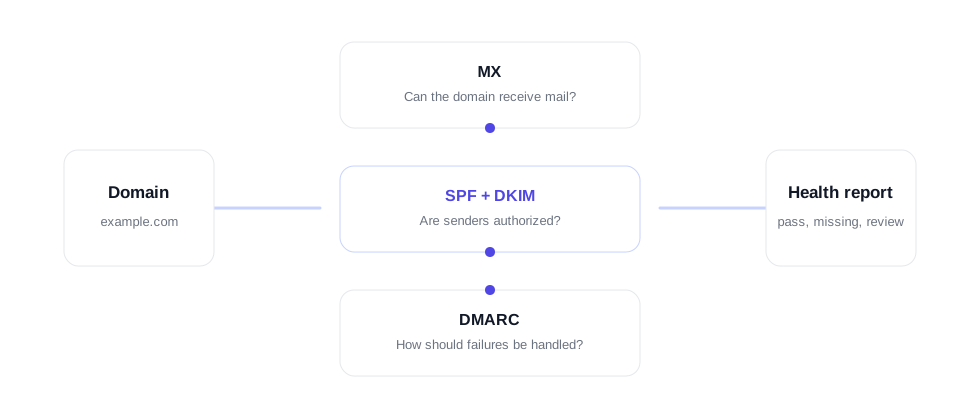
What the email health check looks for
Email verification usually focuses on the recipient address. An email health check focuses on the domain behind the sender or receiver. If the domain is missing basic records, even a clean list can run into deliverability problems because receiving systems cannot confirm where mail should go or whether messages are authorized.
The most important records are MX, SPF, DKIM, and DMARC. MX records tell other systems where to deliver incoming mail for the domain. SPF lists the servers allowed to send for the domain. DKIM adds a cryptographic signature that receiving systems can check. DMARC ties SPF and DKIM together and tells receivers what to do when a message fails authentication.
This tool is useful for sales teams, newsletter operators, agencies, SaaS companies, and developers who need to diagnose a domain before sending. It pairs naturally with single email verification, bulk list verification, and the verification API. Clean recipient data and healthy sending records solve different parts of the same deliverability problem.
MX records
Show where inbound email should be delivered. Missing MX records usually mean the domain cannot receive normal email.
SPF
Lists approved sending services. A missing or broken SPF record can make legitimate mail harder to trust.
DKIM
Lets a sending service sign outgoing messages so receivers can verify that the content was not changed in transit.
DMARC
Defines how receivers should handle authentication failures and where reporting can be sent.
How to use the result
Start with MX. If MX records are missing, the domain is not ready to receive normal mail. Next check SPF. If SPF is missing, add the sending services that are allowed to send for the domain. Then check DKIM using the selector provided by your email provider. Finally, review DMARC. A domain can start with a monitoring policy, then move toward a stricter policy once sending sources are aligned.
- Enter the root domain, such as example.com, not a full URL.
- Use the DKIM selector from your email platform if you know it.
- Review missing records before launching or scaling a campaign.
- After DNS changes, wait for propagation and run the check again.
- Use the bounce checker and list verification tools when the issue is recipient quality rather than sending-domain setup.
A domain can have clean DNS and still perform poorly if the list is bad. The reverse is also true: a verified list can underperform when the sending domain has missing or misaligned records. Treat domain health and address verification as two checks in the same operating system.
When to run another check
Run another health check whenever the sending setup changes. That includes adding a new ESP, changing inbox providers, rotating domains, updating DNS, moving a website, enabling a new DKIM selector, or changing a DMARC policy. DNS changes can take time to propagate, so a failed result immediately after an update is not always final. Re-check after propagation and keep a note of which provider supplied each record.
For ongoing sending, pair domain checks with list checks. Domain authentication helps receiving systems understand that your messages are allowed to come from the domain. Email verification helps ensure the recipients themselves are reachable. Both are needed before a serious campaign, especially when a team is warming a new domain, sending to an imported list, or scaling a previously small program.
The same logic applies when a campaign looks healthy in one platform and weak in another. A domain can inherit records from multiple tools over time, and old SPF includes, stale DKIM selectors, or a missing DMARC policy can make troubleshooting harder. Keeping the health check close to your sending workflow gives the team a fast baseline before changing copy, inboxes, lists, or campaign volume.
For teams managing multiple domains, save the result before and after each DNS change. That gives operators a clear record of what changed and makes it easier to separate DNS issues from list-quality issues.
FAQ
What does an email health check test?
It tests domain records that affect email delivery and authentication, including MX, SPF, DKIM, and DMARC.
Why are MX records important?
MX records tell mail servers where to deliver incoming email for a domain. Without working MX records, the domain cannot reliably receive mail.
Do SPF, DKIM, and DMARC affect deliverability?
Yes. SPF and DKIM help prove that a sender is authorized, while DMARC tells receivers how to handle messages that fail authentication checks.
Which DKIM selector should I use?
Use the selector provided by your email service provider. Common selectors include google, default, selector1, selector2, k1, or a provider-specific value.
When should I run an email health check?
Run it before launching a new sending domain, changing DNS, connecting a new email platform, or investigating bounce, spam, or authentication issues.