Catch-all email detection for cleaner outreach segments
VeriMails detects domains that accept mail broadly and flags catch-all results during verification, so your team can separate uncertain addresses before they enter campaigns, CRM updates, or enrichment workflows.
100 free credits. No credit card required.
Why catch-all domains need their own workflow
A normal verification result is most useful when the domain gives a clear signal. Catch-all domains make the picture less direct because the receiving server may accept many addresses even when a particular mailbox is uncertain.
Visible catch-all status
Verification results include a catch-all indicator when domain behavior suggests broad acceptance, giving operators a clear field to filter and export.
Segmentation before sending
Keep catch-all addresses apart from cleaner deliverable rows, invalid rows, and contacts that require manual review before campaign launch.
Practical list hygiene
Use catch-all detection as part of a broader verification pass with syntax, domain, disposable, role-based, and deliverability context.
From uncertain domain behavior to an actionable segment
Catch-all detection is not about declaring every address on a catch-all domain good or bad. It is about recognizing that the domain behaves differently from a standard mailbox check and giving that behavior a place in your workflow.
When you verify a list with VeriMails, catch-all status becomes a filterable result. Sales, marketing, and operations teams can then decide whether to route those rows into lower-volume sequences, manual qualification, suppression, or a later recheck.
That separation matters because a mixed list hides risk. A campaign owner looking only at total list size may assume all non-invalid rows are ready to send. A cleaner export makes the decision visible before a sequence starts.
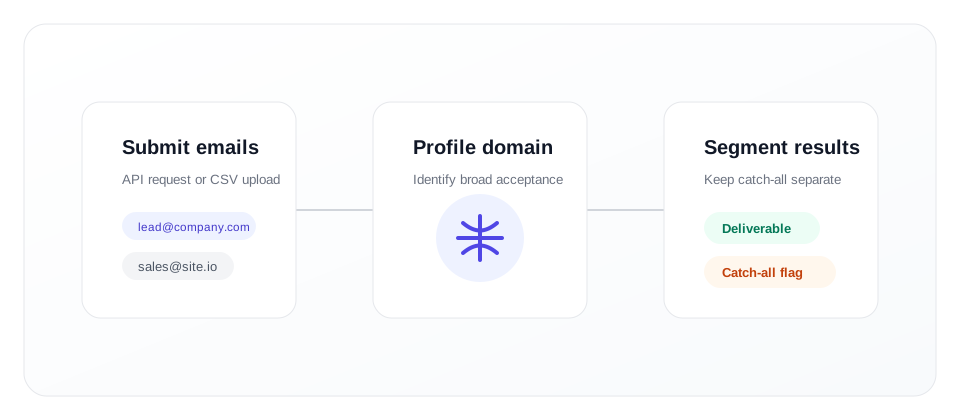
How VeriMails fits into your catch-all handling process
Use catch-all detection wherever addresses enter or leave your database: signup forms, lead lists, uploaded CSVs, enrichment jobs, or CRM cleanup projects.
Verify addresses
Submit a single email through the Email Verification API or upload a CSV through bulk verification.
Read the catch-all flag
Review the returned status fields and identify which rows sit on domains that accept mail broadly.
Route each segment
Export clean segments for your CRM, campaign tool, or internal review process instead of treating every row the same.
When catch-all detection is most useful
Catch-all status is especially valuable when a list contains business domains, older CRM records, purchased event contacts, partner lists, or prospecting exports. These sources often contain addresses that look plausible but need more context before a team sends at volume.
For a revenue team, the catch-all flag helps separate high-confidence contacts from addresses that need a more cautious workflow. For an operations team, it creates a consistent field that can be mapped into Salesforce, HubSpot, a warehouse, or a suppression process.
For developers, the value is consistency. The API can return the same kind of catch-all context that marketers see in file exports, which means application forms and background jobs can enforce the same policy.
Recommended segmentation approach
There is no universal rule for every sender, but a practical catch-all workflow usually starts with separation. Keep rows with clear deliverable results in one segment, invalid or disposable rows out of your sending flow, and catch-all rows in a review segment.
- Use catch-all rows for lower-risk follow-up when the contact is otherwise well qualified.
- Exclude catch-all rows from high-volume launches when list quality is the priority.
- Recheck older catch-all rows before reactivation campaigns or CRM migrations.
- Document your policy so sales, marketing, and data teams handle the flag the same way.
A written policy prevents catch-all results from becoming a judgment call every time a list is prepared. For example, your team may allow catch-all addresses only when the contact has recent engagement, a known business relationship, or strong account fit. The same policy can require exclusion when the list source is stale, the campaign is broad, or the contact has no other qualification signals.
Connect catch-all detection to the rest of your email quality stack
Catch-all handling works best when it is part of a complete email verification process, not a standalone checkbox.
For batch list cleanup
Upload a CSV, verify the list, and export results with catch-all status included. This is useful before importing a lead list into a sales engagement platform, before refreshing a CRM, or before handing a segment to a campaign owner.
For one-time cleanup, keep the original file and the verified export together so the team can trace how each row was handled. A simple export with email, status, catch-all flag, and recommended destination is often enough for non-technical operators to make consistent decisions.
For product and data workflows
Add verification to forms, enrichment jobs, and backend processes with the API. Store catch-all status as a structured field so your product can route addresses into the right workflow automatically.
For ongoing workflows, store the verification timestamp and source of the email address next to the catch-all field. That gives analysts and operators enough context to decide whether a row should be sent now, rechecked later, or left out of a sensitive campaign.
This also makes reporting easier because list quality questions can be answered from the data itself instead of from scattered campaign notes.
Catch-all detection FAQs
Short answers for teams deciding how to use catch-all results in everyday list quality work.
What is catch-all email detection?
Should I send to catch-all email addresses?
What should I do with a catch-all result?
Can I detect catch-all domains in bulk?
Separate catch-all addresses before you send
Start with 100 free credits and verify a sample list. Use the catch-all flag to build cleaner segments before outreach.
Start Free