Free Email Verifier
Check whether a single email address is valid, reachable, and safe to add to a campaign before you send.
100 free credits. No credit card required.
TL;DR
- Use this free verifier for fast one-off checks before replying, importing, enriching, or adding a contact to a sequence.
- A useful check should go beyond syntax and look at DNS, MX records, mailbox response, disposable email signals, role-based addresses, and catch-all behavior.
- For files, CRM exports, or prospect lists, move from the single check to bulk email verification so every address is labeled before sending.
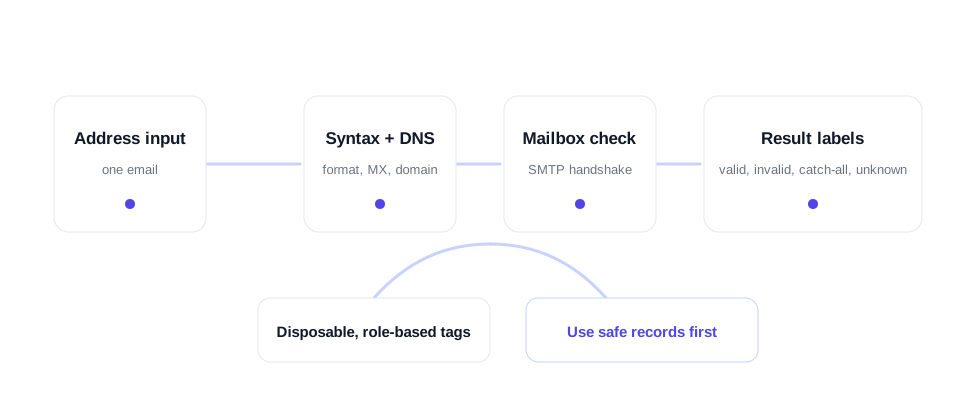
What a real email verification check should confirm
A free email verifier is useful only when it answers the question a sender actually has: will this address waste a send, bounce, or create risk? A format check is a start, but it is not enough. A string can look like an email address and still point to a domain that cannot receive mail, a disposable inbox, a shared role inbox, or a mailbox that no longer exists.
VeriMails checks the address in layers. The first layer catches obvious formatting problems. The second layer looks at the domain and mail records. The third layer evaluates mailbox-level signals where the receiving server allows that check. The final layer labels addresses that need different handling, including disposable emails, role-based addresses, catch-all domains, and unknown responses.
That layered result matters for sales teams, agencies, recruiters, and marketers because the right action is not always simply "send" or "delete." A valid business address can go into the main workflow. An invalid address should be removed. A catch-all address can be held for review or tested more carefully. A role-based address may still be useful for a company-level contact, but it should not be treated like a direct buyer inbox.
Syntax and format
Checks whether the address is shaped correctly and catches common typos before deeper verification starts.
MX records
Confirms the domain has mail exchange records, which are required for receiving email.
Mailbox response
Uses mailbox-level checks where available to separate reachable addresses from addresses that should be suppressed.
Catch-all detection
Labels domains that accept broadly, so your team can review those addresses separately.
Disposable email
Flags temporary inboxes that rarely belong in sales, marketing, product, or recruiting workflows.
Role-based email
Labels shared inboxes such as info@, support@, and sales@ so they are not confused with individual contacts.
How to use this free verifier in a real workflow
Use the single-address checker when you are looking at one contact and need a quick decision. That might be before replying to a form submission, enriching a lead, adding a manually researched contact to a CRM, or checking why a previous message bounced. The free tool is also a good way to understand how result labels work before using the single verification API.
For larger work, the single tool should become a spot-checking layer rather than the whole process. If you are cleaning a CSV, use bulk verification. If new users, leads, or contacts arrive every day, use the Email Verification API. If your team is preparing outbound lists, pair verification with the cold email workflow so risky records are filtered before they reach a sequencer.
- Paste one address into the verifier and run the check.
- Send valid addresses through your normal workflow.
- Suppress invalid and disposable addresses.
- Review catch-all, role-based, and unknown labels separately instead of mixing them into the main send list.
- Move to bulk or API verification when the same decision has to happen across many records.
When a one-off check is enough
The free verifier is best for high-intent moments where one address matters. A sales rep may want to check a manually researched buyer before adding them to an account plan. A recruiter may want to confirm a candidate address before sending a first note. A support team may want to inspect a suspicious signup before merging it into the customer record. A founder may want to verify a partner contact before sending a sensitive introduction.
Once the same decision is repeated more than a few times, move it into a repeatable workflow. CSV lists belong in bulk verification. Product signups, form submissions, and enrichment flows belong in API verification. The single checker remains useful as a spot-checking tool, but the larger value comes from making sure bad addresses never enter the system in the first place.
FAQ
What does the free email verifier check?
It checks email format, domain mail records, mailbox response where available, disposable email signals, role-based addresses, and catch-all domain behavior.
Does the free email verifier send an email?
No. The check does not send a message to the address. It classifies the address using verification checks and returns a result label.
How should I use a catch-all result?
Keep catch-all addresses in a separate review segment. The domain may accept mail broadly, so the specific mailbox is harder to confirm than a normal valid or invalid result.
When should I use bulk verification?
Use bulk verification when you have a CSV, CRM export, prospect list, newsletter list, or any workflow with many addresses.
How many free checks are available?
The public tool allows five free checks per day without an account. A free VeriMails account includes 100 credits for larger checks and API access.