Verify emails inside the workflows that collect them
Use the VeriMails API to check email addresses before they enter product signups, lead forms, CRM syncs, enrichment jobs, or outbound lists. Responses are structured for application logic, reporting, and follow-up workflows.
An email verification API for teams that need clean data at the point of capture
Invalid and risky addresses usually become expensive later. They trigger failed account emails, pollute CRM records, waste enrichment budget, and create extra work for sales, support, and operations teams. The best place to catch those issues is often the moment an address is collected.
VeriMails gives developers a practical email verification API that can be used from signup forms, backend validation jobs, import tools, and internal systems. A verification result gives your application a clear status and useful flags, so you can decide whether to accept, review, suppress, or route an address differently.
The API fits alongside other VeriMails workflows. Teams that need one-off file cleaning can use bulk email verification, while applications that need ongoing checks can call the API directly. If your workflow depends on handling uncertain domains carefully, pair the API with catch-all detection so your rules can treat those addresses separately.
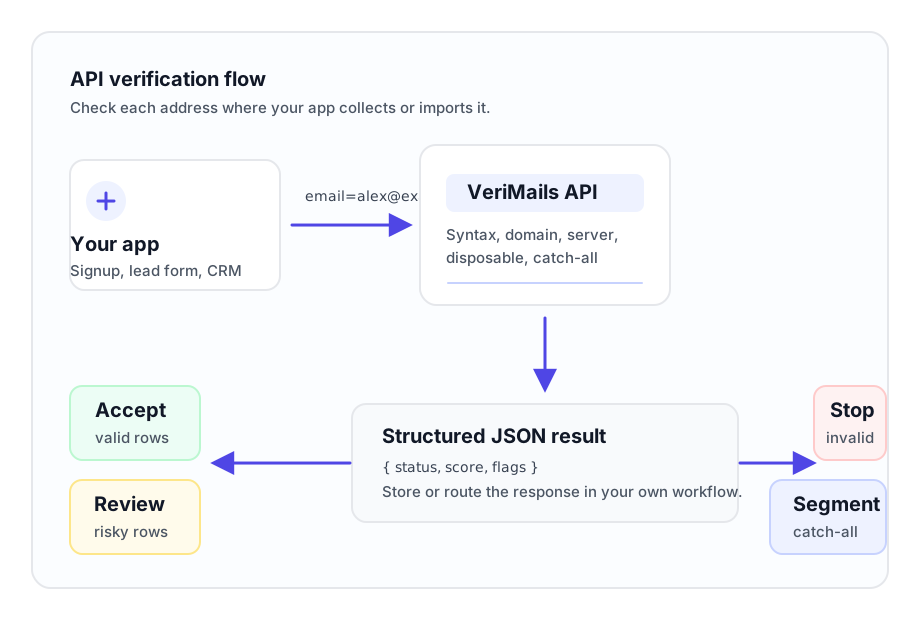
Where API verification makes the biggest difference
Use VeriMails wherever an email address becomes part of a customer, lead, or message workflow.
Signup and trial forms
Verify addresses before sending welcome emails, activation links, password resets, or product notifications that depend on a reachable inbox.
CRM and data imports
Check contacts before they are synced into sales tools, lifecycle campaigns, support systems, or warehouse tables used by multiple teams.
Lead qualification
Add verification to lead capture and enrichment flows so reps see which contacts are ready to use and which ones need review.
Messaging gates
Apply verification before addresses enter onboarding, notification, billing, cold outreach, or email marketing queues.
Batch checks from code
Submit up to 500 emails per batch request when your system needs to verify a small import, queued list, or nightly segment.
Custom business rules
Use result categories and flags to build rules that match your risk tolerance, form behavior, and sending policy.
API limits and credit behavior are easy to plan around
Clear defaults help developers design queueing, retries, and cost controls before production traffic arrives.
Structured responses your application can act on
Verification is most useful when the result can be consumed without manual interpretation. VeriMails returns a predictable JSON response with the email address, status, score, and flags such as disposable, catch-all, MX, and SMTP-related values.
A product team might block obvious invalid addresses at signup, allow a user to correct a typo, and send uncertain results to a manual review path. A sales team might keep valid contacts in the next campaign, exclude disposable addresses, and segment catch-all addresses into a more careful sequence. An operations team might store the verification status beside the original record so future imports do not repeat the same decision.
For endpoint details, see single verification, rate limits, result codes, and webhooks.
"email": "alex@example.com",
"status": "valid",
"score": 92,
"disposable": false,
"catch_all": false,
"mx_found": true,
"smtp_valid": true
}
How to add VeriMails to your stack
Start with a focused integration, then expand verification into every place email quality affects the customer experience.
Choose the first workflow
Pick one high-value entry point, such as a signup form, lead capture form, or CRM import. Define what your app should do with valid, invalid, risky, disposable, and catch-all results.
Call the API
Create an API key, send addresses for verification, and store the response fields your team needs for routing, filtering, reporting, and support visibility.
Extend to batch and files
Use the batch endpoint for groups of up to 500 emails per request, and use bulk verification when a CSV-based workflow is the better fit.
Build rules that match the way your team sends email
Email verification should not force every business into one fixed decision. A consumer app may want to ask users to correct invalid addresses immediately. A B2B sales team may want to keep catch-all business domains but put them in a separate review or lower-risk sequence. A lifecycle marketing team may want to keep verification status in the CRM so suppressed addresses do not keep returning through imports.
VeriMails supports those choices by returning results that can be used in your own application logic. You can reject, warn, queue, tag, suppress, or enrich records based on the outcome. When you need background processing, connect API results to your job queue or webhook workflow. When you need human review, write the result into your CRM or admin interface.
If you are still comparing verification methods, the API vs. bulk email verification guide explains when a real-time integration is the better choice and when a CSV upload is simpler.
Useful next pages
Plan the integration, understand credits, and connect API verification with the rest of your email quality workflow.
Email Verification API FAQ
Common questions from teams planning a VeriMails API integration.
What can I use the VeriMails email verification API for?
You can use it to verify email addresses in signup forms, lead capture flows, CRM imports, enrichment jobs, internal tools, and outbound preparation workflows.
What are the default API limits?
API keys default to 60 requests per minute and 5,000 requests per day. These defaults are useful when planning form validation, imports, queues, and retry behavior.
How many emails can the batch endpoint accept?
The batch endpoint accepts up to 500 emails per request, which works well for small imports, queued segments, and background checks from your application.
How are API checks charged?
Each verified email uses 1 credit. Credits from credit packs never expire, so teams can use purchased credits as their verification volume changes over time.
Add email verification to your product flow
Create an account, review the quickstart, and start verifying addresses where clean data matters most.