How Email Verification Works
Email verification checks whether an address can actually receive mail before you send anything to it. This guide walks through every layer of the process, from a simple syntax check to the live SMTP handshake, and explains what each result really means.
Email verification works by layering checks: syntax, DNS/MX, SMTP, catch-all detection, disposable detection, and role-based detection. The SMTP handshake is the key mailbox-level check, but the final result should also explain risk categories so your bulk verification and API verification workflows can make practical sending decisions.
What Email Verification Is For
Every email address on your list is a small bet. When you send a campaign, you are wagering that the address is real, that the mailbox is active, and that the receiving server will accept your message. When that bet fails, the message bounces, and bounces cost you more than a single undelivered email. Mailbox providers like Gmail, Outlook, and Yahoo watch your bounce rate closely and treat a high rate as a signal that you are sending to a poorly maintained list. That signal pushes your future messages toward the spam folder, even the ones going to perfectly valid addresses.
Email verification removes the guesswork. Instead of discovering bad addresses after a campaign goes out, you check each address in advance and remove the ones that will fail. The result is a cleaner list, a lower bounce rate, and a sender reputation that holds up over time. Verification does not improve your copy or your offer, but it does make sure the people who would have engaged actually receive the message.
The important thing to understand is that verification happens without sending anything. A verifier never delivers a message to the address it is checking. It uses the same protocol that real mail servers use to talk to each other, but it stops short of the step where an actual email would be transmitted. The recipient sees nothing.
The Layers of a Verification Check
A reliable verifier does not rely on a single test. It runs a sequence of checks, each one narrowing down whether an address is safe to use. VeriMails runs six layers on every address: syntax validation, MX and DNS lookup, a live SMTP handshake, catch-all detection, disposable domain detection, and role-based address detection. Each layer answers a different question, and together they produce a result that is far more reliable than any one check alone.
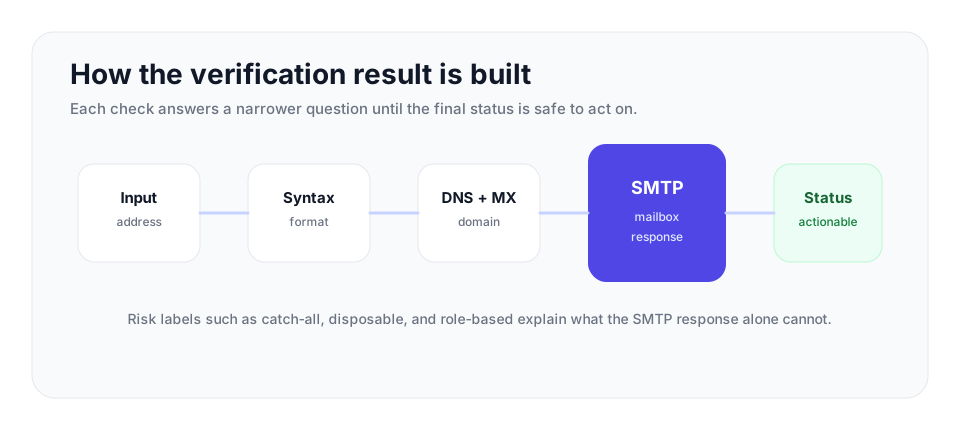
| Layer | Question answered | Common result |
|---|---|---|
| Syntax | Does the address follow email format rules? | Malformed addresses are rejected early. |
| DNS/MX | Can the domain receive mail? | Dead domains are removed before SMTP. |
| SMTP | Will the receiving server accept this recipient? | Valid or invalid when the server gives a clear answer. |
| Risk labels | Is the address catch-all, disposable, role-based, or ambiguous? | You get a sending policy category, not just a yes-or-no answer. |
Syntax validation
The first and cheapest check confirms the address is structurally valid. Email format is defined by a specification called RFC 5322, which sets out the rules for what a legal address looks like. Syntax validation catches addresses with no @ symbol, with spaces or illegal characters, with a missing domain, or with a malformed local part. This step is fast because it requires no network connection at all, and it filters out the obvious mistakes before any slower check runs. A surprising share of bad addresses fail here, usually because of typos made during manual data entry.
MX and DNS lookup
If the syntax is valid, the verifier looks up the domain's DNS records. The key record is the MX record, short for Mail Exchanger. MX records tell the rest of the internet which servers are responsible for receiving mail on behalf of a domain. A domain with valid MX records is configured to accept email. A domain with no MX records cannot receive mail at all, so any address on that domain is invalid regardless of how it is spelled. The verifier reads the MX records, picks the server with the highest priority, and prepares to connect to it. This step also catches domains that no longer exist, which is common when a company has shut down or changed names.
The SMTP handshake
This is the core of the check. SMTP, the Simple Mail Transfer Protocol, is the language mail servers use to exchange messages. The verifier opens a connection to the recipient's mail server and begins a normal SMTP conversation. It introduces itself with an EHLO or HELO command, declares a sender address with MAIL FROM, and then issues a RCPT TO command naming the address being verified. The receiving server responds with a status code. A 250 code means the server is willing to accept mail for that address. A 550 code means the server is rejecting it, usually because the mailbox does not exist. The verifier reads this code and then issues QUIT to close the connection. It never sends the DATA command, which is the step where a real message body would be transmitted. Because the conversation stops before DATA, no email is delivered.
Catch-all, Disposable, and Role-based Detection
The SMTP handshake works well for most addresses, but some mail servers behave in ways that defeat a simple valid or invalid answer. This is why a good verifier layers additional detection on top of the handshake.
Catch-all detection
Some domains are configured as catch-all, also called accept-all. A catch-all server accepts mail for every address at the domain, whether or not the mailbox actually exists. Send to a real address, a misspelled address, or a completely random address, and the server returns a 250 acceptance code for all of them. This means the SMTP handshake alone cannot confirm whether a specific mailbox exists on a catch-all domain. VeriMails handles this with catch-all detection. It probes the domain with a randomly generated address that is almost certainly not a real mailbox. If the server accepts that random address, the domain is a catch-all, and any result for it is reported as catch-all rather than valid or invalid. Catch-all is a detection outcome, not a quality score. It tells you the domain cannot be resolved at the mailbox level, so you can decide how cautiously to treat the address.
Disposable domain detection
Disposable email services provide temporary addresses that expire after a short time. People use them to sign up for things without exposing a real inbox. An address on a disposable domain may pass the SMTP handshake today and stop working tomorrow. VeriMails maintains a list of known disposable domains and flags any address that uses one, so you can exclude addresses that will not be reachable for long.
Role-based address detection
Role-based addresses are addresses tied to a function rather than a person, such as info@, support@, sales@, or admin@. These addresses are often monitored by several people or by none, and they tend to generate more spam complaints and lower engagement. They are usually valid mailboxes, so the SMTP handshake passes, but they are not always good targets for outreach. VeriMails detects role-based addresses and labels them, leaving the decision of whether to keep them up to you.
Why a Verifier Cannot Always Say Yes or No
Verification is highly accurate, but it is honest about uncertainty. There are real situations where a definitive answer is not possible, and a trustworthy verifier reports those cases rather than guessing.
Catch-all domains are the most common example. As described above, a catch-all server says yes to everything, so the mailbox cannot be confirmed. Greylisting is another. Some servers deliberately return a temporary failure code the first time they see a new sender, expecting a legitimate mail server to try again later. A verifier that misreads a greylisting response as a permanent failure would wrongly mark a good address as invalid. VeriMails recognizes temporary codes and classifies them correctly instead of forcing a false result. Rate limiting and connection throttling can also interrupt a check, especially at large providers that treat heavy probing as suspicious.
For these reasons, verification results fall into a few categories rather than a strict pass or fail. Valid means the mailbox responded and is safe to send to. Invalid means the address does not exist or the domain cannot receive mail. Catch-all means the domain accepts everything and the mailbox cannot be confirmed. Risky covers addresses where the result is uncertain, such as role-based addresses or servers that behaved unpredictably. Honest categories are more useful than a forced answer, because they let you build sending rules that match your tolerance for risk.
Turn the Results Into Sending Rules
Verification works best when the result file becomes a rulebook. Decide the policy before a campaign starts so a sender, marketer, or sales operator does not have to improvise under deadline pressure.
| Status | Campaign rule | Why it matters |
|---|---|---|
| Valid | Send normally and continue monitoring bounces, replies, and complaints. | The mailbox passed the strongest deliverability checks available. |
| Invalid | Suppress before import and block re-entry through future CSV uploads. | This is the hard-bounce group that damages reputation fastest. |
| Catch-all | Keep separate from valid addresses and send only in cautious test batches. | The domain accepts broadly, so the individual mailbox was not confirmed. |
| Disposable or role-based | Exclude by default for cold outreach; review only when the business case is clear. | These addresses tend to weaken engagement quality or distort lead data. |
| Unknown or temporary | Hold, retry later, or require another signal before adding to a campaign. | A cautious policy avoids turning uncertainty into a bounce spike. |
After the send, compare performance with the 2026 bounce rate benchmarks: under 3% is healthy, 3% to 5% needs cleanup, and above 5% is high risk.
Accuracy and Speed
The value of verification depends on getting a useful answer quickly enough for the workflow. VeriMails is built for fast checks at API and bulk-list scale. The reliability comes from layering the checks described above rather than relying on a single SMTP probe, and from correctly classifying catch-all and greylisted servers instead of squeezing every address into a valid or invalid label.
You can run verification two ways. The REST API checks a single address in real time, which is ideal for validating a signup form the moment a visitor submits it or for enriching a CRM record as it is created. Bulk CSV verification handles entire lists, which is the right choice before a campaign or when cleaning a legacy database. Both run the same six-layer check, so the result is consistent whether you verify one address or five million.
Pricing scales with volume. Verification starts from $0.0019 per email, with 10,000 credits priced at $19 and volume packages reaching 5 million credits for $1,499. Annual plans start at $12.50/month when billed yearly. Every new account gets 100 free credits on signup with no credit card required, and those credits never expire, so you can test the full check on your own addresses before committing.
Frequently Asked Questions
Related Articles
Start with Clean Data
100 free credits on signup. No credit card required. Put the advice into practice today.
Start Free