What Happens When You Send to an Invalid Email Address
An invalid address does not just fail quietly. It sets off a chain of events that ends with damage to your sender reputation. This guide follows that chain step by step and explains why a few bad addresses can cost you the inbox for everyone else.
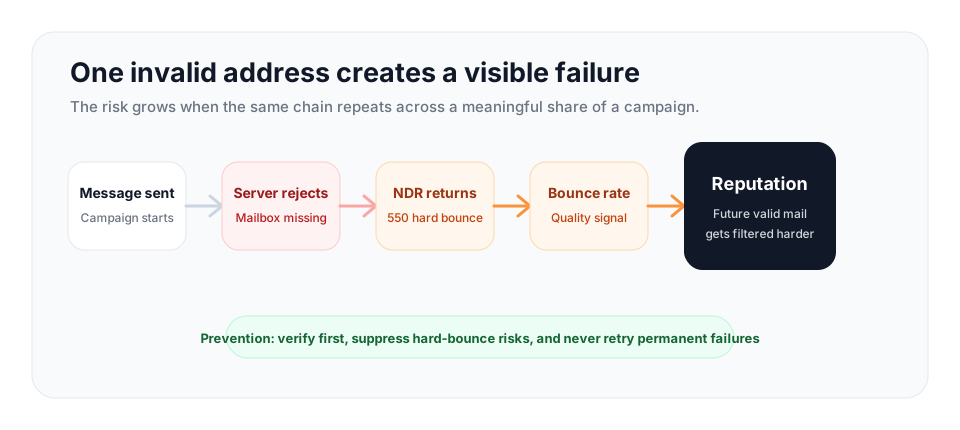
One invalid address usually does little by itself. A repeated pattern of hard bounces tells mailbox providers your list is poorly maintained, and that can lower inbox placement for messages sent to valid recipients too. Use bulk verification before campaigns and the API at capture to stop invalid addresses earlier.
The Moment You Hit Send
When you send an email, your message travels to the receiving mail server, the one named in the recipient domain's MX records. That server makes a decision: accept the message for delivery, or refuse it. For a valid, active mailbox, the server accepts the message and places it in the recipient's inbox or spam folder. For an invalid address, the answer is no.
An address can be invalid for several reasons. The mailbox may never have existed because the local part, the piece before the @, was mistyped. The mailbox may have existed once and since been deleted, which is common when an employee leaves a company. The domain itself may be dead, with no mail server configured to receive anything. In every one of these cases, the receiving server cannot deliver your message, and it responds accordingly.
The rejection is not silent. The server generates a reply and sends it back to you, and that reply is where the consequences begin.
The Non-Delivery Report
The reply you receive is called a non-delivery report, abbreviated NDR, and also known as a bounce message or bounce-back. It is an automated email that lands in the inbox tied to your return address, the Return-Path on the message you sent. The NDR tells you that your message could not be delivered and, crucially, why.
Every NDR carries a status code that explains the failure. A code in the 500 range signals a permanent failure. The most common one, 550, means the mailbox is unavailable, usually because the address does not exist. A code in the 400 range signals a temporary failure, such as a mailbox that is full or a server that is briefly unavailable. The NDR also usually contains a human-readable line, something like "recipient address rejected: user unknown" or "mailbox unavailable," that restates the same information in plain language.
For an invalid address, the NDR will report a permanent failure. This is what is known as a hard bounce. A hard bounce means the failure will never resolve itself. The address is dead, and it will be dead tomorrow and next month too. This is the opposite of a soft bounce, a temporary failure that might succeed if the message is retried later. The distinction matters enormously for what you should do next, and for what the failure does to your reputation.
What a Hard Bounce Does to Your Reputation
A single hard bounce is not a disaster. If you send one message to one dead address, the effect on your sender reputation is negligible. The danger is not the individual bounce. It is the pattern.
Mailbox providers such as Gmail, Outlook, and Yahoo continuously evaluate every sender. They track how many of your messages bounce, how many recipients mark you as spam, how many open and engage, and several other signals. From these they build a sender reputation, an ongoing judgment about whether you are a legitimate sender worth delivering to the inbox. If you are monitoring a campaign, compare hard bounces against current email bounce rate benchmarks instead of treating every failed send as normal noise.
Here is the logic from the provider's side. Legitimate senders who collect addresses with permission and maintain their lists rarely send to dead addresses, because they know who their subscribers are. Spammers, on the other hand, blast scraped and purchased lists full of addresses they never verified, so they hard bounce constantly. A high hard bounce rate is therefore one of the most reliable fingerprints of a spammer. When your campaigns start hard bouncing at a high rate, you begin to look like the second group.
The consequence is not limited to the dead addresses. Once a provider decides your list quality is poor, it starts routing all of your mail more skeptically, including the messages going to perfectly valid, engaged recipients. Your inbox placement drops. Your real audience stops seeing your emails. In severe cases, sustained high bounce rates can land your sending domain or IP on a blocklist, at which point delivery problems spread across every provider at once. The few cents you saved by not verifying the list end up costing you the inbox.
The bounce domain angle
There is a second, less obvious layer of risk. The Return-Path domain that receives your NDRs, sometimes called the bounce domain, has a reputation of its own. A high volume of hard bounces landing against that domain is itself a signal to providers that you are sending to invalid or stale addresses. So a careless campaign damages reputation in two places at once: the sending identity and the bounce domain.
When Invalid Addresses Become an Emergency
The moment to act is before a campaign becomes a pattern of failed delivery. Use the total bounce rate and hard-bounce concentration together.
| Campaign signal | Risk level | Immediate move |
|---|---|---|
| Under 3% total bounces | Healthy if hard bounces are low and stable. | Keep suppressing failures and verify new records at capture. |
| 3% to 5% total bounces | Needs cleanup before more volume. | Pause broad sending, verify the remaining list, and inspect the source that caused the failures. |
| Above 5% total bounces | High risk for sender reputation and account restrictions. | Stop the campaign until invalids are removed and suppression is confirmed. |
| Hard bounces cluster in one source | The import, enrichment, or old segment is likely stale. | Quarantine that source and verify it before any future send. |
For a deeper definition of the metric, use the bounce rate glossary alongside the benchmark guide.
Why Retrying Makes It Worse
A natural instinct, when a message fails, is to try again. With hard bounces, that instinct is wrong, and acting on it actively harms you.
A hard bounce is permanent by definition. The address does not exist. Sending to it a second time produces exactly the same result: another rejection, another NDR, another hard bounce recorded against your reputation. You have gained nothing and spent more reputation. But the deeper problem is what the retry communicates. When a receiving server sees you send repeatedly to an address it has already told you is dead, it reads that as a sender who either is not processing bounce feedback or does not care. Both readings point to a low-quality, possibly automated sender. Repeated sends to known-dead addresses are precisely the behavior providers associate with spam operations.
The correct response to a hard bounce is to suppress the address permanently. Add it to a suppression list, remove it from your active list, and never send to it again. Most email platforms can do this automatically when they process the NDR. Treat a hard bounce as final, because it is.
Bounce handling rules
| Signal | What it means | What to do next |
|---|---|---|
| 5xx NDR or hard bounce | Permanent delivery failure | Suppress the address permanently and do not retry it. |
| 4xx temporary failure | Mailbox, server, or policy issue that may clear | Let the sending platform retry on its normal schedule, then suppress if failures persist. |
| Repeated bounces in one segment | The list is stale or poorly verified | Pause that segment and verify the remaining addresses before sending more volume. |
| Catch-all or unknown result | The server does not confirm the individual mailbox | Send conservatively, segment separately, or require a stronger signal before outreach. |
How to Avoid Sending to Invalid Addresses
The entire chain described above, the rejection, the NDR, the reputation damage, is preventable. It only happens when an invalid address is on your list at send time. Remove the invalid addresses before you send, and the chain never starts.
That is what email verification does. A verifier checks each address before you use it and tells you which ones will fail, so you can drop them from the campaign. VeriMails runs a layered check on every address: syntax validation against the RFC 5322 format specification, an MX and DNS lookup to confirm the domain can receive mail, and a live SMTP handshake that asks the receiving server whether the mailbox responds, all without ever delivering a message. It also detects catch-all domains, disposable addresses, and role-based addresses, the categories most likely to cause problems. Verification is built for reliable list cleaning and returns a clear result for each address.
You can verify two ways. Bulk CSV verification cleans an entire existing list in one pass, which is the right move before any campaign. The REST API verifies a single address in real time, which is ideal for catching a typo on a signup form before the bad address ever enters your database. Catching the mistake at the point of capture is the most efficient prevention of all, because the invalid address never gets stored.
When to verify again
Verify again when a list has been idle for months, after a large CRM import, after enrichment, or before a campaign to contacts you have not mailed recently. Addresses can become invalid when people change jobs, domains expire, or mailboxes are removed, so a clean result is a point-in-time signal rather than a permanent guarantee.
Verification costs less than repairing a damaged sending reputation. Check current VeriMails pricing when you are choosing between one-time credit packs and monthly plans, then test a sample of your current list before a high-volume send.
Frequently Asked Questions
Related Articles
Start with Clean Data
100 free credits on signup. No credit card required. Put the advice into practice today.
Start Free