Email Bounce Rate Benchmarks for 2026
Knowing what counts as a healthy bounce rate is the first step to protecting your sender reputation. This guide covers the 2026 benchmarks, the gap between hard and soft bounces, how rates vary by industry, and the practical steps that keep your list below the high-risk line.
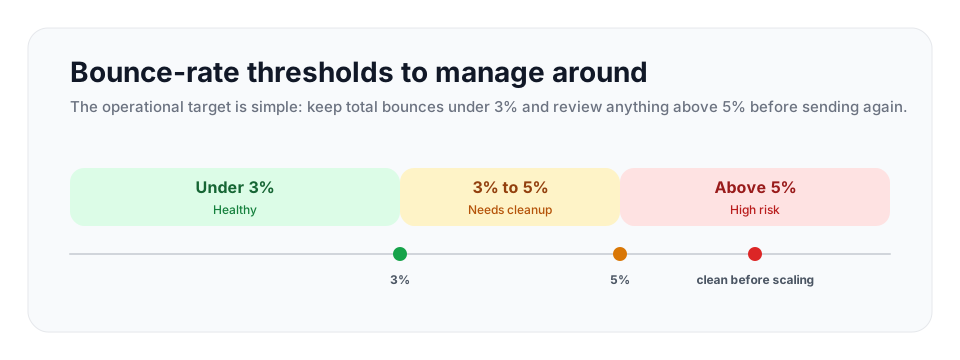
A total bounce rate under 3% is generally healthy, 3% to 5% needs cleanup and attention, and anything sustained above 5% is high risk. Keep hard bounces as low as possible, use bulk verification before campaign sends, and use the API at capture so bad addresses do not enter your database.
What Counts as a Healthy Bounce Rate in 2026
Your bounce rate is the share of sent emails that the receiving server refused to deliver. It is one of the clearest signals mailbox providers use to judge whether you maintain a clean list. For permission-based marketing email in 2026, a total bounce rate under 3% is generally healthy. Between 3% and 5% needs cleanup and attention. Anything sustained above 5% is a serious deliverability risk that can start to drag your inbox placement down and weaken sender reputation.
| Total bounce rate | Status | What to do next |
|---|---|---|
| Under 3% | Healthy | Maintain verification at capture and clean older segments before reuse. |
| 3% to 5% | Needs cleanup | Pause broad sends, bulk verify the audience, and suppress invalids before continuing. |
| Above 5% | High risk | Stop using the list until it is cleaned and the acquisition source is reviewed. |
These thresholds vary by list type and sending context, but the pattern is consistent: cleaner lists have fewer bounces, steadier engagement, and fewer deliverability problems. A list drifting toward the cleanup range should be verified before the next campaign instead of after the bounce report arrives.
It helps to think of the bounce rate as a budget. Every bounce spends a little of your reputation. Stay inside the healthy range and the budget is easier to protect. Drift above it and you start borrowing against future deliverability, and the interest is your messages landing in spam.
Hard Bounces vs Soft Bounces
Not all bounces are equal, and the headline bounce rate hides an important distinction. A bounce is either hard or soft, and the two carry very different weight.
Hard bounces
A hard bounce is a permanent failure. The address does not exist, the domain has no mail server, or the receiving server explicitly and permanently rejected the message. A hard bounce will never succeed no matter how many times you retry, and retrying is the worst thing you can do, because each attempt tells the receiving server that you are still trying to reach an address you should already know is dead. Hard bounces do the most damage to sender reputation because they are the clearest sign of a poorly maintained list. A practical 2026 target is to keep hard bounces below 0.5% and investigate anything approaching 1%.
Soft bounces
A soft bounce is a temporary failure. The mailbox is full, the server is briefly down, the message is too large, or the receiving server applied a temporary block such as greylisting. A soft bounce may succeed if the message is retried later, and most email platforms retry soft bounces automatically for a day or two before giving up. Soft bounces are less damaging than hard bounces, but they are not free. If the same addresses soft bounce campaign after campaign, that pattern starts to look like a list problem too. An address that soft bounces repeatedly across several sends should be treated as effectively dead and removed.
The practical takeaway is that you should track hard and soft bounces separately, not just the combined number. A 1.5% total bounce rate made up almost entirely of soft bounces is a different situation from a 1.5% rate that is mostly hard bounces. The first is a delivery hiccup. The second is a list-quality emergency.
Bounce Rates by Industry
Bounce rates vary across industries, and the variation comes almost entirely from how each industry sources its email addresses. Industries that collect addresses directly from customers, with a verification step at signup, bounce far less than industries that buy or scrape contact data.
| List type | Typical bounce posture | Why it behaves that way |
|---|---|---|
| E-commerce, media, SaaS signup lists | Usually lowest when forms are verified | Addresses are first-party, recent, and entered by the customer or user. |
| Nonprofit, education, healthcare, government | Often moderate | Large databases include old records, event imports, and role or work addresses. |
| B2B sales, recruitment, real estate | Highest risk without verification | Data often comes from sourcing, enrichment, referrals, or third-party lists that decay quickly. |
| Cold outreach lists | Treat as untrusted until verified | The sender usually did not collect the address directly from the recipient. |
On the low end, media, publishing, and e-commerce typically see hard bounce rates between 0.1% and 0.5%. These businesses usually collect addresses through their own checkout flows, account creation, and newsletter signups, so the data is fresh and self-reported. Education, nonprofits, and SaaS companies with real-time signup verification also fall in the lower range, because they capture addresses directly from the people who use their services.
In the mid range, education, government, and healthcare often sit between 0.4% and 0.9%. These sectors hold large databases, and some of their contact records are old, which is the main driver of the slightly higher rate.
On the high end, B2B sales, recruitment, and legal services regularly see bounce rates between 0.7% and 1.5%. Recruiting and HR, B2B sales and lead generation, and real estate consistently record the highest bounce rates of any segment. The cause is consistent across all of them: contact data sourced from third-party databases, purchased lists, and scraped sources, all of which decay quickly and contain a meaningful share of addresses that were never valid.
The pattern is the lesson. The industry label does not determine your bounce rate. Your data source does. A B2B sales team that verifies its prospect list before every campaign can hit the same sub-0.5% rate as an e-commerce store, and an e-commerce store that buys a list will bounce just as badly as a careless recruiter.
Why Cold Email Bounces More
Cold email deserves its own category because it behaves very differently from permission-based email. Unverified cold lists often bounce several times more than opt-in lists. That is not a small gap. It is the difference between a healthy program and one that providers may throttle within a few campaigns.
The reason is data source, again. Cold lists are built from prospecting databases, scraping, and third-party data providers. None of those sources confirm that an address is currently active. People change jobs, companies rename domains, and addresses that were valid eighteen months ago when a database was last refreshed are often dead today. A cold list that has never been verified is essentially a list of educated guesses, and a meaningful share of those guesses are wrong.
The fix is straightforward. Verifying a cold list before sending removes the invalid addresses, and a verified cold list bounces at a rate much closer to the permission-based benchmark. This is the single highest-impact step a cold outreach team can take, and it is often the difference between a risky send and a healthy one.
How to Review a Campaign Against the Benchmark
Use the benchmark as a campaign review habit, not just a static target. The useful question is not only what the rate was, but what changed since the previous send.
| Review step | What to compare | Decision |
|---|---|---|
| Separate hard and soft bounces | Hard bounce rate, soft bounce rate, and total bounce rate. | Suppress hard bounces immediately and investigate repeated soft failures. |
| Compare by source | Signup forms, CRM imports, enrichment, purchased lists, and cold prospecting files. | Keep clean sources active and pause sources that push the campaign into 3% to 5%. |
| Check list age | Fresh captures versus lists older than 60 to 90 days. | Re-verify stale segments before reuse, especially for B2B and cold outreach. |
| Apply a stop rule | The current send against the under 3%, 3% to 5%, and above 5% bands. | Continue, clean, or stop based on the band rather than waiting for account restrictions. |
This review pairs well with email list cleaning: the benchmark tells you when to act, and cleaning gives you the workflow for removing the addresses behind the spike.
How to Keep Your Bounce Rate Healthy
Hitting the healthy benchmark is not complicated, but it does require treating list hygiene as an ongoing habit rather than a one-time task.
Verify every address before you send. This is the foundation. Running a list through verification removes the invalid addresses that cause hard bounces before they ever reach a mailbox provider. VeriMails verification is built for reliable list cleaning and returns a clear result for each address, so even large lists clear quickly. The checks cover syntax, MX and DNS records, a live SMTP handshake, catch-all detection, disposable domain detection, and role-based detection, which together identify the addresses most likely to bounce.
Remove hard bounces immediately and never retry them. Once an address hard bounces, it is dead. Suppress it permanently. Retrying it only signals carelessness to the receiving server.
Re-verify older lists before reusing them. Email data decays. Addresses go stale at a steady rate as people change jobs and providers, so a list that was clean six months ago is not clean today. Re-verify any list before a campaign if it has been sitting unused.
Use a clear signup process. Typos at the point of capture are a major source of invalid addresses. Real-time verification on signup forms catches a misspelled address before it enters your database, which prevents the bounce entirely. The VeriMails REST API is built for exactly this, validating an address the moment a visitor submits it.
Verification is inexpensive relative to the cost of damaged deliverability. VeriMails starts from $0.0019 per email, with 10,000 credits at $19 and volume packages up to 5 million credits for $1,499. Annual plans start at $12.50/month when billed yearly. Every account gets 100 free credits on signup with no credit card required, and they never expire, so you can verify a sample of your list and see your real bounce risk before spending anything.
- Track hard bounce rate, soft bounce rate, and total bounce rate separately.
- Clean any list that has been dormant, imported, purchased, enriched, or sourced before sending.
- Use real-time verification on forms so typos are corrected while the person is still present.
- Review acquisition sources that repeatedly produce high invalid or disposable-address rates.
Frequently Asked Questions
Related Articles
Start with Clean Data
100 free credits on signup. No credit card required. Put the advice into practice today.
Start Free