How to Clean an Email List
An email list collects dead weight over time: typos, abandoned mailboxes, and contacts who stopped caring. Cleaning it removes that weight so your campaigns reach real people. This guide walks through the process step by step, from exporting your list to keeping it clean for good.
Clean an email list by exporting a backup, removing duplicates and suppressions, verifying every remaining address, segmenting by engagement, re-engaging inactive subscribers, and keeping a permanent suppression list. Use bulk verification before major sends and API verification at signup to prevent bad addresses entering the list again.
Why list cleaning is worth the effort
Every email list degrades. People change jobs, abandon addresses, and lose interest. Typos creep in at signup. Over a year, a meaningful share of any list becomes either undeliverable or unengaged. If you keep mailing the whole list anyway, three things go wrong. Your bounce rate climbs, which mailbox providers read as a sign of a careless sender. Your engagement rates fall, because dead and disinterested addresses never open. And your sender reputation erodes, which pushes even your good mail toward the spam folder.
Cleaning reverses this. It is not about having a bigger list; it is about having a list that works. A smaller, verified, engaged list reliably outperforms a larger neglected one on open rate, click rate, and deliverability, and it usually costs less because most email platforms bill by contact count. Cleaning is one of the highest-return tasks in email marketing.
Step one: export and back up your list
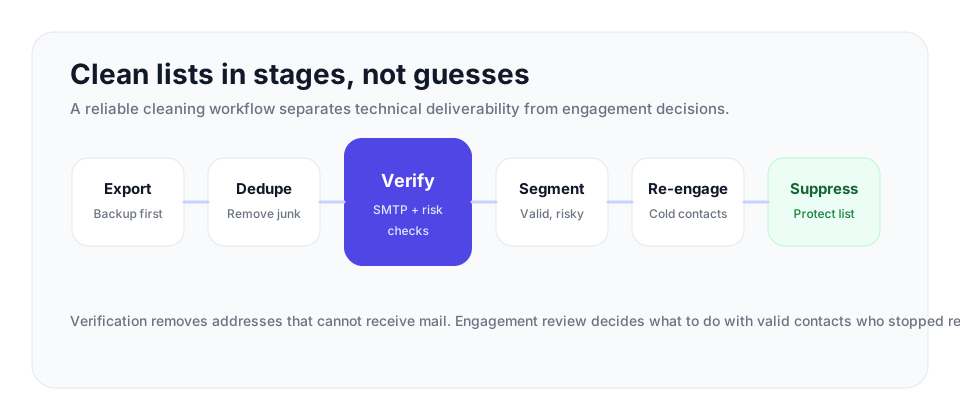
| Stage | What to check | Recommended action |
|---|---|---|
| Export | Email, source, opt-in date, last engagement, bounce status | Keep an untouched backup and work on a copy. |
| Pre-clean | Duplicates, unsubscribes, complaints, hard bounces, malformed rows | Remove or suppress before spending verification credits. |
| Verify | Syntax, MX/DNS, SMTP, catch-all, disposable, role-based labels | Keep valid, remove invalid, and separate catch-all or risky groups. |
| Engagement | Recent opens, clicks, replies, purchases, or form activity | Segment active, lapsing, and never-engaged contacts. |
| Suppression | Invalids, unsubscribes, complaints, and contacts who ignore re-engagement | Store permanently so future imports cannot re-add them. |
Start by exporting your full list from your email platform or CRM, including the data you will need to make decisions: each address, the date it was added, its source, the last time it engaged, and any bounce history. Keep the original export untouched as a backup. You are about to remove records, and a backup means a mistake is recoverable. Work on a copy.
This is also the moment to look at where addresses came from. Source tags are valuable: a batch from a scraped list or an old import behaves very differently from contacts who signed up through your own forms, and knowing the origin helps you judge risk later.
Step two: remove the obvious problems
Before any sophisticated work, clear out the clear-cut issues. De-duplicate the list so no address appears twice. Remove anything that hard bounced in the past; a hard bounce is permanent and those addresses will never deliver. Remove anyone who has unsubscribed or filed a spam complaint, both because mailing them again is wrong and because in most jurisdictions it is unlawful. Strip out obvious junk: malformed entries, test addresses, and addresses that are plainly fake.
This first pass is quick and removes a surprising amount of dead weight before you spend anything on verification.
Step three: verify every remaining address
This is the core of list cleaning. Verification checks each address without sending a message to it, and it finds the invalid addresses that would otherwise bounce during a campaign.
What verification checks
A proper verification run inspects several things. Syntax validation confirms the address is correctly formed. MX and DNS lookups confirm the domain can receive mail. The live SMTP handshake connects to the receiving mail server and asks whether it will accept mail for that exact mailbox, which is the check that actually proves a mailbox exists. Verification also flags disposable addresses from throwaway providers, role-based addresses such as info@ or sales@ that reach a group rather than an individual, and catch-all domains.
How to act on the results
Verification sorts your addresses into clear groups. Valid addresses passed every check and stay on the list. Invalid addresses failed and should be removed. Catch-all addresses sit on a domain that accepts mail for any address, so the mailbox could not be individually confirmed; verification reports this as a detection, not a quality score, and the right move is to set these aside as a separate group rather than treating them as confirmed or discarding them outright. Disposable and role-based addresses are decisions for you: disposables rarely belong on a marketing list, and role addresses depend on your goals.
VeriMails handles this whole step. Upload your list as a CSV for bulk verification, and every address is checked for syntax, MX, DNS, a live SMTP handshake, catch-all detection, disposable detection, and role-based detection. Verification starts at $0.0019 per email, with credit packs from 10,000 credits at $19, and new accounts get 100 free credits on signup with no card, which never expire. There is also a REST API if you want to verify programmatically.
Pre-send quality gate after cleaning
Do one final gate before the cleaned file goes back into your email platform. This turns list cleaning from a vague hygiene task into an operating rule your team can repeat.
| Signal | Pass condition | Action if it fails |
|---|---|---|
| Total bounce rate forecast | The segment is expected to stay under 3% total bounces. | If it looks likely to land between 3% and 5%, clean again or narrow the segment. Above 5% is high risk, so do not send yet. |
| Invalid and disposable results | All invalid and disposable addresses are suppressed before import. | Block the upload until suppression is confirmed. |
| Catch-all results | Catch-all addresses are separated from confirmed deliverable addresses. | Use a conservative test segment or hold them for a different campaign. |
| Suppression list | Past hard bounces, unsubscribes, and complaints cannot be re-added. | Import the suppression file first, then import the approved send file. |
This gate is especially useful for shared CRM environments where old imports can reappear. Treat the cleaned file as the only approved source for the next send, and keep the rejected rows in a permanent suppression process.
Step four: segment by engagement
Verification tells you which addresses are deliverable. It does not tell you which subscribers still want your mail. For that, look at engagement.
Sort the verified addresses by recent behavior. Active subscribers have opened or clicked recently and are the heart of your list. Lapsing subscribers engaged once but have gone quiet over the last three to six months and need attention before they go fully cold. Never-engaged subscribers signed up but have not opened a single email, often for ninety days or more, and are your highest-risk group. Continuing to mail people who never engage drags down your metrics and tells mailbox providers your mail is unwanted, even when the addresses are technically valid.
Step five: run a re-engagement campaign
Do not delete lapsed and never-engaged subscribers straight away. Give them one clear chance to come back with a short re-engagement campaign, a focused series of two to four emails over roughly one to two weeks. Open with a warm note that you have noticed they have been quiet. Follow with a reminder of the value they signed up for. Close with an honest last-chance message telling them you are cleaning your list and they should click to stay.
Be careful with incentives. A heavy discount can revive a contact who only ever wanted a coupon, which trains the wrong behavior. Whatever the response, the campaign gives you a clean answer: subscribers who engage move back to the active list, and subscribers who ignore the whole series have told you, clearly, that they are done.
Step six: suppress, document, and keep it clean
Now act on what you have learned. Move the unresponsive contacts to a suppression list rather than simply deleting them. A suppression list is a permanent record of addresses you should not mail, and it stops a future import from quietly re-adding a hard bounce or an unsubscribe. Update your live list to hold only verified, engaged contacts. Keep a short record of what you removed and why, which matters for compliance.
Keep the list clean going forward
Cleaning is not a one-off. Stop bad data entering by verifying new addresses in real time at signup, using a verification API on your forms so typos and invalid addresses are caught before they are stored. Use confirmed opt-in for marketing signups so every new contact is proven real. Then re-verify on a schedule that matches your volume: monthly for high-volume senders, quarterly for moderate volume, twice a year for smaller lists. Contact data decays continuously, so cleaning has to be a habit, not an event. A list maintained this way stays deliverable, keeps your sender reputation intact, and makes every campaign you send work harder. For the operating thresholds to watch after each campaign, use the 2026 bounce rate benchmark guide.
Frequently Asked Questions
Related Articles
Start with Clean Data
100 free credits on signup. No credit card required. Put the advice into practice today.
Start Free