Email List Decay: How Fast Email Lists Go Stale
An email list is not a fixed asset. It loses value every month as people change jobs and abandon addresses. Industry research puts annual decay at roughly 22 to 30 percent. This guide explains why lists decay, what it costs, and how to keep yours fresh.
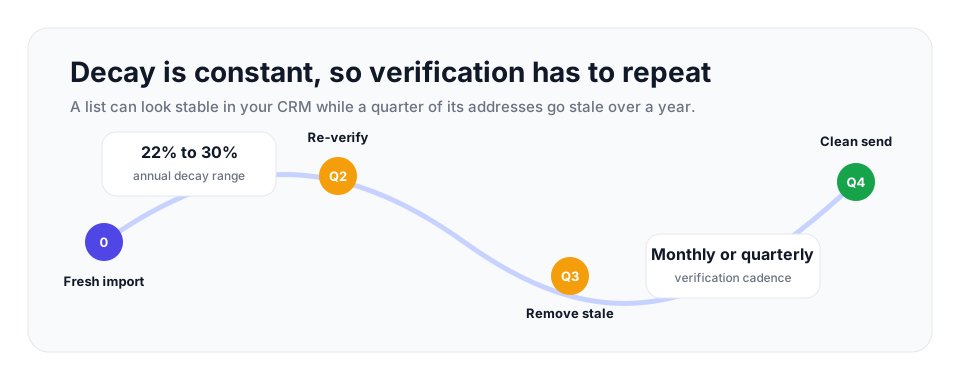
Email lists commonly lose roughly 22% to 30% of usable addresses per year, which means a 50,000-contact list can have more than 11,000 stale records within twelve months. Use real-time verification at capture and bulk verification on a monthly, quarterly, or pre-campaign schedule.
What email list decay means
Email list decay is the steady process by which the addresses on a list become invalid or unreachable. Decay rate is the proportion that goes stale over a period, almost always measured over a year. The figure that matters is uncomfortable: the common benchmark is roughly 22 to 30 percent annually. Put plainly, somewhere between one in four and one in three addresses on your list can be dead or unusable within twelve months.
That number tends to surprise people, because a list feels permanent. You collected those addresses, they sit in your database, and nothing visibly changes them. But the mailboxes behind the addresses are out in the world, attached to people and companies that keep moving. The list looks static while the reality it points to drifts away from it.
| Starting list size | At 22.5% annual decay | At 30% annual decay | Operational meaning |
|---|---|---|---|
| 10,000 contacts | 2,250 stale records | 3,000 stale records | Enough bad data to distort small-campaign metrics. |
| 50,000 contacts | 11,250 stale records | 15,000 stale records | A pre-campaign clean can remove thousands of likely bounces. |
| 250,000 contacts | 56,250 stale records | 75,000 stale records | Verification becomes a deliverability control, not an admin task. |
Why lists decay
Decay has several causes, and they run constantly.
People change jobs
This is the largest single driver, especially for business addresses. When an employee leaves a company, their work email is typically deactivated within days. The address on your list still looks fine, but the mailbox is gone. Since the average professional changes jobs every few years, a steady stream of work addresses on any B2B list quietly stops working.
Addresses get abandoned
People accumulate email addresses and let old ones go. An address used for one purpose years ago may now be ignored entirely, even if the mailbox technically still exists. These addresses do not always hard bounce, but mail to them is never read, which is its own form of decay.
Domains and providers disappear
Companies shut down, domains expire, and email providers close. When that happens, every address on the affected domain stops working at once. A single defunct company can take a cluster of contacts off your list in one stroke.
Bad data enters at signup
Not all decay is about addresses going bad over time. Some addresses were never good. Typos at signup, fake addresses entered to grab a download, and disposable addresses created to be thrown away all add records that were invalid from day one. Without verification at the point of capture, they sit on the list as decay you imported.
B2B versus B2C decay
Decay does not hit all lists at the same speed. The type of list matters.
B2B lists decay faster, commonly cited in the range of 25 to 30 percent a year. The reason is straightforward: business addresses are tied to employment, and employment changes. A work address is among the first things deactivated when someone leaves. Job turnover alone can account for a quarter or more of a B2B list going stale in a year.
B2C lists, built on personal addresses, decay more slowly, often around 20 to 25 percent a year. People keep personal addresses far longer than work addresses, sometimes for decades. But B2C decay is real too, because a personal address that someone has stopped checking is functionally dead even when the mailbox still exists. Either way, decay is significant, and neither kind of list maintains itself.
What decay costs you
An unmaintained list does not just shrink in usefulness; it actively works against you. The costs compound.
The first cost is bounces. As addresses decay, more of every send hits dead mailboxes and bounces. That matters more than ever, because mailbox providers treat sustained bounce rates above the healthy range as a sign of poor list quality. A list left to decay can push past 5 percent and start dragging down delivery of even its good addresses.
The second cost is sender reputation. Mailbox providers watch how your mail performs. High bounce rates and low engagement, both direct results of decay, tell them your sending is careless. Once your reputation drops, more of your mail goes to spam, and recovering reputation is slow and painful.
The third cost is wasted spend and distorted numbers. Most email platforms charge by contact count, so every decayed address on your list is money spent to store and mail something dead. And decayed addresses drag down your reported open and click rates, because the percentages are calculated against a denominator full of mailboxes nobody reads. You end up paying more to look like you are performing worse.
How to manage decay
You cannot stop decay; people will always change jobs. What you can do is manage it so the dead addresses are found and removed before they cause harm. That comes down to regular verification.
| Sending pattern | Recommended cadence | What to clean |
|---|---|---|
| High-volume weekly sending | Monthly verification plus real-time checks at capture. | Active audience, recent imports, and contacts moving into automation. |
| Moderate monthly campaigns | Quarterly verification, with an extra pass before major launches. | Primary newsletter list, CRM exports, and reactivation segments. |
| Seasonal or fundraising sends | Before each major campaign and at least twice per year. | Appeal audiences, event lists, donor lists, and older supporter cohorts. |
| Cold or sourced outreach | Before every send. | Every sourced address, especially work emails tied to job movement. |
Verify your list on a schedule
Treat verification as routine maintenance. Run your whole list through verification on a schedule that matches your volume: monthly for high-volume senders, quarterly for moderate volume, at least twice a year for smaller lists. Each run catches the addresses that have decayed since the last one. Because decay runs at 22 to 30 percent a year, even quarterly verification is removing a meaningful share of dead weight every cycle.
Verification works by checking each address without sending to it: syntax, MX and DNS records, and a live SMTP handshake with the receiving server, plus detection of disposable, role-based, and catch-all addresses. The addresses that fail are exactly the decayed ones, and removing them keeps the list deliverable.
Verify new addresses in real time
Stop importing decay. Add verification at every point where addresses enter, signup forms, lead capture, imports, so an invalid or mistyped address is caught before it is ever stored. A verification API makes this a quick check at the moment of capture. It will not stop existing contacts from changing jobs later, but it ensures every address starts out real.
Watch engagement
Verification finds addresses that have gone technically dead. Engagement data finds addresses that are still valid but where the person has drifted away. Track who has stopped opening and clicking, run a short re-engagement campaign for the ones who have gone quiet, and remove the ones who never respond. This catches the softer side of decay that a deliverability check alone cannot see.
- Do not treat a one-time clean as permanent; decay starts again the day after the file is verified.
- Mark invalid addresses in the CRM instead of only removing them from the email platform.
- Separate technical invalids from inactive but deliverable contacts so re-engagement stays precise.
- Compare decay by acquisition source to find forms, imports, or vendors producing weak data.
Keeping a list fresh with VeriMails
VeriMails is built for exactly this routine. Upload your list as a CSV for bulk verification each cycle, and every address is checked for syntax, MX, DNS, a live SMTP handshake, catch-all detection, disposable detection, and role-based detection, with stated clear verification accuracy and real-time-friendly checks. For the real-time side, the REST API lets you verify addresses at signup so decay is kept out from the start.
Pricing makes regular verification affordable, which matters when you are doing it every month or quarter. It starts at $0.0019 per email, with credit packs from 10,000 credits at $19 up to 5 million credits at $1,499, and monthly annual plans from $12.50/month when billed yearly. Credits never expire, so the cadence is up to you. New accounts get 100 free credits on signup with no card required. Decay is constant and unavoidable, but a list verified on a regular schedule stays clean, keeps your bounce rate down, and protects the sender reputation that every campaign depends on.
Frequently Asked Questions
Related Articles
Start with Clean Data
100 free credits on signup. No credit card required. Put the advice into practice today.
Start Free