How to Reduce Your Email Bounce Rate
A high bounce rate quietly damages email programs. It wastes sends, hurts your sender reputation, and can lead mailbox providers to filter or reject more of your mail. This guide explains what causes bounces and walks through the steps that bring the rate down and keep it there.
Reduce bounces by verifying before every significant send, removing hard bounces permanently, separating catch-all results, and checking new addresses at signup through the API. The operating rule is simple: prevent bad addresses at capture, clean existing lists before campaigns, and suppress failures forever.
What a bounce is and why it matters in 2026
A bounce is an email that the receiving mail server refuses to deliver. The server sends back a failure notice instead of placing the message in an inbox. Bounce rate is the share of a send that bounces, and it is one of the clearest signals a mailbox provider uses to judge whether you are a careful sender or a careless one.
The stakes are high because mailbox providers treat bounce rate as a quality signal. A list that drifts above the healthy range can lose inbox placement, and a sustained rate around 5 percent or higher can trigger throttling, filtering, or account review. Bounce rate has moved from a soft quality metric to a hard operational signal, which makes reducing it one of the most important things an email sender can do.
Hard bounces versus soft bounces
Bounces come in two kinds, and the right response differs for each.
Hard bounces
A hard bounce is a permanent failure. The most common cause is that the mailbox does not exist, because the address was mistyped, the person left the company, or the address was never real. A domain that cannot receive mail at all also produces hard bounces. A hard-bounced address will never accept mail, so it must be removed from your list immediately and never sent to again. Hard bounces are the category that does the most reputation damage, and they should sit below 0.5 percent.
Soft bounces
A soft bounce is a temporary failure. The mailbox might be full, the receiving server might be briefly down, or the message might be too large. Soft bounces can be retried, because the address may accept mail on a later attempt. But a soft bounce is also a warning. If the same address soft bounces repeatedly across several sends, it is effectively dead, and continuing to mail it just generates failure signals. Treat an address that soft bounces persistently, after roughly three to five attempts, as a hard bounce and suppress it.
| Bounce signal | What it usually means | Operator response |
|---|---|---|
| Hard bounce | Permanent mailbox or domain failure. | Suppress immediately and block re-imports from CSV or CRM syncs. |
| Repeated soft bounce | A temporary issue has become a practical deliverability failure. | Pause after several attempts, then suppress if the address keeps failing. |
| Catch-all uncertainty | The domain accepted the check, but the mailbox was not confirmed. | Keep in a separate low-volume test segment. |
| Sudden campaign spike | A bad import, stale list, or authentication issue may have entered the workflow. | Stop the send, verify the remaining list, and review sender setup before resuming. |
Verify your list before you send
The single most effective way to cut bounce rate is to verify your list before each significant send. Most hard bounces come from addresses that are invalid before you ever press send, which means they can be found and removed in advance.
Email verification checks each address without delivering a message to it. It confirms the address is syntactically valid, that the domain has working MX and DNS records, and through a live SMTP handshake whether the receiving server will accept mail for that exact mailbox. It also flags disposable addresses, role-based addresses, and catch-all domains. The addresses that fail verification are the ones that would otherwise bounce, so removing them in advance turns a 4 percent hard bounce rate into a fraction of a percent.
VeriMails performs all of these checks: syntax, MX, DNS, live SMTP handshake, catch-all detection, disposable detection, and role-based detection, with layered deliverability checks. You can verify an existing list by uploading a CSV for bulk processing, or verify addresses one at a time in real time through a REST API. Verification starts at $0.0019 per email, and new accounts get 100 free credits on signup with no card required, which never expire.
- Export the full campaign list. Include every address that may receive the send, not only newly added records.
- Run bulk verification before import. Do the cleanup before the list reaches the sending platform so invalid records cannot slip into a sequence.
- Map each result to a policy. Valid addresses can send, invalid and disposable addresses are suppressed, and catch-all results stay separate.
- Re-import only the approved segment. Avoid uploading the original file again after cleanup.
- Save the suppression output. Keep hard-bounced and failed addresses out of future campaigns even if they appear in another data source.
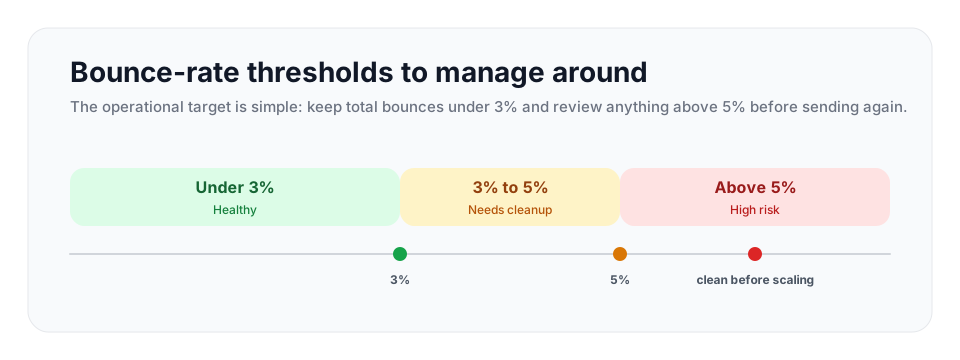
Use thresholds as stop rules
Do not wait until a platform warning arrives. Set operating bands before the campaign starts and assign a response to each band.
| Total bounce rate | Operating status | What to do |
|---|---|---|
| Under 3% | Healthy | Keep sending, keep suppression active, and continue verifying new addresses at capture. |
| 3% to 5% | Needs cleanup | Pause broad sending, verify the remaining audience, and inspect the import source. |
| Above 5% | High risk | Stop the campaign until invalids are removed and the acquisition process is fixed. |
These are the same bands used in the 2026 bounce rate benchmark guide. Consistent thresholds make it easier for marketing, sales, and operations teams to respond the same way to every campaign report.
Handle catch-all domains carefully
Catch-all domains deserve their own discussion because they are a frequent hidden cause of bounces. A catch-all domain is configured to accept mail addressed to any mailbox, real or not. When verification reaches such a domain, the SMTP handshake comes back positive even for an address that has no mailbox behind it, because the server accepts everything.
Good verification responds with detection: it identifies the domain as catch-all and labels the result so you know that address could not be individually confirmed. It does not turn an unconfirmed mailbox into a numeric certainty. The practical move is to separate catch-all addresses from your cleanly verified addresses. Send to the clean addresses with confidence. Send to catch-all addresses in small test batches and watch the results. If a catch-all batch bounces or fails to engage, stop. Treating every catch-all address as deliverable is one of the ways a list that looked clean still bounces above threshold.
Stop bad addresses from entering your list
Cleaning a list repeatedly is necessary, but it is better not to let bad data in to begin with. Two practices matter most.
Verify at the point of capture
Add real-time verification to your signup forms and lead capture points. When someone enters an address, check it before you store it. This catches typos at the moment they happen, when you can ask the person to correct them, and it stops invalid addresses from ever reaching your database. The VeriMails API is built for this real-time check.
Use confirmed opt-in where you can
For marketing lists, sending a confirmation email and requiring the subscriber to click a link proves the address is real and that a person controls it. It slows list growth slightly but produces a far cleaner list with naturally lower bounces. Avoid buying or scraping lists entirely; purchased lists are full of invalid and trap addresses and are a common cause of sudden bounce spikes.
Get the technical foundations right
Some bounces are caused not by bad addresses but by the receiving server distrusting your mail. Authentication is the fix. Set up SPF, DKIM, and DMARC for your sending domain so receiving servers can confirm your mail genuinely comes from you. Major providers now require bulk senders to authenticate with all three, and mail that fails authentication is far more likely to be rejected. Make sure your sending domain and IP have valid forward and reverse DNS records as well.
If you are sending from a new domain or IP, warm it up gradually rather than blasting a large volume on day one. Start with small sends to your most engaged contacts and increase volume over a few weeks. A new sender that suddenly pushes high volume looks suspicious, and suspicion turns into rejections that show up as bounces.
Monitor and maintain
Reducing bounce rate is not a one-time project. Contact data decays continuously, at roughly 22 to 30 percent per year, as people change jobs and abandon addresses. A list verified twelve months ago has lost a meaningful share of valid addresses since.
| List pattern | Verification cadence | Trigger to verify immediately |
|---|---|---|
| High-volume outbound | Monthly, plus before major campaign launches. | Any bounce spike, new provider import, or domain change. |
| Moderate newsletter or CRM list | Quarterly, plus before seasonal promotions. | A list older than 90 days or a new segment pulled from the CRM. |
| Small low-frequency list | At least twice a year. | Any campaign to contacts who have not heard from you recently. |
| Signup or lead forms | Real-time at capture. | Every submission, especially when typos create support or sales work. |
Build a maintenance rhythm. Watch your bounce rate on every send and act when it rises. Suppress hard bounces immediately and automatically. Re-verify your list on a schedule: monthly for high-volume senders, quarterly for moderate volume, at least twice a year for smaller lists. Keep a suppression list of every address that has hard bounced so it can never be re-added by an import. Done consistently, this keeps total bounces comfortably under the thresholds that now matter, protects your sender reputation, and keeps your mail landing where it should. Verification before the send is the foundation, and the rest builds on it.
Frequently Asked Questions
Related Articles
Start with Clean Data
100 free credits on signup. No credit card required. Put the advice into practice today.
Start Free