Catch-all Email Verification: A Complete Guide
Catch-all domains are the trickiest case in email verification. They accept mail for every possible address, which means a standard check cannot confirm whether a specific mailbox exists. This guide explains what catch-all domains are, how catch-all detection works, and how to send to them without risking your reputation.
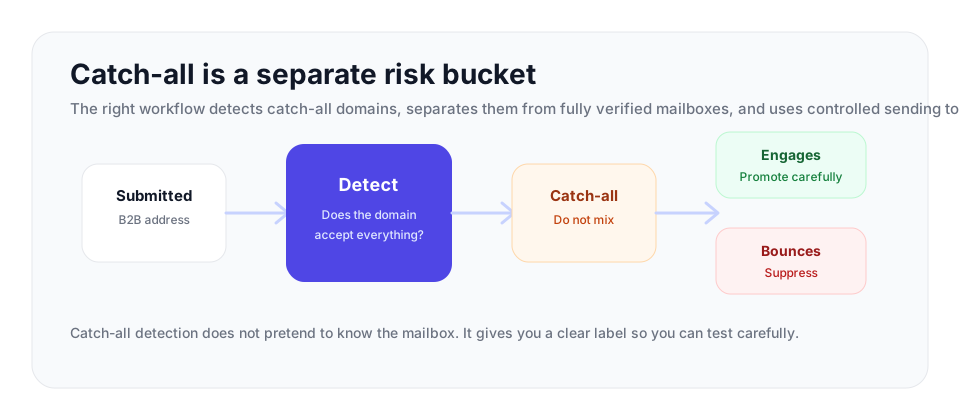
A catch-all domain accepts every address during the SMTP check, so mailbox-level confirmation is not possible from outside. Treat catch-all as a separate operating segment with its own send cap, bounce threshold, and promotion rule instead of mixing it with confirmed addresses.
What a catch-all domain is
A catch-all domain, sometimes called an accept-all domain, is a domain whose mail server is configured to accept any message sent to it, no matter what address appears before the at sign. Mail to john@company.com is accepted. Mail to a mailbox that has never existed at company.com is also accepted. The server catches everything, which is where the name comes from.
Businesses turn this on for sensible reasons. If an employee or a customer mistypes an internal address, a catch-all setup means the message is not bounced and lost; it lands somewhere it can be reviewed. It is a safety net against typos. The trouble is that the same setting that prevents lost mail also makes the domain opaque to anyone trying to verify a single address on it from the outside.
How standard verification works, and why catch-all breaks it
To understand the problem, it helps to know how normal verification confirms a mailbox. A verification engine performs a live SMTP handshake. It opens a connection to the receiving mail server and, in the language of the email protocol, effectively asks the server whether it will accept mail for one specific address. On an ordinary domain the server answers honestly. If the mailbox exists, it responds positively. If the mailbox does not exist, it returns a rejection, commonly a 550 response meaning the user is unknown. That clear yes-or-no answer is what lets verification confirm or reject an address.
A catch-all domain removes the no. Because the server is configured to accept every address, it returns a positive response for every handshake, whether the mailbox is real or invented. The verification engine asks about a genuine address and gets a yes. It could ask about a completely random, obviously fake address at the same domain and get the same yes. The signal that normally separates real from fake mailboxes is simply not there. This is the heart of the catch-all problem: the domain answers positively to everything, so a positive answer no longer means the mailbox exists.
How catch-all detection works
| Result | What it means | How to handle it |
|---|---|---|
| Valid | The mailbox could be confirmed by the receiving server. | Use in the clean send segment. |
| Invalid | The server rejected the mailbox or the address failed required checks. | Suppress before sending. |
| Catch-all | The domain accepts every address, so the mailbox could not be individually confirmed. | Keep separate and test cautiously if the contact is valuable. |
| Disposable | The address belongs to a temporary-mail provider. | Suppress for serious marketing, sales, and product communication. |
| Role-based | The address reaches a group or function, not a clear individual. | Use only when that type of inbox fits the campaign. |
Since an engine cannot confirm an individual mailbox on a catch-all domain, the useful thing it can do is detect that the domain is catch-all in the first place. That detection is straightforward in principle and is the foundation of honest catch-all handling.
The engine tests the domain with an address that cannot possibly exist. It generates a random string that no real mailbox would ever use, something clearly invented, and runs an SMTP handshake for that fake address at the target domain. The response tells it everything. If the server rejects the fake address, the domain behaves normally and individual verification is reliable. If the server accepts the fake address, the domain is catch-all: it has just confirmed a mailbox that definitely does not exist, which proves it will confirm anything.
Once the engine knows the domain is catch-all, it reports that fact. The right output for any address on that domain is a catch-all result: a label that says, clearly, this domain accepts all addresses and the individual mailbox could not be confirmed. That is detection. It is an honest statement of what could and could not be verified.
Detection, not scoring
This distinction matters enough to state plainly. Catch-all handling is detection, not scoring. Some tools take a catch-all address and attach a numeric probability suggesting how likely the mailbox is to be real. That is not verification. The whole reason a catch-all domain is hard is that the information needed to judge an individual mailbox is not available from the outside. Turning the uncertainty into a numeric estimate does not create knowledge that does not exist; it just hides the uncertainty behind a number.
VeriMails treats catch-all strictly as a detection result. When a domain is catch-all, VeriMails tells you it is catch-all. It does not pretend to know whether a specific mailbox on that domain exists, because that cannot be determined by an external check. An honest catch-all label is far more useful than a fabricated score, because it tells you exactly what you are dealing with and lets you make a real decision rather than trusting a guess dressed as data.
Where catch-all addresses come from and how common they are
Catch-all is not rare. It is especially common in business email, because catch-all configurations are more typical of company-managed domains than of large consumer mail providers. Estimates vary, but a meaningful share of B2B domains operate as catch-all, and on some business-heavy lists catch-all addresses make up a substantial portion of the total. If you do cold outreach or B2B marketing, you will encounter catch-all addresses constantly, so having a clear plan for them is not optional.
The risk catch-all carries is that the addresses are genuinely unknown. A catch-all address might be a real, active mailbox belonging to exactly the person you want to reach. Or it might be a non-existent address that the server accepts and then silently discards, or routes to an unmonitored inbox. You cannot tell from verification alone, which is why catch-all addresses tend to carry higher bounce risk than fully verified ones.
How to send to catch-all addresses safely
The goal with catch-all addresses is to capture the value of the real mailboxes among them without letting the unknown ones damage your sender reputation. A careful approach does that.
| Segment rule | Default policy | When to change it |
|---|---|---|
| Send volume | Start below the volume used for fully verified addresses. | Increase only after low bounces and normal engagement. |
| Bounce threshold | Stop the catch-all batch faster than a clean verified batch. | Resume only after removing poor domains or low-value contacts. |
| Engagement review | Track opens, clicks, replies, and non-response separately from verified mailboxes. | Promote engaged contacts into a trusted segment after repeated positive signals. |
| Suppression | Suppress addresses that bounce or stay silent across repeated tests. | Do not re-add them unless a fresh verification and business reason supports it. |
- Create a catch-all-only segment. Do not blend these addresses into the deliverable export.
- Prioritize by business value. Test high-fit prospects first instead of sending to every catch-all address.
- Send a small batch. Keep the first batch small enough that a bad result cannot damage the full campaign.
- Review bounce and engagement together. Low bounces with no engagement still deserves caution.
- Promote or suppress. Move engaged contacts to a trusted segment and suppress addresses that fail or never respond.
Separate them from your verified list
First, keep catch-all addresses in their own segment, apart from the addresses that passed full verification cleanly. Your clean addresses are confirmed and can be mailed with confidence. Catch-all addresses are a different risk category and should be treated as one. Mixing them dilutes the reliability of your whole send.
Test in small batches
Do not mail your entire catch-all segment at once. Send to a small batch first and watch what happens. Track the bounce rate and the engagement on that batch. If the batch bounces little and gets normal engagement, the addresses are mostly real and you can proceed with more. If the batch bounces heavily or gets no engagement, stop. A controlled test reveals the quality of the segment without putting your reputation on the line.
Lean on engagement over time
Over several sends, engagement data does what verification could not. A catch-all address that opens and clicks is clearly a real, monitored mailbox, and you can promote it to your trusted segment. A catch-all address that never responds across multiple sends should be suppressed. Engagement is the signal that resolves the uncertainty catch-all leaves behind.
Putting it together with VeriMails
VeriMails builds catch-all detection into every verification. Whether you verify a single address through the REST API or upload a full list as a CSV for bulk processing, each address is checked for syntax, MX, DNS, and a live SMTP handshake, and the engine runs catch-all detection alongside disposable detection and role-based detection. When a domain is catch-all, the result says so, clearly and without a fabricated score, so you can route those addresses into their own segment and apply the careful approach above.
Pricing starts at $0.0019 per email, with credit packs from 10,000 credits at $19 up to 5 million credits at $1,499 and annual plans from $12.50/month when billed yearly. New accounts get 100 free credits on signup, no credit card, and credits never expire. Catch-all domains will always be part of email, particularly in B2B. The way to handle them is honest detection followed by careful sending, and that combination keeps the real mailboxes reachable while keeping the unknown ones from hurting you.
Frequently Asked Questions
Related Articles
Start with Clean Data
100 free credits on signup. No credit card required. Put the advice into practice today.
Start Free