Why You Should Verify Emails Before Cold Outreach
Cold outreach lives or dies on whether your messages reach the inbox. Sending to an unverified list spikes your bounce rate, tells mailbox providers you mail bad data, and quietly pushes the rest of your campaign into spam. Verification before you send is the single cheapest insurance against all of that.
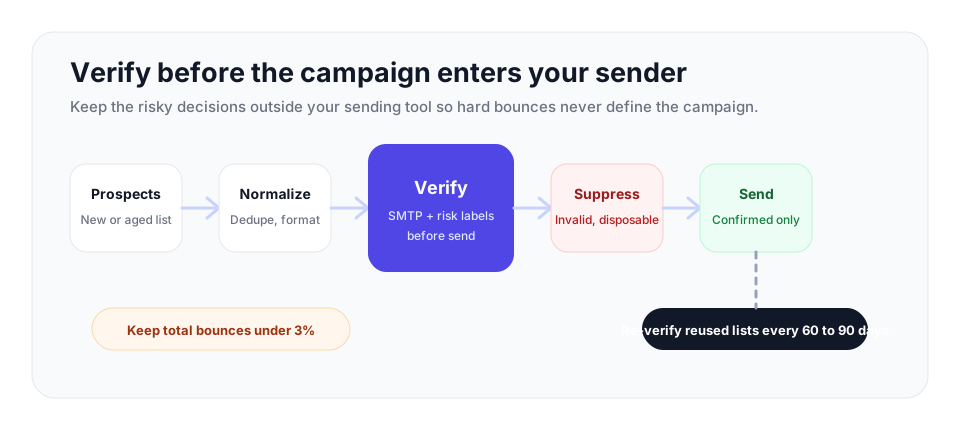
Verify a cold list before it enters your sending tool. Use bulk verification, suppress invalid and disposable addresses, decide your policy for catch-all domains, and re-verify reused lists every 60 to 90 days.
The Problem with Unverified Cold Lists
Cold outreach is built on data you did not collect through opt-in. The addresses come from prospecting tools, data providers, scraping, list purchases, or inferred business emails. None of those sources can promise the address is live, and even an address that was real when it was sourced has a shelf life. People change jobs, companies fold, and mailboxes are decommissioned constantly.
The result is that an unverified cold list always contains a meaningful share of dead addresses. When you send to them, each one produces a hard bounce. And here is the part that catches people out: the cost of those bounces is not paid by the bad addresses, it is paid by the good ones. A bounce spike damages the sending reputation that decides whether your message to a real, interested prospect lands in their inbox or their spam folder.
How Bounce Rates Wreck Sender Reputation
Mailbox providers such as Gmail, Outlook, and Yahoo do not have a person reading your campaign. They make automated judgments about whether to trust you, and one of the strongest negative signals they watch is the hard bounce rate. Every hard bounce is an address that does not exist, and a sender hitting many nonexistent addresses looks exactly like a sender working from scraped, stale, or purchased data, because that is usually what they are.
When your bounce rate climbs, providers respond by lowering your inbox placement. More of your mail goes to spam, including mail to perfectly valid recipients. For cold email, total bounces should stay under 3% whenever possible. From 3% to 5%, the list needs cleanup before more volume. Above 5% is high risk, and many email platforms treat 5% as the threshold where they may throttle or suspend your account outright.
The damage is also persistent. A single campaign with a bounce rate of 8 to 10% can set a mailbox's reputation back by weeks, and two consecutive high-bounce campaigns can flag a mailbox more lastingly. Reputation is built on history, so a bad send is not a one-day problem. It is a tax on every campaign that follows it until the reputation recovers.
Cold outreach bounce-rate stop rules
Set the rule before you launch, then follow it without debate once reports start coming in.
| Total bounce rate | What it means | Sender response |
|---|---|---|
| Under 3% | Healthy for a verified cold list. | Continue at planned volume and keep monitoring hard bounces separately. |
| 3% to 5% | Needs cleanup before scaling. | Pause broad sending, re-verify the remaining file, and review the source. |
| Above 5% | High risk for deliverability and account restrictions. | Stop the campaign until the list, source, and suppression process are fixed. |
These stop rules protect the sender reputation that decides whether valid prospects see the next message.
The Data Decay You Cannot See
Even a list that was clean when you built it does not stay clean. B2B email addresses decay steadily as people change roles, companies rename domains, and old mailboxes are retired. That decay adds up quickly: a list that was 98% valid in January is closer to 86% valid by July if you do nothing.
For cold outreach this matters twice over. First, the lists you source are often already months old by the time you use them, so a chunk of the decay has already happened before you press send. Second, if you reuse a list across campaigns over time, the decay keeps compounding. A list you verified three months ago is no longer the list you verified. This is why verification is not a one-time chore but a recurring step, ideally run right before each campaign.
What Verification Catches Beyond Dead Addresses
Bounce prevention is the headline benefit, but a proper verification pass cleans several other problems out of a cold list before they cost you.
Disposable addresses
Throwaway addresses from temporary-mail services occasionally slip into prospecting data. They will not bounce in a useful way and they will never reply. Disposable detection strips them out so they do not pad your list or your metrics.
Role-based addresses
Generic addresses such as info@, sales@, or support@ route to a shared inbox rather than a named person. They tend to produce higher complaint rates and lower engagement, and a cold message to a role address rarely reaches a decision maker. Role-based detection flags these so you can exclude them or handle them deliberately.
Catch-all domains
Many companies run catch-all domains that accept mail to every possible address, which means a mailbox-level check cannot confirm an individual address there. A good verifier does not pretend otherwise. It performs catch-all detection and reports those addresses as catch-all, so you know which results are confirmed and which carry more risk, and can decide your own sending policy for them rather than being misled by a false green light.
The Business Case: Verification Pays for Itself
Verification is one of the lowest-cost steps in the entire outreach process, and the math behind it is simple. Suppose you are about to send to 10,000 cold addresses and 8% of them are dead. Without verification, that is 800 hard bounces, a bounce rate well into reputation-damaging territory, and a real chance your sending domain gets throttled. With verification, you remove those 800 addresses first, send to 9,200 confirmed addresses, and keep your bounce rate where providers want it.
The cost of verifying that list is small. At $0.0019 per email, verifying 10,000 addresses costs roughly $19. Against that, weigh the cost of a damaged sending domain: weeks of reduced inbox placement, the deals that quietly never landed because your message went to spam, and in the worst case a suspended sending account and the time spent rehabilitating a domain or buying new ones. Verification is cheap precisely because the thing it protects, your ability to reach the inbox, is expensive to lose.
There is an honesty benefit too. When the dead weight is gone, your reported open and reply rates reflect real engagement instead of being diluted by addresses that were never going to do anything. That makes it far easier to tell whether your subject lines and copy are actually working, because you are measuring against an audience that genuinely received the message.
How to Verify Before You Send
The workflow is straightforward. Build or source your list, then before loading it into your sending tool, run the whole thing through verification. With VeriMails you do this by exporting the list as a CSV and uploading it for bulk verification. The service checks every address against live mail servers, running syntax, MX, DNS, a live SMTP handshake, catch-all detection, disposable detection, and role-based detection, then returns a results file marking each address.
You then suppress the addresses you do not want to mail: the invalid ones at minimum, and usually the disposable and role-based ones too, plus a deliberate decision on how to treat catch-all addresses. Only the confirmed addresses go into the campaign. If you continuously add prospects through a tool or workflow, the VeriMails REST API lets you verify each address as it is captured, so the list stays clean between bulk runs. Either way, the principle is the same: verify before the send, every time, and re-verify any reused list every 60 to 90 days because the data keeps decaying.
Pre-send status policy
| Verification result | Recommended action | Reason |
|---|---|---|
| Deliverable | Send normally | The mailbox is the cleanest group to move into the campaign. |
| Invalid or undeliverable | Suppress | These addresses are the hard-bounce risk you are trying to remove. |
| Disposable | Suppress | Temporary inboxes rarely produce replies and can distort campaign metrics. |
| Role-based | Exclude by default | Shared inboxes such as info@ or support@ tend to be weaker cold outreach targets. |
| Catch-all | Use a conservative policy | The domain accepts mail broadly, so the individual mailbox is harder to confirm. |
VeriMails returns clear status labels for deliverable, invalid, catch-all, disposable, and role-based results. Pricing starts at $0.0019 per email, with 10,000 credits for $19 and volume up to 5 million credits for $1,499, and annual plans from $12.50/month when billed yearly for teams that send regularly. Every new account includes 100 free credits on signup with no credit card required, and those credits never expire, so you can verify your next list before you commit to anything.
Frequently Asked Questions
Related Articles
Start with Clean Data
100 free credits on signup. No credit card required. Put the advice into practice today.
Start Free