Enterprise Email Verification at Scale
Verify large CRM databases, marketing audiences, product signups, and partner lists with API and bulk workflows built for operational teams.
The short version: verify first, then send.
Enterprise teams use VeriMails as a verification layer across CRM cleanup, marketing operations, sales operations, product intake, and recurring data governance projects.
Enterprise verification use cases
Make email quality a repeatable control across the customer data lifecycle.
| Enterprise workflow | Verification method | Operational owner |
|---|---|---|
| CRM database cleanup | Bulk CSV verification | Revenue operations or data operations |
| Product signup quality | Real-time API verification | Engineering or product operations |
| Marketing governance | Recurring list cleanup and suppression files | Marketing operations |
| Sales territory readiness | Bulk verification before account assignment | Sales operations |
| Platform migration | Pre-migration and post-import list checks | Data migration or IT teams |
At enterprise scale, email verification becomes part of data governance. A large organization is not cleaning one list before one campaign. It is managing contact quality across marketing, sales, customer operations, product signups, partner data, and database migrations.
The challenge is consistency. Without a shared verification standard, different teams make different decisions about invalid, risky, disposable, role-based, and catch-all records. That makes it harder to control bounce rate, maintain sender reputation, and keep CRM reporting trustworthy.
VeriMails supports both sides of the enterprise workflow: API verification for new-record intake and bulk verification for existing datasets. Technical teams can start in the API documentation, and procurement or security teams can contact sales for review materials, volume planning, and rollout support. Use the same result language in every system so teams can filter, suppress, and review contacts without rebuilding policy for each department. That matters when one bad import can affect sales outreach, lifecycle messaging, and customer operations at the same time.
Built for enterprise requirements
Controls and workflows for large teams that need repeatable email data quality.
Procurement-ready review
Support security and procurement review with documentation and rollout planning for larger organizations.
Data processing support
Coordinate verification requirements, retention expectations, and data processing review with your enterprise stakeholders.
Large dataset workflows
Process CRM exports, historical databases, and migration files as background bulk verification jobs.
Operational reliability
Use API and bulk workflows that fit production systems, scheduled cleanup, and cross-team data operations.
Rollout support
Plan verification policies across marketing operations, sales operations, engineering, data operations, and customer teams.
Volume planning
Match credit planning to database size, recurring cleanup cadence, API usage, and team ownership.
Enterprise rollout workflow
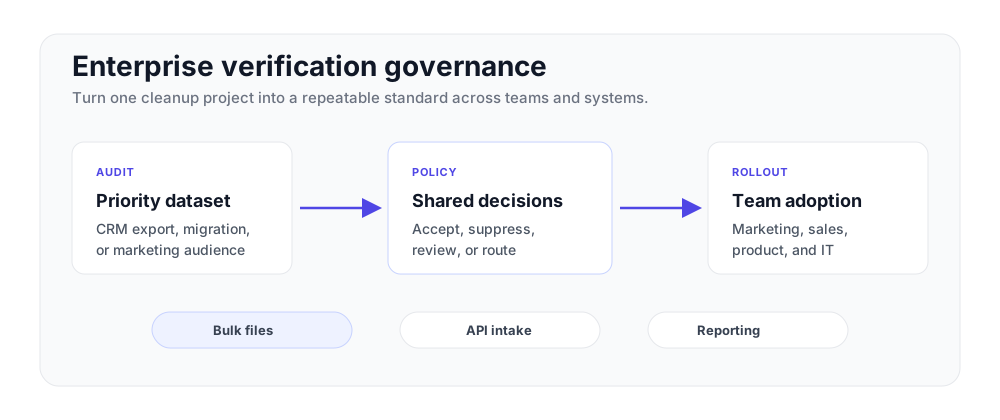
Start with one dataset, then standardize verification across systems.
Audit a priority dataset
Start with a CRM export, marketing audience, or product-signup dataset and measure result distribution.
Define result policies
Decide which statuses are accepted, suppressed, reviewed, or routed differently by each team.
Expand to intake points
Add API checks to forms, imports, and routing workflows while keeping bulk cleanup on a recurring cadence.
Enterprise governance module
Create one result policy for every system: valid records can move forward, invalid records are suppressed, risky records are reviewed, and catch-all records follow a documented team policy.
Standardize email quality across teams
Enterprise email data gets messy because every team collects it differently. Sales imports event scans. Marketing syncs webinar lists. Product accepts trial signups. Support updates customer records. If each workflow uses a different rule, invalid and risky emails spread through the CRM before anyone notices. A shared verification policy keeps the decision consistent.
Use VeriMails as a common gate before records move between systems. Valid addresses can sync automatically. Invalid addresses should be suppressed or sent back for correction. Catch-all, disposable, and role-based records can follow rules that match your risk tolerance. Connect the policy to CRM hygiene, API checks, and bulk cleanup so the same answer follows the contact wherever it goes.
The first rollout does not need to cover every system. Start with the records that create the most risk: high-volume imports, sales-owned contact creation, and product signups that trigger automated email. Once the policy works there, extend it to the rest of the stack.
Make the rule visible to every team that owns contact data. Sales, marketing, product, and support do not need separate definitions of a usable email address; they need one status model that works in dashboards, API responses, imports, and exports.
That consistency matters when contact data crosses several owned systems.
Frequently asked questions
Common questions from enterprise teams.
Related pages
Ready to discuss enterprise verification?
Talk to our sales team about volume pricing, SLAs, and security documentation.
Contact sales