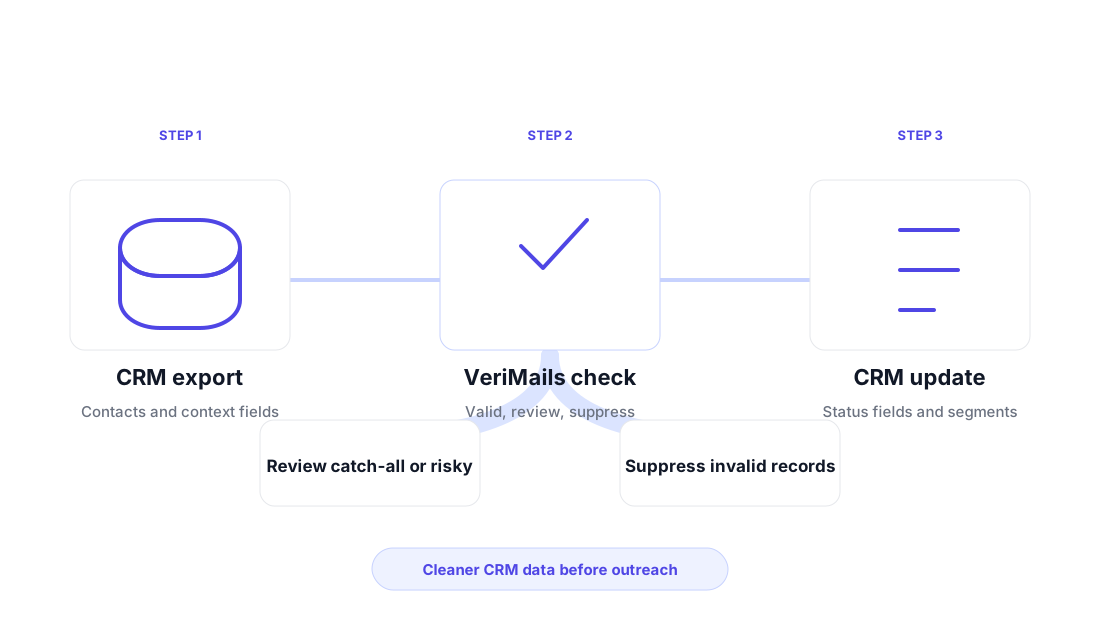
Clean the contact records already sitting in HubSpot, Salesforce, Pipedrive, Zoho, or any CRM export before stale addresses turn into wasted sequences and avoidable bounces.
A CRM is only useful when the records inside it can still be reached. Sales teams import conference lists, buy enrichment data, sync form submissions, add LinkedIn-sourced prospects, and revive older opportunities. Over time, contacts change roles, companies merge, domains are retired, and manually typed addresses collect mistakes. The CRM still looks full, but the sendable part of the database quietly shrinks.
Email verification gives RevOps, sales, and marketing teams a clean operating layer before campaigns go out. Instead of treating every record as equally usable, VeriMails helps separate contacts into practical action buckets: valid contacts that can enter outreach, catch-all or risky contacts that deserve a more cautious segment, and invalid or disposable records that should be suppressed before they damage performance.
The workflow is simple enough for a CSV export and flexible enough for an automated pipeline. Use bulk verification for periodic database cleanup, then use the email verification API to check new contacts as they enter forms, imports, or custom CRM workflows.
Bad records do not only create bounces. They distort decisions across sales, marketing, and operations.
Every hard bounce from your CRM tells mailbox providers your list quality needs work. Under 3% bounce rate is healthy, 3-5% needs cleanup and attention, and above 5% is high risk.
Your sales team spends time routing, researching, and sequencing contacts who may have left the company months ago. Invalid contacts waste budget and attention before anyone has a chance to reply.
Open rate, reply rate, meeting conversion, and nurture performance are harder to read when the denominator includes records that could not receive mail.
Turn verification results into CRM fields your teams can use for segmentation, routing, and campaign decisions.
Add a clear result field to each CRM record so sales, marketing, and operations can filter contacts without re-checking the same list manually.
Many corporate mail servers accept broadly, which makes binary decisions risky. VeriMails flags catch-all contacts so they can be reviewed separately.
Employees change jobs, companies shut down, and mailboxes get deactivated. Verification helps identify records that should stop receiving outbound or nurture emails.
Export a CRM segment, upload the CSV, and download a verified file with result categories you can map back to CRM fields.
Flag addresses such as info@, admin@, and support@ so person-level outreach does not accidentally target shared inboxes.
Verify emails at the point of CRM entry through forms, imports, or custom workflows. Bad records can be tagged before routing and scoring depend on them.
Make the cleanup operational: preserve the original record, add verification fields, then route contacts into usable segments.
Export the email, contact owner, lifecycle stage, company, country, last activity, source, and any campaign fields that help you re-import decisions later. A focused segment is better than a vague full export if only one team owns the next action.
Upload the CSV for verification and keep the result as its own CRM field. Do not overwrite the original email without review. A dedicated field gives you repeatable filtering without losing the raw record.
Valid contacts can enter planned outreach. Catch-all and risky contacts should be sent with more caution or routed for review. Invalid and disposable contacts should be suppressed from outbound and nurture sends.
CRM hygiene has the highest impact when it happens before a system takes action. Before cold outreach, verification keeps bad records out of Salesloft, Outreach, Instantly, Smartlead, or any sequencer. Before nurture campaigns, it reduces the number of stale contacts that distort engagement. Before reactivation, it helps decide which closed-lost, churned, or old opportunity records still deserve a new message.
It also improves handoffs between teams. RevOps can define clean fields, marketing can segment lists with more confidence, and SDR managers can see which records are safe to send, which need review, and which should not be touched. That is a stronger operating model than asking every rep to guess whether a contact is still reachable.
For broader context, pair this workflow with the guide to cleaning an email list, the bounce rate glossary, and the cold email verification use case. Together they define the operating model: clean the CRM, send to reachable contacts, and keep risky segments separate.
A practical review cadence is usually tied to business events, not a calendar reminder alone. Verify before a new outbound push, after a large trade-show import, before reassigning old accounts, and before marketing revives contacts that have been quiet for months. That keeps hygiene close to the moments where bad data would create visible damage.
Keep the rules simple enough for campaign teams to follow without asking engineering for every cleanup.
Use valid records for planned campaigns, especially if the contact source is recent and the CRM owner recognizes the account.
Separate catch-all and risky records. They may still be useful in B2B lists, but they should not be mixed blindly with clean contacts.
Keep invalid, disposable, and clearly bad addresses out of outbound, newsletters, nurture, and reactivation workflows.
Start with 100 free credits. No credit card required.