VeriMails vs EmailListVerify
EmailListVerify is a long-running budget email verification service with one-time credits, monthly subscriptions, API validation, email finder credits, and a familiar upload-clean-download workflow. VeriMails is built for buyers who want lower public verification prices, simpler credit math, and direct catch-all segmentation without buying a broader toolset.
Want the full credit table in one place? Check VeriMails pricing before you choose a pack.
TLDR: Quick Verdict
At a Glance
EmailListVerify is credible for basic list cleaning, and its API page now shows more structured response metadata than older one-word verifier APIs. The practical buying difference is price clarity, catch-all routing, and whether you want a general email utility suite or a focused verification workflow.
| Feature | VeriMails | EmailListVerify |
|---|---|---|
| Best fit | Lower-cost bulk verification and API checks | Budget verifier with email finder, free tools, monthly plans, and simple list cleanup |
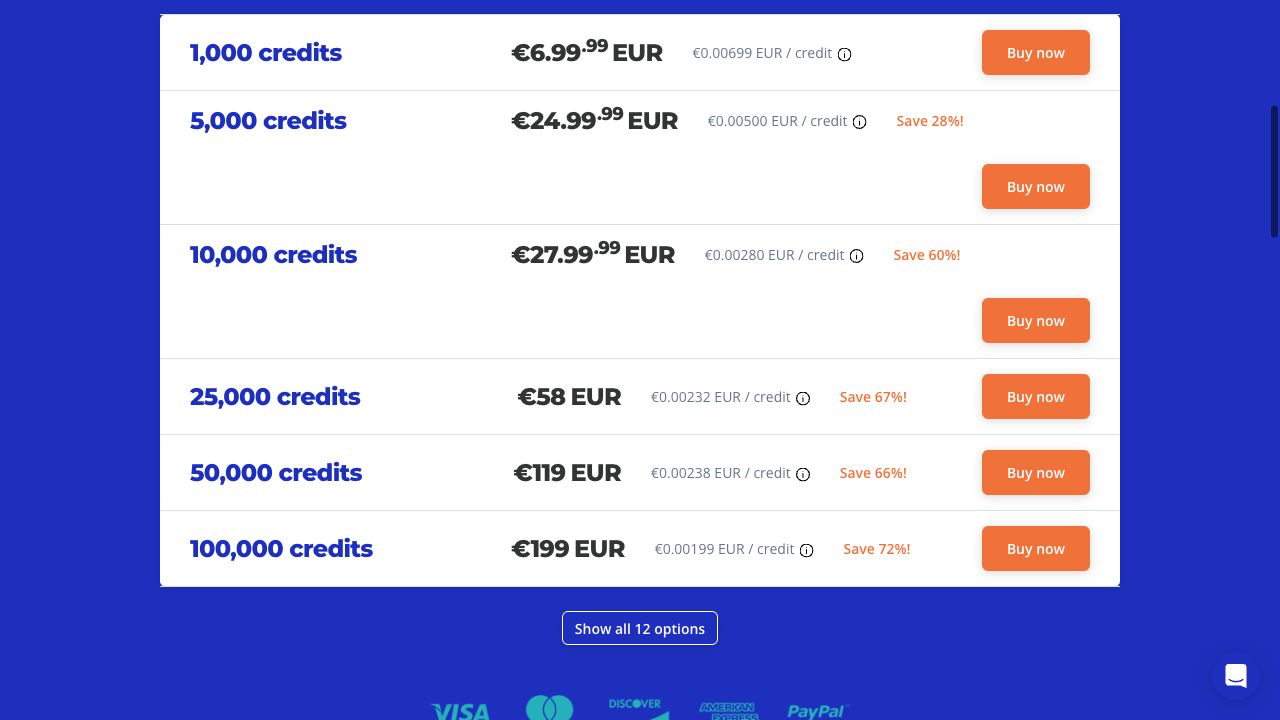
| 10,000 one-time credits | $19 | About 27-28 in current checkout variants |
| 100,000 one-time credits | $99 | About 186-199 in current checkout variants |
| Free start | 100 signup credits, no credit card required | 100 free verifications promoted publicly |
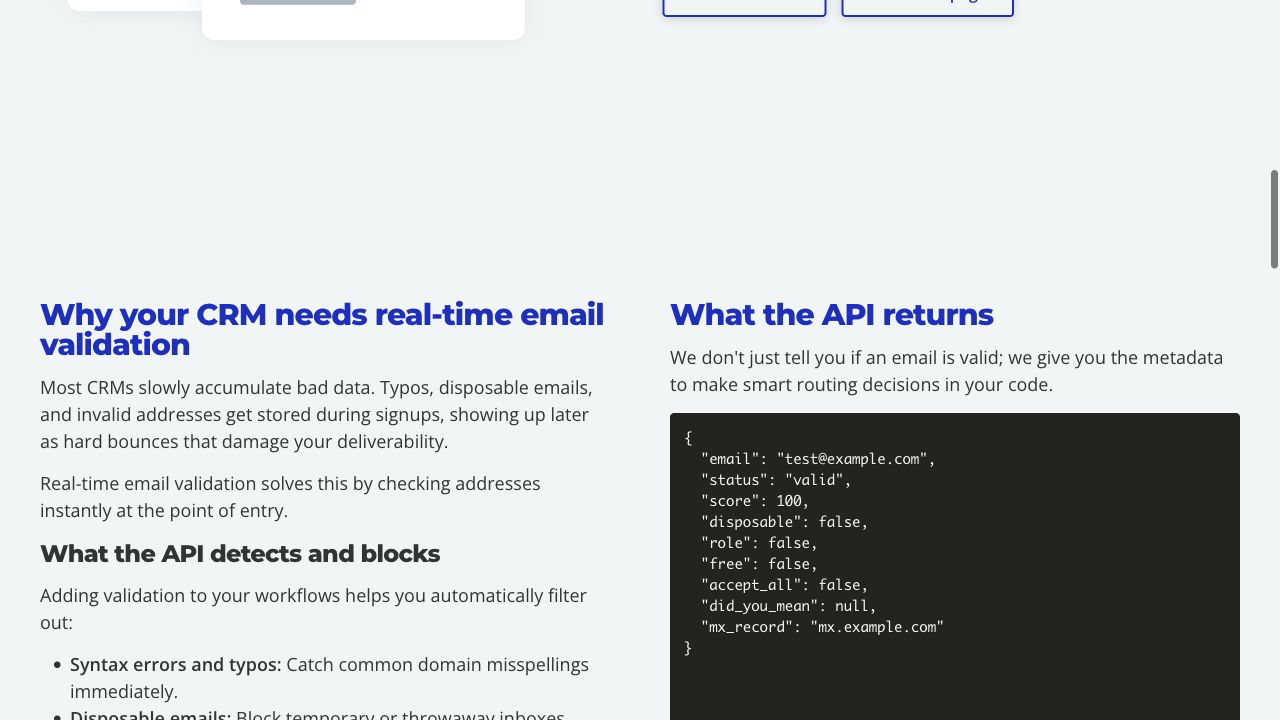
| API response | Focused verification result fields for sending decisions | JSON example includes status, score, disposable, role, free, accept_all, did_you_mean, and mx_record |
| Catch-all handling | Segmented catch-all output for campaign policy | API includes accept_all; marketing copy frames catch-alls as risky addresses to avoid |
| Bulk workflow | Upload, verify, filter, and export | Upload lists from dashboard; pricing FAQ says more than 100K verifications per hour per customer |
Pricing and Credit Model
EmailListVerify pricing can appear in localized currency and pricing variants, so buyers should check the final checkout currency before purchasing. For planning, common checkout variants place 10,000 one-time credits around 27-28 and 100,000 credits around 186-199. Monthly subscription examples include 10,000 credits at 25/month and 100,000 credits at 168/month.
EmailListVerify's FAQ says one-time credits do not expire. It also says email finder can use the same credits, with 5 EmailListVerify credits consumed for each email found at medium confidence or higher. That makes the account flexible, but buyers should separate verification spend from finder spend when forecasting.
| Volume | VeriMails credit packs | EmailListVerify one-time credits | Buyer note |
|---|---|---|---|
| 10,000 credits | $19 | About 27-28 | Final checkout currency may vary by region. |
| 50,000 credits | $59 | About 98-119 | Confirm the live checkout tier before buying a larger pack. |
| 100,000 credits | $99 | About 186-199 | VeriMails stays lower at this common list-cleaning tier. |
| 1,000,000 credits | $499 | About 659-699 | EmailListVerify publishes larger tiers through its pricing data. |
EmailListVerify is still a lower-cost market option compared with many premium verifiers. The point of comparison here is narrower: VeriMails is less expensive at the common public tiers above.
What Buyers Compare
Verification Workflow
EmailListVerify's workflow is straightforward: upload a list or call the API, let the service run checks, then use the result to allow, flag, suppress, or export contacts. Its pricing FAQ says the process uses domain validation, syntax verification, spam-trap removal, deduplication, MX checks, and bounce processing. It also says list processing exceeds 100K verifications per hour per customer, depending on list factors.
Catch-All Handling
EmailListVerify's API page includes an accept_all field in the example JSON response. That is the important signal buyers should look for. A catch-all domain can accept messages to addresses that may not represent real inboxes, so a verifier should not silently treat those contacts as normal deliverable mailboxes.
VeriMails keeps catch-all results actionable by separating them before export or API use. The practical decision is the same for both products: do not blend catch-all into your main sendable segment without a policy. Suppress them, test them in a small controlled send, or reserve them for high-value accounts where the risk is worth it.
API and Developer Experience
EmailListVerify's API page is stronger than a bare valid/invalid endpoint. It describes sub-second real-time validation, a GET endpoint, examples for cURL, PHP, Ruby, Python, and C#, and a JSON object with deliverability and metadata fields. That is enough for signup forms, checkout validation, and basic CRM intake rules.
VeriMails is the better fit when developers want a smaller verification surface and pricing that is easier to explain internally. EmailListVerify is attractive if developers also need its account ecosystem, status page, SDK examples, or a broader utility set around verification.
VeriMails Pricing Reference
These VeriMails credit packs tiers are the direct cost comparison for verification-only buyers:
| Credits | VeriMails Price | Price per Email |
|---|---|---|
| 10,000 | $19 | $0.0019 |
| 25,000 | $39 | $0.00156 |
| 50,000 | $59 | $0.00118 |
| 100,000 | $99 | $0.00099 |
| 250,000 | $199 | $0.000796 |
| 500,000 | $349 | $0.000698 |
| 1,000,000 | $499 | $0.000499 |
| 2,500,000 | $999 | $0.0004 |
| 5,000,000 | $1,499 | $0.0003 |
Email Finder costs 20 credits only when VeriMails returns a verified person-level email. At the 10,000-credit pack, that is $0.038 per found email. Monthly plans start at $12.50/mo when billed yearly.
VeriMails also offers annual plans for recurring verification needs, starting at $12.50/month when billed yearly and scaling through 50,000, 100,000, 500,000, and agency tiers.
Best-Fit Decision
Choose VeriMails if..
- You verify lists regularly and want lower pricing at 10K, 100K, and 1M volumes.
- You want a focused verification workflow without extra email utility products in the way.
- Your operators need simple segmentation for invalid, risky, and catch-all results.
- Your team wants verification costs that are easy to forecast before each campaign.
Choose EmailListVerify if..
- You already use its dashboard or prefer its upload workflow.
- You want email finder credits, free DNS/email tools, and API examples in one ecosystem.
- You prefer a monthly plan, and the pricing variant shown at checkout fits your budget.
- You need a familiar budget verifier more than the lowest verification-only cost.
Verification Accuracy
Both VeriMails and EmailListVerify can help reduce bad addresses before a campaign. The difference is how clearly the result fits your next send: VeriMails keeps valid, invalid, disposable, role-based, catch-all, and unknown rows separate for decision-making.
Use a recent sample from your own CRM, not a perfect test list. The addresses that matter are the ones you plan to mail this week: old leads, imported contacts, role inboxes, catch-all domains, and records from mixed sources.
Who VeriMails Is Best For
Choose VeriMails when verification is the job and you want the result before the send.
- You already have a list and need to clean it before a campaign.
- You want prepaid verification credits that never expire.
- You need API and CSV verification without paying for a larger sales platform.
Who EmailListVerify Is Best For
Choose EmailListVerify when its broader product strengths match the job you are buying for.
- Choose EmailListVerify when its existing dashboard, integrations, or deliverability features already fit your workflow.
- Choose it when you value that specific result model or account setup more than lower self-serve verification pricing.
- Choose it when your team has already standardized on its exports, API fields, or support process.
Frequently Asked Questions
Why teams switch to VeriMails
“Cleaned our HubSpot database of 95K contacts. 12% were invalid. Email open rates jumped 15% in the next campaign because we stopped hitting dead addresses.”
— Maria C. — Marketing Director at B2B Services Company, Germany
“We were on Emailable paying $400 a month. Same volume on VeriMails costs $99. Switched in a day, no difference in accuracy.”
— Hannah L. — Email Operations Manager at SaaS Company, Ireland
Related Comparisons
Try VeriMails Free
100 free credits on signup. No credit card required. See why teams switch to VeriMails.
Start Free