Email Verification for E-Commerce Stores
Verify checkout, signup, customer, and marketing emails so order updates arrive, subscriber lists stay healthy, and customer records are easier to trust.
The short version: verify first, then send.
E-commerce teams use VeriMails to verify customer emails at checkout, clean subscriber lists before promotional campaigns, and keep customer databases ready for order updates, support, and repeat purchase flows.
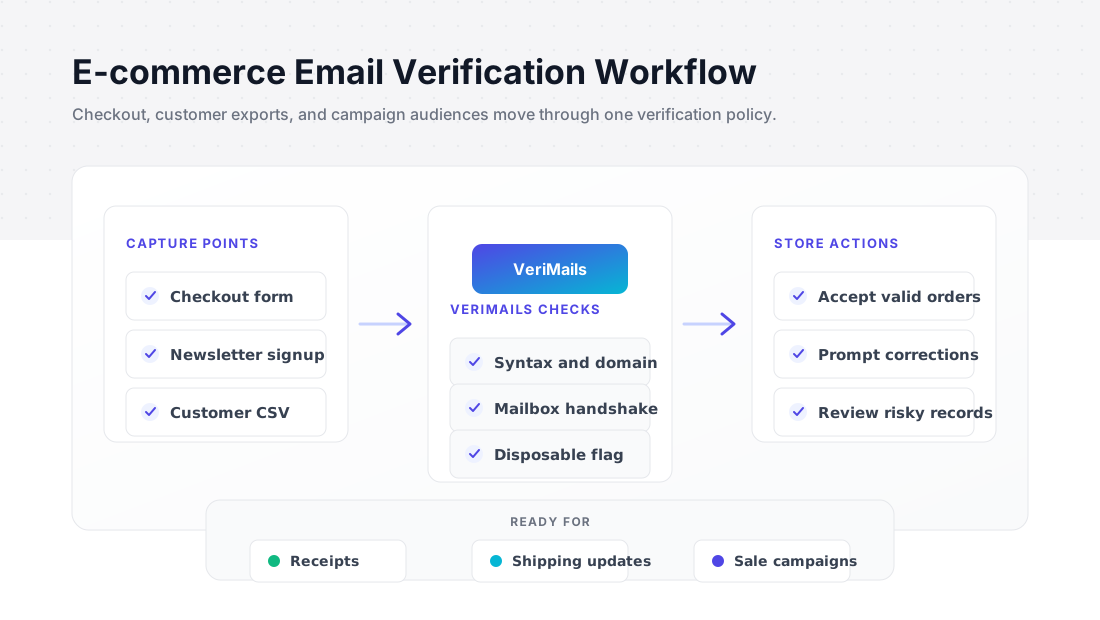
Where e-commerce teams use verification
Verify the email address before it becomes an order, subscriber, or customer record.
| Commerce workflow | What to verify | Business outcome |
|---|---|---|
| Checkout and account creation | Customer email at capture | Fewer bounced receipts, account messages, and delivery updates. |
| Promotional campaigns | Klaviyo, Mailchimp, Omnisend, or Shopify subscriber exports | Cleaner launch, sale, and winback audiences. |
| Customer database imports | Historical orders and migrated customers | Better customer records before a platform move or reactivation send. |
| Discount and loyalty programs | New signups and reward members | Keep disposable and risky records out of high-value flows. |
For an online store, the email address is part login, part receipt destination, part shipping-notification channel, and part repeat-purchase engine. When that address is wrong, order confirmations, password resets, delivery updates, abandoned-cart messages, and loyalty emails all become less reliable.
Verification solves two e-commerce problems. At the point of entry, it helps flag invalid or disposable addresses before they become customer records. Before a campaign, it helps clean a customer or subscriber export so bounce rates do not undermine sender reputation, inbox placement, or campaign reporting.
Use bulk verification to clean your full customer list before a major campaign, and wire the verification API into your store to check addresses at signup and checkout. For platform-specific workflows, see the guides for Shopify, WooCommerce, Klaviyo, and e-commerce email verification.
Built for e-commerce brands
Improve customer email quality across checkout, campaigns, and order operations.
Checkout email checks
Verify addresses at checkout or account creation so customer records are more reliable from the first order.
Campaign list cleaning
Clean subscriber and customer exports before launches, seasonal sales, product drops, and winback sends.
Transactional email reliability
Support order confirmations, shipping updates, receipts, and password resets by checking email quality before messages are triggered.
Customer data quality
Use verification labels to decide which customer records should be accepted, reviewed, corrected, or suppressed from marketing.
Platform workflows
Use CSV, Zapier, or the REST API with Shopify, WooCommerce, Klaviyo, Mailchimp, Omnisend, and similar tools.
List health reporting
Get a clear breakdown of valid, invalid, risky, catch-all, role-based, and disposable records before importing an audience.
E-commerce verification workflow
Clean customer and subscriber records before the next send.
Export your customer list
Export a CSV from Shopify, Klaviyo, Mailchimp, or your e-commerce platform. Any file with an email column works.
Verify with VeriMails
Upload the file, map the email column, and process it as a background verification job.
Segment and re-import
Suppress invalid records, review risky segments, and import the approved audience back into your commerce or email platform.
Pre-campaign store checklist
Before a seasonal sale or product launch, verify customer exports, suppress invalid and disposable records, review catch-all segments, and sync the approved audience back into the commerce stack.
Clean the records that cost you margin
Bad customer emails do not just hurt campaigns. They break order updates, password resets, return messages, loyalty notices, and win-back flows. Verify checkout addresses before they become customer records, then clean your existing list before seasonal sends. Invalid addresses should leave the audience. Catch-all and risky rows can stay out of high-volume promotional sends until you have a clear reason to keep them.
The best time to clean is before you pay to email the list again. Export from Shopify, Klaviyo, Mailchimp, or your commerce database, run the file through VeriMails, then re-import only the segment you want to keep. Use the e-commerce verification workflow for the cleanup path and check credit pricing before a large campaign window.
For stores with frequent promotions, keep one saved process for the pre-send cleanup. Run the same export, verification, suppression, and re-import steps before every peak campaign so holiday volume does not turn old subscriber data into avoidable bounces.
If a store is growing quickly, verify new subscribers at capture and clean the full database before big calendar moments. That gives the team both protections: fewer bad records entering the system and fewer stale contacts reaching the campaign audience months later.
That gives retention teams a cleaner list for every major send.
Frequently asked questions
Common questions from e-commerce teams.