How to Verify Emails in Klaviyo
Klaviyo audiences often include profiles from store signups, checkout, integrations, and imports. When stale or mistyped addresses stay in the active marketing audience, they can increase bounce risk and complicate active-profile cleanup. This guide covers exporting Klaviyo lists and segments, checking them with VeriMails, and re-importing a verified-valid list while routing risky results to suppression or review.
TLDR
- Export the Klaviyo list or segment you plan to mail, then clean it with bulk email verification before re-importing campaign-ready profiles.
- Route deliverable results back into your active audience and send invalid, disposable, catch-all, and role-based results to suppression or review based on your account rules.
- Use the free starter credits for a sample segment, then compare ongoing list-cleaning costs on pricing before a larger profile cleanup.
Why Verify Your Klaviyo Contacts
Klaviyo is an ecommerce-focused marketing platform built around customer profiles, lists, segments, and automated flows. Profiles arrive from store signups, checkout, integrations, and CSV imports, so operators need a repeatable way to separate valid results from addresses that need suppression or review.
The first reason to verify is account hygiene. Klaviyo billing and active profile rules can depend on how contacts are stored and suppressed in your account. Verification gives operators invalid and risky result files to use before import or during periodic cleanup, but any billing effect depends on the suppress, delete, or exclude decisions you make in Klaviyo and should be checked in the account after cleanup.
The second reason is sender reputation. A hard bounce is a permanent delivery failure, and a high bounce count can tell mailbox providers that you do not maintain your list. That perception may lower sender reputation and make inbox placement harder for campaigns and flows.
The third reason is how Klaviyo handles bounces. Klaviyo can suppress hard-bounced profiles to keep lists clean, and repeated soft bounces may also require suppression handling. Suppression helps, but it is reactive: the failed send has already counted against campaign performance. Verifying upfront helps keep likely invalid addresses out of the audience and gives you cleaner performance metrics. Open rates, click rates, placed-order rates, and revenue per recipient are easier to interpret when likely bounces and review-needed addresses are separated before the campaign.
What VeriMails Checks
VeriMails runs every address through a layered verification process, so the list you load into Klaviyo can separate stronger send candidates from addresses that are likely to bounce or need review. Each layer targets a distinct reason an address could otherwise fail.
Syntax validation confirms the address is correctly formatted. MX and DNS checks confirm the domain exists and is configured to receive mail, which helps catch typo domains and dead domains before deeper checks run. The live SMTP handshake connects to the receiving mail server to check whether the individual mailbox appears able to accept mail, which is a strong indicator that a send is less likely to hard bounce.
VeriMails also performs catch-all detection. A catch-all domain accepts mail for any address at that domain, so the server cannot confirm whether one specific mailbox is real. VeriMails reports this as a detection result, not a score, leaving the decision with you. Disposable detection flags temporary inbox domains, which are common in promo-driven ecommerce signups, and role-based detection identifies generic addresses such as info@, support@, and orders@ that tend to underperform. VeriMails returns a clear verification result for each address.
Pricing for Klaviyo Users
VeriMails pricing is built for predictable list-cleanup costs before imports, launches, and scheduled hygiene passes. Verification starts at $0.0019 per email. A 10,000-credit pack costs $19, enough to clean a mid-sized list or segment, and credit packs scale up to 5 million credits for $1,499 for large profile databases and agencies managing multiple Klaviyo accounts.
If you clean your lists on a regular schedule, annual plans start at $12.50/month when billed yearly. Every new account starts with 100 free credits and no credit card required, so you can verify a sample of a Klaviyo segment and see how much dead weight it carries before spending. Credits never expire, so a pack you buy stays usable for your next cleanup.
Use the credit cost as an operator-side cleanup cost, not a guaranteed billing offset. If the results lead you to suppress or remove contacts that Klaviyo no longer counts as active, you may see a smaller active audience; confirm the count and tier in Klaviyo after the cleanup. The same file also gives marketing a cleaner campaign input by separating valid, invalid, catch-all, disposable, and role-based statuses before the send.
Workflow Visual
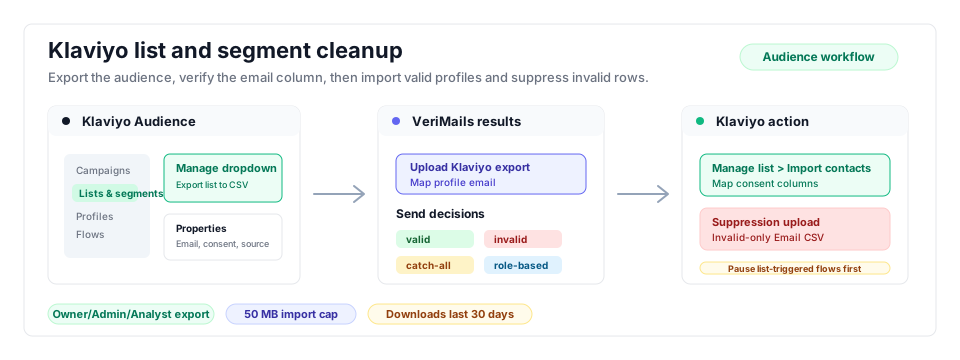
The Klaviyo workflow is cleanest when you export the exact list or segment you plan to mail, verify it once, and keep verified profiles separate from addresses that need suppression or review.
- List hygiene: Keep this workflow close to every email marketing cleanup before campaign launches.
- Bulk verification: Use bulk CSV verification for list and segment exports that are too large to review manually.
- Related ecommerce guide: If Klaviyo is fed by store contacts, compare the Shopify verification workflow.
Step-by-Step
Export the exact audience
Go to Audience, then Lists & Segments, and open the list or segment you want to clean. If the goal is all profiles, create a segment containing all profiles first. Choose Manage, then Export to CSV. Export only the properties you need for the next import, usually email plus name, consent, source, and key ecommerce fields. Only Owner, Admin, and Analyst users can export, and exports remain available under Downloads for 30 days.
Prepare the CSV for verification
Keep the email column and remove properties that are not needed for the cleanup decision. Save a copy of the raw Klaviyo export before editing so you can audit the original counts later. The expected input for VeriMails is one CSV with one email column and no manual status edits.
Upload and run verification
Log in to VeriMails, open bulk verification, and upload the Klaviyo CSV. VeriMails detects the email column and runs syntax, DNS, MX, SMTP, catch-all, disposable, and role-based checks. When the queued job completes, download separate result files instead of copying statuses by hand.
Suppress invalid profiles
Create an invalid-only CSV with a single Email header, then add those addresses to Klaviyo's suppression list or bulk suppress the matching list or segment. Suppressed profiles are not eligible for marketing sends, and suppression may affect active profile counts depending on current Klaviyo rules; verify the count after cleanup.
Import and tag valid profiles
Import the valid-only file to the Klaviyo list that will feed your campaign or segment, map email, consent, and retained properties, and apply a durable tag such as verimails-valid or verified-2026-05. This creates a clear send segment without relying on spreadsheet memory.
QA the next campaign
Before sending, confirm that invalid profiles are suppressed, catch-all and role-based rows are in review segments, and the campaign recipient count matches the valid tagged group. Repeat the verification pass before every major import and every few months for standing ecommerce lists.
Operator Checklist
Use this checklist to turn the verification run into clean Klaviyo account hygiene instead of a one-off spreadsheet exercise.
| Check | What Good Looks Like | Why It Matters |
|---|---|---|
| Export role | The export is run by an Owner, Admin, or Analyst user and retrieved from Downloads within 30 days. | Prevents blocked exports and stale file confusion. |
| CSV scope | The file matches the list or segment you plan to mail, with unneeded profile properties removed. | Controls verification spend and simplifies import mapping. |
| Suppression file | Invalid addresses are reduced to one Email column before upload to Klaviyo suppressions. | Avoids accidental property changes while stopping future marketing sends. |
| Valid tag | Valid-result profiles receive a reusable verification tag and a dated tag. | Makes future campaign segments auditable. |
| Campaign guardrail | Campaigns use the verified tag while excluding invalid, disposable, role-based, and catch-all review groups. | Helps keep likely invalid or review-needed addresses out of the active send audience. |
Frequently Asked Questions
Related Guides
Try VeriMails Free
100 free credits on signup. No credit card required. Put this guide into practice today.
Start Free