How to Verify Emails in Snov.io
Snov.io combines prospecting and outreach in one platform, which means prospect lists should still be checked before sending. Running those lists through verification before you launch a campaign helps reduce avoidable bounces against practical bounce rate benchmarks. This guide explains how to export your Snov.io prospects, verify them with VeriMails, and re-import valid rows for the next campaign.
TLDR
- Export the exact Snov.io list, tag segment, or campaign-recipient group you plan to use next.
- Keep Email, name, company, job title, tags, and custom variables so personalization survives the cleanup.
- Verify the CSV in VeriMails before importing it into a new list or campaign.
- Import valid rows only; keep catch-all, role-based, disposable, and invalid rows out of the send-ready list.
- Re-verify older Snov.io lists before relaunching a campaign because saved prospect data ages quickly.
Snov.io Export Decisions
Most Snov.io cleanup mistakes happen before verification, when the export is too broad or the return file loses important campaign fields.
| Decision | Best operating choice | Why it matters |
|---|---|---|
| Export source | Use the Leads page list, tag filter, or campaign recipient list that matches the next outreach motion. | Keeps verification tied to a real campaign instead of creating a broad account dump. |
| Status filters | Filter by email status, tags, LinkedIn profile presence, or campaign state before exporting. | Prevents already rejected, irrelevant, or wrong-segment prospects from returning to a clean list. |
| Columns to keep | Include Email, name, company, position, tags, list, and any custom variables used in your email copy. | Snov.io can map default and custom fields back during import, so keep the data needed for personalization. |
| Duplicate handling | Choose whether the cleaned file should update existing prospects, skip duplicates, or create a fresh list. | Gives operators a clear audit trail and prevents cleaned rows from overwriting fields unintentionally. |
| Campaign gate | Do not attach the list to outreach until valid rows are separated from review statuses. | Keeps Snov.io campaigns from using the first send as the quality test. |
Why Verify Your Snov.io Contacts
Snov.io is a sales toolkit with prospect lists, drip campaigns, and a built-in CRM view. Its strength is helping teams build and organize prospects quickly. That same speed is the reason verification matters: contact data can be incomplete, stale, or uncertain before a campaign starts.
The first reason to verify is to catch addresses that are stale, invalid, or uncertain. A verification pass labels which contacts are valid, invalid, catch-all, disposable, or role-based before they enter a campaign.
The second reason is bounce-rate control. Snov.io sends campaigns through your connected mailbox, so every bounce becomes part of your sending record. Mailbox providers read a climbing bounce rate as a list-quality signal and can make filtering more likely. Keeping high-risk rows out of the send helps keep that signal easier to manage.
The third reason is an independent status check. Snov.io includes verification, but it spends Snov.io credits to run it. A separate pass through a dedicated verifier gives you a clear status breakdown before a campaign. The fourth reason is data decay. Even a list that was usable when you built it ages as people change jobs and companies restructure. Re-verifying before each send means you are working with current statuses, not last quarter's snapshot.
What VeriMails Checks
VeriMails runs each address through a layered verification process so the list you load back into Snov.io is one you can trust. The email verification process explains how each layer addresses a different reason a send would otherwise fail.
Syntax validation confirms the address is correctly formatted before any network work begins. MX and DNS checks confirm the domain is real and configured to receive mail, which removes typo domains and dead companies. The live SMTP handshake connects directly to the receiving mail server to confirm the specific mailbox exists. This step is especially valuable for Snov.io users, because it independently tests addresses before they enter a campaign.
VeriMails also runs catch-all detection. A catch-all domain accepts mail for any address, so the server cannot confirm whether one mailbox is real. VeriMails reports this as a detection result, not a score, so you decide how to treat those prospects. Disposable detection flags temporary inbox domains that signal a low-value lead, and role-based detection identifies generic addresses such as info@, sales@, and contact@ that underperform in personalized outreach. VeriMails returns a clear verification result for each address.
Pricing for Snov.io Users
VeriMails pricing is built to be predictable for prospecting teams. Verification starts at $0.0019 per email. A 10,000-credit pack costs $19, enough for a solid round of campaign prep, and credit packs scale up to 5 million credits for $1,499 for agencies and high-volume outbound teams. The pricing page helps compare packs before a large list build.
If you prospect on a steady schedule, annual plans start at $12.50/month when billed yearly and often work out cheaper than buying packs as needed. Every new account starts with 100 free credits and no credit card required, so you can verify a sample of your Snov.io list and see how many generated addresses hold up before you spend anything. Credits never expire, so a pack you buy stays usable across future campaigns.
Reading Your Verification Results
When a VeriMails run completes, every address from your Snov.io export carries a clear status, and reading those statuses tells you whether the exported list is ready for outreach. Valid addresses passed the verification checks and are the best candidates for the campaign. Invalid addresses failed a definitive check and should be dropped before they reach a campaign.
Catch-all and how to treat it
Catch-all results come from domains configured to accept mail for any address. Because the server will not confirm a single mailbox, VeriMails reports the address as catch-all detection rather than valid or invalid. A reasonable approach is to send to high-value catch-all prospects in a smaller, monitored campaign while watching the bounce data, and to hold lower-priority catch-all addresses until you have stronger signals.
Disposable and role-based results
Disposable addresses use temporary inbox domains and almost never belong to a genuine business contact, so they are not worth a campaign slot. Role-based addresses such as info@ or contact@ reach a shared inbox rather than a named decision maker, and one-to-one outreach tends to underperform there. Neither is strictly invalid, but both are best treated as lower priority. Sorting your Snov.io export by these statuses before re-import keeps each campaign focused on the addresses most likely to convert.
Workflow Visual
Use this flow to verify Snov.io prospects after list building and before campaign outreach.
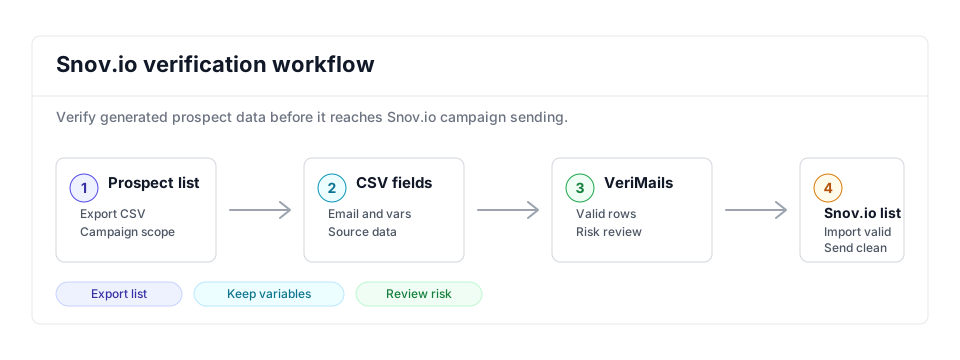
- Export scope: Open the specific Snov.io prospect list you want to send or enrich before exporting; compare similar sales flows in the Mailshake guide.
- Matching field: Keep email, name, company, source, and any variables needed by campaign personalization while bulk verification runs.
- Result action: Use valid rows for campaigns and review catch-all or role-based rows before adding them to outreach or CRM hygiene workflows.
Step-by-Step
Export your prospect list from Snov.io as a CSV
Open the list you want to clean on the Snov.io Prospects page. Click the three-dot menu in the top toolbar and choose Export prospect list. Set the filters for which prospects and fields to include, then select CSV as the export format. List export is available on premium Snov.io plans. QA the export by confirming tags, list name, email status, and the custom variables used in campaign copy.
Upload the CSV to VeriMails
Log in to VeriMails, open the bulk verification tool, and upload your exported file. VeriMails automatically detects and maps the email column, so there is no spreadsheet cleanup needed. Confirm the mapped column before starting the queued job. Teams generating leads continuously can use the Email Verification API before prospects ever become a CSV.
Review your verification results
When the run completes, VeriMails groups every address by status: valid, invalid, catch-all, disposable, and role-based. The invalid count tells you which addresses were not deliverable. Download the filtered results, keep the valid addresses, and decide how to treat catch-all results based on prospect value. Review the status mix by list, tag, and enrichment source so poor inputs are fixed upstream.
Re-import the cleaned list into Snov.io
Take the downloaded file of valid addresses and import it back into Snov.io as a new prospect list. Snov.io's import flow lets you map columns to default and custom fields, so confirm the email column and any personalization fields line up before you attach the list to a campaign. Check import totals, duplicate behavior, and a few sample prospect records before scheduling the first step.
Verify every list before you send
Generated and aging data both decay, so verify each new list before it enters a campaign and re-verify standing lists every few months. Making this routine reduces avoidable bounces and keeps list quality easier to manage over time.
What to Do With Each Result
Use the VeriMails status as the import rule for Snov.io. The goal is a send-ready list, not another mixed spreadsheet.
- Valid Import into a clean Snov.io list and use it for the next campaign or CRM update.
- Invalid Exclude from campaigns and keep only for source cleanup or owner review.
- Catch-all Hold in a separate segment for cautious, low-volume outreach when the account is important.
- Disposable Remove from outbound workflows because the inbox is temporary and low value.
- Role-based Review manually; shared inboxes need different copy than named prospects.
Frequently Asked Questions
Related Guides
Try VeriMails Free
100 free credits on signup. No credit card required. Put this guide into practice today.
Start Free