How to Verify Emails in Yesware
Yesware lives inside Gmail and Outlook, so every Campaign you run sends through your own mailbox and your own sending reputation. Recipient lists pulled from Salesforce and other sources collect stale addresses fast, and those turn into bounces the moment a Campaign starts. Verifying your list first keeps bounces low against healthy bounce rate benchmarks and protects the inbox you depend on. This guide covers exporting your Yesware recipients, cleaning them with VeriMails, and re-importing a verified list.
TLDR
- Export the recipient list from the Yesware Campaign you plan to reuse or relaunch.
- Enable Personal Details so the CSV includes Email plus fields like FirstName, LastName, Title, Phone, and Company.
- Verify the CSV in VeriMails, then rebuild the campaign import with valid rows only.
- Keep Email in column A and preserve exact, case-sensitive merge-field headings.
- Hold catch-all, disposable, role-based, and invalid rows outside the Campaign audience.
Yesware CSV Decisions
Yesware imports are sensitive to column structure, so protect the campaign format before and after verification.
| Decision | Best operating choice | Why it matters |
|---|---|---|
| Export source | Use the Campaign recipient export, not a general CRM dump, when relaunching an existing sequence. | Keeps the file aligned with the campaign that reps recognize. |
| Personal details | Check Personal Details before exporting. | Adds the fields needed to rebuild the campaign import without losing personalization. |
| Required column | Put Email first in column A before importing back into Yesware. | Yesware expects the email field in the first column during CSV upload. |
| Merge fields | Keep column headings exactly matched to the merge fields used in the campaign body. | Headings are case-sensitive, so small changes can break personalization. |
| Send gate | Import valid rows only and preview the Campaign before sending. | Confirms the cleaned list and variables are correct before your mailbox sends. |
Why Verify Your Yesware Contacts
Yesware is a sales engagement tool built as an add-in for Gmail and Outlook. It adds tracking, templates, and multi-step Campaigns to the inbox sales reps already use. Recipients are usually added by uploading a CSV, often one exported from Salesforce, or by pulling contacts directly from the CRM.
The first reason to verify is that Yesware sends through your real mailbox. There is no separate sending service to absorb the impact of bad addresses. When a Campaign hits invalid recipients, those hard bounces are recorded against your own Gmail or Outlook sending reputation, and that reputation decides whether your future email reaches the inbox.
The second reason is the quality of Salesforce data. CRM records accumulate over years, and contacts leave their companies without anyone updating the record. A list exported from Salesforce can include addresses that no longer exist. Verifying before a Campaign filters those out instead of discovering them through bounce reports.
The third reason is mailbox provider thresholds. Gmail and Outlook both watch bounce rates and treat a high rate as a signal of poor list hygiene, which pushes mail toward the spam folder and can trigger sending restrictions. A verified list keeps you well clear of those thresholds. The fourth reason is reliable Campaign metrics. Yesware reports opens and replies, and those numbers only mean something if the first email was actually delivered. Verifying upfront ensures your reporting reflects how real prospects respond, which is what makes testing subject lines and templates worthwhile.
What VeriMails Checks
VeriMails runs each address through a layered verification process, so the recipient list you load into a Yesware Campaign is one you can trust. The email verification process explains how every layer targets a specific reason an address would otherwise bounce.
Syntax validation confirms the address is correctly formatted. MX and DNS checks confirm the domain is real and configured to receive mail, which removes typo domains and dead companies before deeper checks run. The live SMTP handshake connects to the receiving mail server to confirm the individual mailbox exists, which is the strongest single indicator that a Campaign send will be delivered rather than bounced.
VeriMails also performs catch-all detection. A catch-all domain accepts mail for any address at that domain, so the server will not confirm whether one specific mailbox exists. VeriMails reports this as a detection result, not a score, leaving the call to you. Disposable detection flags temporary inbox domains that signal a low-value contact, and role-based detection identifies generic addresses such as info@, sales@, and support@ that perform poorly in one-to-one sales email. VeriMails returns a clear verification result for each address.
Pricing for Yesware Users
VeriMails pricing is straightforward and fits the way sales teams work. Verification starts at $0.0019 per email. A 10,000-credit pack costs $19, which covers a meaningful round of Campaign prep, and credit packs scale up to 5 million credits for $1,499 for larger sales organizations. Use the pricing page to plan the right pack before a Salesforce-sourced export.
If your team prospects on a steady cadence, annual plans start at $12.50/month when billed yearly and often work out cheaper than buying packs as needed. Every new account starts with 100 free credits and no credit card required, so you can verify a sample of your Yesware list and see the results before spending. Credits never expire, so a pack carries over to your next Campaign.
Reading Your Verification Results
When a VeriMails run finishes, every address in your Yesware export carries a clear status, and knowing what each one means helps you decide what to load back into a Campaign. Valid addresses passed every check, including the live SMTP handshake, and are safe to send to. Invalid addresses failed a definitive check, usually because the mailbox does not exist or the domain cannot receive mail, and these are the ones to drop before they bounce.
Catch-all and how to treat it
Catch-all results come from domains configured to accept mail for any address. The server will not confirm whether one specific mailbox exists, so VeriMails reports the address as catch-all detection rather than valid or invalid. Many legitimate companies run catch-all domains, so these are not automatically bad contacts. A common approach for Yesware users is to send to high-value catch-all prospects in a smaller, carefully monitored Campaign while keeping a close eye on the bounce report, and to leave low-priority catch-all addresses out until you have more signal.
Disposable and role-based results
Disposable addresses use temporary inbox domains and rarely belong to a real long-term contact, so they are usually not worth a Campaign slot. Role-based addresses such as sales@ or info@ reach a shared inbox rather than a named person. They are not invalid, but one-to-one sales messaging tends to underperform when it lands in a shared mailbox, so treat them as a lower-priority segment. Sorting your export this way before re-import means each Yesware Campaign goes to the cleanest possible audience.
Workflow Visual
Use this flow to clean Yesware campaign recipients before sending from Gmail or Outlook.
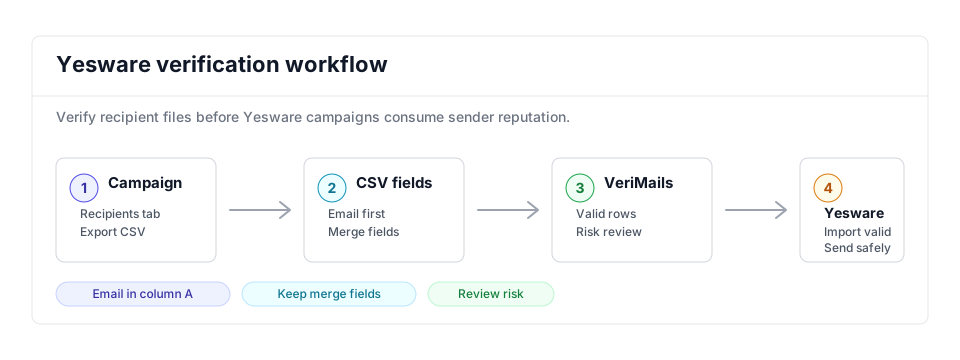
- Export scope: Open the campaign recipient list you intend to reuse or relaunch before exporting; adjacent Gmail workflows can follow the Mixmax guide.
- Matching field: Keep Email in the required first column plus personalization fields used by templates while bulk verification runs.
- Result action: Import valid recipients and hold invalid, catch-all, disposable, and role-based rows for review before the campaign sends from Gmail or Outlook and affects bounce-rate targets.
Step-by-Step
Export your recipients from Yesware as a CSV
Open the Yesware Campaign whose recipients you want to clean and click the Recipients tab. Tick the Personal Details box, then click Export. Yesware produces a CSV with fields such as Email, FirstName, LastName, Title, Phone, and Company. This CSV is what you upload to VeriMails. QA the export by checking Email is present, personalization headings are intact, and the row count matches the Campaign audience.
Upload the CSV to VeriMails
Log in to VeriMails, open the bulk verification tool, and upload your exported file. VeriMails automatically detects and maps the email column, so there is no spreadsheet cleanup needed at this stage. Confirm the mapped column before starting the queued job. Teams that refresh Salesforce lists constantly can use the Email Verification API before recipients ever reach a Campaign CSV.
Review your verification results
When the run completes, VeriMails groups every address by status: valid, invalid, catch-all, disposable, and role-based. Review the breakdown to see how much of your Salesforce-sourced list was stale, then download the filtered results. Check invalid rates by CRM owner or source campaign, and sample high-value catch-all rows before allowing any into a smaller monitored Campaign.
Re-import the cleaned list into Yesware
Format the cleaned file to Yesware's requirements: put the Email column first in column A, and make sure every column heading exactly matches the merge fields used in your email body, since headings are case sensitive. Save it as CSV and upload it to a new or existing Campaign. Preview imported recipients, check skipped rows, and send a small internal test before the Campaign goes live.
Verify before every Campaign
CRM data ages constantly, so verify each list before it becomes a Campaign and re-verify standing lists every few months. Making this routine keeps your Yesware bounce rate low and your Gmail or Outlook sending reputation healthy, especially when several reps reuse the same CRM segment.
What to Do With Each Result
Yesware Campaigns should be rebuilt from the verified valid file, with review statuses kept separate.
- Valid Put into the Campaign CSV with Email in column A and exact merge-field headings.
- Invalid Exclude and clean the Salesforce or source record before the next export.
- Catch-all Hold for a smaller monitored Campaign only when the account is important.
- Disposable Remove from sales outreach because the inbox is temporary.
- Role-based Review manually; shared inboxes usually do not fit one-to-one sales Campaigns.
Frequently Asked Questions
Related Guides
Try VeriMails Free
100 free credits on signup. No credit card required. Put this guide into practice today.
Start Free