How to Verify Emails in Reply.io
Reply.io runs multichannel sequences that depend on healthy sender reputation, and a list with many invalid addresses can quietly push your bounce rate into the danger zone. Verifying your prospects before they enter a sequence keeps deliverability high and protects the sending domains you have worked to warm up. This guide walks through exporting your Reply.io prospects, cleaning them with VeriMails, and re-importing a list you can trust.
TLDR
- Start from the People list, saved list, or sequence segment you intend to use next.
- Keep Email, names, company, title, owner, list, and custom fields needed for sequence personalization.
- Verify the CSV in VeriMails before importing or reusing the audience in Reply.io.
- Import valid rows only; hold catch-all, disposable, and role-based rows outside the main sequence.
- Add a verification date or list tag so reps know which audience is safe to enroll.
Reply.io List Decisions
Reply.io sequences are easier to manage when the verified list is narrow, named, and tied to the exact outreach motion.
| Decision | Best operating choice | Why it matters |
|---|---|---|
| Export scope | Use the People list, saved list, or campaign segment tied to the next sequence. | Prevents old or unrelated prospects from blending into a cleaned campaign audience. |
| Fields to keep | Email, First Name, Last Name, Company, Title, Owner, list name, and custom variables. | Those fields support dedupe, assignment, and personalization during import. |
| CRM sync | Keep CRM IDs or stable contact IDs when the list came from a connected CRM. | Helps sales operations reconcile cleaned rows without creating duplicates. |
| Review statuses | Separate catch-all, role-based, disposable, and invalid rows before import. | Stops uncertain rows from being enrolled accidentally. |
| Sequence launch | Enroll from a fresh verified list or tag after the import is reviewed. | Makes the cleanup visible to reps and keeps enrollment repeatable. |
Why Verify Your Reply.io Contacts
Reply.io is built for volume. Sales teams load prospects from CRM syncs, events, enrichment tools, partner lists, and older outbound files, then run them through email, LinkedIn, call, SMS, and WhatsApp steps. The problem is that prospect data decays fast. People change jobs, companies fold, and old records keep circulating. When those addresses sit in a Reply.io sequence, every send to them is a hard bounce.
The first reason to verify is bounce rate control. Mailbox providers read bounces as a signal that you are not maintaining your list. A clean import keeps that number low from day one instead of forcing you to react after the damage is done.
The second reason is sending domain protection. Most Reply.io users run dedicated cold outreach domains and spend weeks warming them. A spike in bounces undoes that work quickly, and reputation is far slower to rebuild than to lose. Verifying before import means the warmup investment is not wasted on addresses that were never going to receive mail.
The third reason is workflow efficiency. Cleaning before import means reps do not spend sequence time and attention on addresses that should have been removed upstream. The fourth reason is reporting accuracy. Open rates, reply rates, and meeting conversion all look artificially low when a chunk of your list never received the first email. Verified lists give you metrics that reflect real prospect behavior, which makes A/B testing your sequences meaningful.
What VeriMails Checks
VeriMails runs every address through a multi-layer verification process so you know exactly what you are importing into Reply.io. Each check targets a different failure mode that would otherwise turn into a bounce or a spam complaint.
Syntax validation confirms the address is correctly formatted before any network work happens. MX and DNS checks confirm the domain is real and actually configured to receive mail, which catches typo domains and dead companies. The live SMTP handshake connects to the receiving mail server and confirms the specific mailbox exists, which is the single most reliable signal that a send will be delivered.
Beyond existence, VeriMails performs catch-all detection. A catch-all domain accepts mail for every possible address, so the server cannot confirm whether an individual mailbox is real. VeriMails reports this as a detection result rather than a score, so you can decide how to treat those prospects in your sequences. Disposable detection flags temporary and throwaway domains that signal a low-quality lead, and role-based detection identifies addresses like info@, sales@, and support@ that tend to underperform in one-to-one outreach. The platform returns clear verification results for each address.
Pricing for Reply.io Users
VeriMails pricing is designed to fit the way sales teams actually buy. Verification starts at $0.0019 per email. A 10,000-credit pack costs $19, which comfortably covers a quarter of prospecting for most small teams, and credit packs scale all the way up to 5 million credits for $1,499 for agencies and high-volume senders.
If your prospecting volume is steady, annual plans start at $12.50/month when billed yearly, which often works out cheaper than buying packs ad hoc. Every new account starts with 100 free credits, with no credit card required, so you can verify a sample of your Reply.io list and see the results before spending anything. Credits never expire, so a pack you buy for a big campaign stays usable for the next one.
Set against the alternative, verification is inexpensive insurance. A Reply.io account that crosses the bounce threshold can see sequences throttled and a warmed sending domain lose the reputation it spent weeks building, and that recovery costs far more in lost meetings than a clean list ever would. At $0.0019 per address, verifying a 5,000-prospect list costs under ten dollars, which is a small outlay to keep every sequence deliverable and every reputation signal healthy.
Workflow Visual
Use this flow to verify Reply.io prospects before lists or sequences start sending.
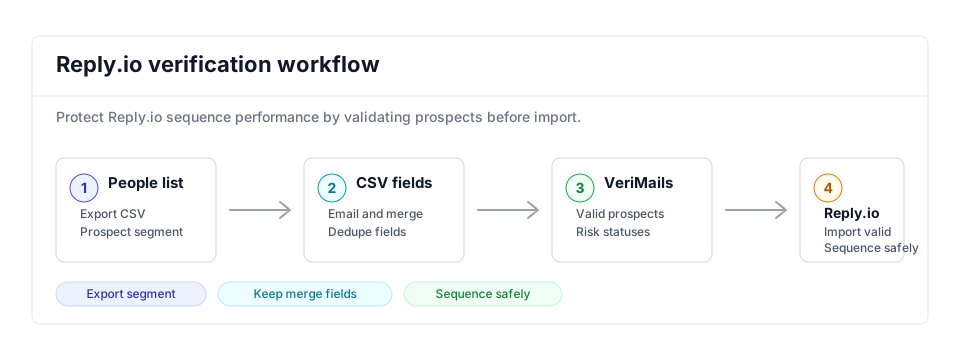
- Export scope: Export the People list or prospect segment connected to the sequence you plan to run.
- Matching field: Keep email, name, company, and custom fields needed for personalization and dedupe.
- Result action: Import valid prospects and keep invalid, catch-all, disposable, and role-based rows out of automated outreach.
Step-by-Step
Export your prospects from Reply.io as a CSV
In Reply.io, open the People section or the specific prospect list you want to clean. Use the export option to save the contacts as a CSV file. Reply.io lets you export prospects from a list or sync them to a CRM, so choose the plain CSV export. Make sure the file includes the email address column, since that is the only field VeriMails needs.
Upload the CSV to VeriMails
Log in to VeriMails, open the bulk verification tool, and upload your exported file. VeriMails automatically maps the email column, so you do not need to reformat the spreadsheet. The job runs as a queued bulk verification and shows downloadable filtered results when it completes.
Review your verification results
When the run completes, VeriMails shows each address grouped by status: valid, invalid, catch-all, disposable, and role-based. Review the breakdown to understand the quality of your source data, then download the filtered results. Keep the valid addresses and decide how to handle catch-all results based on how valuable those prospects are.
Re-import the cleaned list into Reply.io
Take the downloaded file of valid addresses and import it back into Reply.io as a new list or directly into a sequence. Reply.io's CSV importer lets you map fields during upload, so confirm the email column and any personalization variables line up. Your sequence now runs against a verified list.
Make verification a routine step
Prospect data keeps decaying, so verify every new list before it enters a sequence and re-verify long-standing lists every few months. Building this into your process keeps your Reply.io bounce rate consistently low and your sending domains healthy.
What to Do With Each Result
Reply.io sequences should start from a clean, intentional file. Use each VeriMails status as a routing rule.
- Valid Import into the verified list and enroll when the prospect still matches the campaign criteria.
- Invalid Exclude and mark the upstream CRM or list owner for cleanup.
- Catch-all Keep in a cautious segment for high-value accounts and reduced send volume.
- Disposable Remove from outbound workflows because the inbox is temporary.
- Role-based Review manually; shared inboxes need different copy and ownership rules.
Frequently Asked Questions
Related Guides
Try VeriMails Free
100 free credits on signup. No credit card required. Put this guide into practice today.
Start Free