VeriMails vs Scrubby
Scrubby helps teams take a closer look at risky and catch-all email records after those records have already been found. VeriMails helps teams clean the full list first: upload a CSV, verify addresses, separate the results, and export a safer file for outreach, marketing, recruiting, or CRM cleanup.
At a Glance
| Question | VeriMails | Scrubby |
|---|---|---|
| Primary job | Clean and segment existing email lists | Review risky and catch-all records |
| Best starting point | CSV cleanup, CRM hygiene, API checks, outreach preparation | You already have a risky or catch-all subset from another tool |
| Pricing model | One-time credit packs and monthly plans | Monthly credit plans, one-time credit purchases, and volume tiers |
| Free usage | 100 free credits on signup | 100 free credits promoted on the Scrubby site |
| API access | Included for real-time verification workflows | Listed on monthly pricing cards |
| Integrations | API, bulk upload, and common sales or marketing tools | Promotes integrations with common verifiers, outreach tools, and data tools |
| Catch-all handling | Catch-all records are separated inside the verification results | Extra review for risky and catch-all records |
What the Products Show
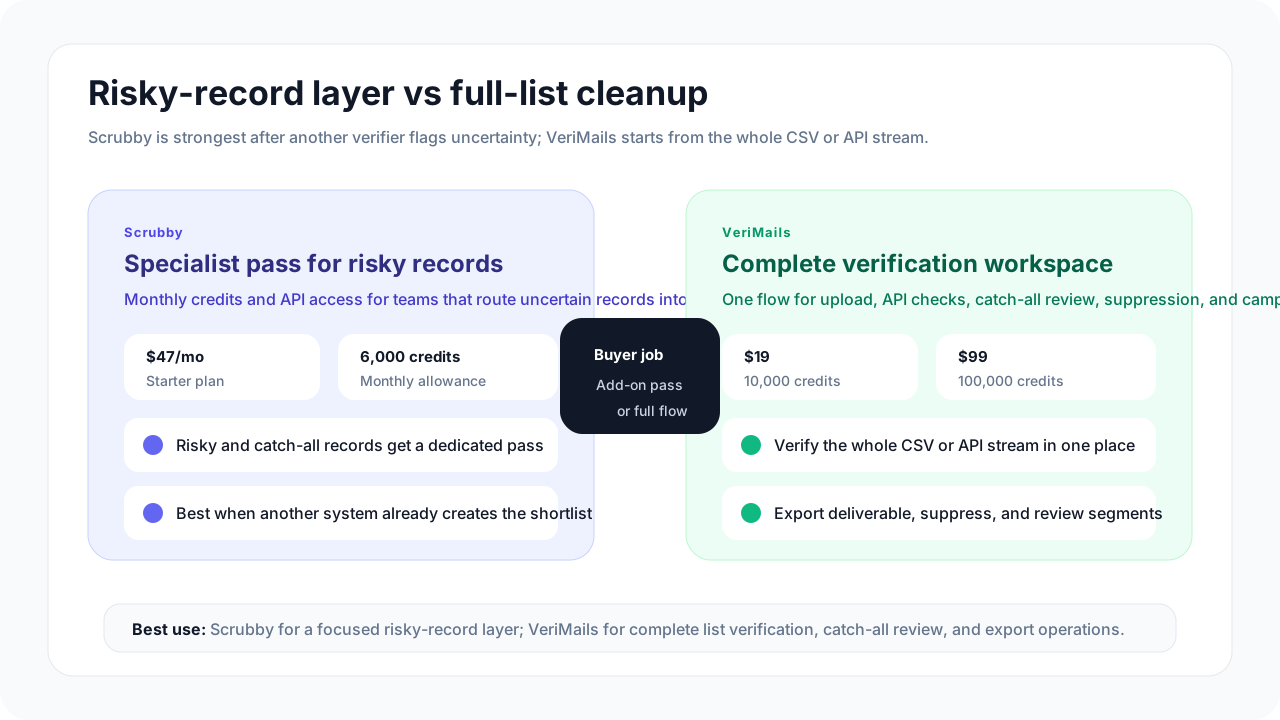
Scrubby presents itself as an add-on for risky and catch-all email validation. Its public pages emphasize working alongside tools such as existing verifiers, data providers, and outreach platforms. That matters because Scrubby is not trying to be the first stop for every raw list; it is aimed at the records a team is still unsure about after an earlier check.
VeriMails is simpler when your starting point is a spreadsheet, CRM export, signup list, lead list, or enrichment file that needs to be cleaned before use. The goal is to turn one messy file into clear result groups: usable addresses, addresses to suppress, catch-all records to review, and uncertain records that need a cautious decision.

Pricing and Credit Model
Scrubby pricing is built around validation credits. At the May 2026 update, Scrubby's monthly pricing cards listed Starter at $47 per month with 6,000 validation credits, Growth at $97 per month with 15,000 credits, and Pro at $497 per month with 100,000 credits. Scrubby's page also showed a credit calculator at $0.008 per credit, credits that never expire, and enterprise volume pricing for larger purchases.
VeriMails is usually easier to understand when the job is list cleaning. Buy the number of checks you need, upload a file or use the API, and keep unused credits for later verification work. That makes the cost easier to compare when the list is already in your hands and the next step is simply to clean it.
| Need | VeriMails path | Scrubby path | What to check before paying |
|---|---|---|---|
| Try a small sample | 100 free signup credits | 100 free credits promoted for new accounts | Test with records that look like your real list. |
| Around 10,000 checks | $19 for 10,000 credits | Growth plan includes 15,000 credits at $97/month | Scrubby is aimed at risky-record review, not necessarily every address in the file. |
| Around 100,000 checks | $99 for 100,000 credits | Pro plan includes 100,000 credits at $497/month | Compare full-list cleaning cost against second-pass review cost. |
| Large monthly volume | Use larger credit packs or contact sales for custom needs | Scrubby lists enterprise tiers from $0.008 down to $0.004 per credit depending on volume | Confirm whether volume is for all emails or only risky emails. |
Pricing changes over time. Use these figures as a public-page snapshot and confirm current checkout terms before purchasing.
VeriMails Credit Pricing
| Credits | VeriMails Price | Price per Email |
|---|---|---|
| 10,000 | $19 | $0.0019 |
| 25,000 | $39 | $0.00156 |
| 50,000 | $59 | $0.00118 |
| 100,000 | $99 | $0.00099 |
| 250,000 | $199 | $0.000796 |
| 500,000 | $349 | $0.000698 |
| 1,000,000 | $499 | $0.000499 |
| 2,500,000 | $999 | $0.0004 |
| 5,000,000 | $1,499 | $0.0003 |
VeriMails credits never expire. Email Finder costs 20 credits only when VeriMails returns a verified person-level email. At the 10,000-credit pack, that is $0.038 per found email. Monthly plans start at $12.50/mo when billed yearly.
Where Each Tool Fits
Scrubby makes the most sense after another tool has already marked emails as risky or catch-all. At that point, you can decide whether those uncertain records are valuable enough to review again before you send.
VeriMails starts earlier. You can upload an existing list, verify the addresses, review deliverable, invalid, disposable, role-based, uncertain, and catch-all groups, then export the cleaned result. That is a better fit for CRM hygiene, cold outreach preparation, signup validation, and recurring list cleanup.
| If you need... | VeriMails path | Scrubby path | Practical next step |
|---|---|---|---|
| Whole-list cleanup | Bulk verification from upload through export | Better after another verifier has already found risky records | Use VeriMails when every row needs a verification result. |
| Risky-record recovery | Segments risky and catch-all records for review | Focused on risky and catch-all records | Use Scrubby when only the uncertain subset needs a second look. |
| App or form checks | API checks and bulk workflows in one credit model | API access listed with its monthly buying path | Decide whether the same tool should handle both real-time and file-based checks. |
| Send policy | Catch-all detection inside the verification results | Extra review for catch-all records | Define suppress, review, or cautious-send rules before campaign launch. |
Catch-All and Risky Emails
Catch-all addresses are difficult because the domain may accept mail for many addresses, even when the exact mailbox is uncertain. Risky emails are broader: they may include catch-all records, temporary addresses, role-based inboxes, or addresses with signals that make them less reliable for a campaign.
The safest choice is not to treat every uncertain address as a normal lead. Put those records into their own group, review the value of the audience, and decide whether they should be suppressed, checked again, or used only in a cautious low-volume campaign.
| Email group | Recommended action | Why it matters |
|---|---|---|
| Valid | Use for normal outreach or CRM import | These are the records most likely to support a clean send. |
| Invalid | Suppress or remove | Sending to known bad addresses wastes credits and can increase bounce risk. |
| Catch-all | Review separately before sending | The address may not be confidently confirmed even when the domain accepts mail broadly. |
| Risky or uncertain | Segment, test carefully, or run an additional review step | This is where Scrubby can make sense if your team already has a risky-only segment. |
| Disposable or role-based | Use stricter rules for marketing and sales campaigns | These records may be less useful for personal outreach or long-term account quality. |
Localized and International Lists
International email lists need more than a single pass/fail label. Regional campaigns often combine different languages, consent rules, suppression lists, and business norms. A clean list for one country can still be risky if it is mixed with another market's outdated records or sent from the wrong campaign stream.
For most teams, the better process is to verify and export each market separately. Keep country, language, source, consent date, and suppression status attached to the record in your CRM or email platform. Then use verification results to decide what enters the campaign, what gets reviewed, and what stays out.
| List situation | What to do | Tool fit |
|---|---|---|
| One country, one campaign | Verify the full file, export clean groups, and keep catch-all records separate | VeriMails is usually enough. |
| Multiple countries | Split by country or region before verification and export | VeriMails helps keep result groups clean by segment. |
| Large risky-only segment | Review whether the uncertain records are worth extra cost | Scrubby may help when the risky group has real commercial value. |
| Strict compliance process | Keep consent, suppression, and verification status in the system of record | Use verification results as one decision signal, not as a replacement for consent checks. |
Which Should You Choose?
Choose VeriMails if...
- You want one tool for bulk list verification, exports, and individual email checks.
- You need clear valid, invalid, catch-all, and uncertain groups before cold outreach or CRM import.
- You prefer one-time verification credits over another monthly tool focused on risky records.
- You are cleaning lists for sales, marketing, recruiting, or agency workflows.
Choose Scrubby if...
- You already have a primary verifier and want a second pass for risky records.
- Your buying decision is centered on catch-all or risky-email recovery.
- Your team is comfortable sending only the uncertain subset through a separate tool.
- You value Scrubby's listed integrations with existing data and outreach tools.
Sources Used for This Comparison
Sources checked for the May 21, 2026 update include Scrubby's public product and pricing information, plus VeriMails' current pricing and feature pages.
Verification Accuracy
Both VeriMails and Scrubby can help reduce bad addresses before a campaign. The difference is how clearly the result fits your next send: VeriMails keeps valid, invalid, disposable, role-based, catch-all, and unknown rows separate for decision-making.
Use a recent sample from your own CRM, not a perfect test list. The addresses that matter are the ones you plan to mail this week: old leads, imported contacts, role inboxes, catch-all domains, and records from mixed sources.
API and Developer Experience
VeriMails gives developers single and bulk REST endpoints with clear JSON results. Scrubby may have its own API shape, limits, or product assumptions, so compare response fields before wiring either tool into production.
The safe build is boring: validate one address in real time, queue large files as bulk jobs, and keep catch-all or unknown rows out of automated sends until a human policy decides what to do with them.
Who VeriMails Is Best For
Choose VeriMails when verification is the job and you want the result before the send.
- You already have a list and need to clean it before a campaign.
- You want prepaid verification credits that never expire.
- You need API and CSV verification without paying for a larger sales platform.
Who Scrubby Is Best For
Choose Scrubby when its broader product strengths match the job you are buying for.
- Choose Scrubby when its existing dashboard, integrations, or deliverability features already fit your workflow.
- Choose it when you value that specific result model or account setup more than lower self-serve verification pricing.
- Choose it when your team has already standardized on its exports, API fields, or support process.
Frequently Asked Questions
Why teams switch to VeriMails
“We cleaned our Klaviyo list of 180K subscribers before Black Friday. Found 22K invalid addresses we'd been paying to email every week. ROI was immediate.”
— Emma H. — Email Marketing Manager at DTC Fashion Brand, United States
“100 free credits let me test before paying anything. Now I buy the $19 pack whenever I have a new list ready. Dead simple, no commitment.”
— Lucas V. — Founder at Early-Stage Startup, Portugal
Related Comparisons
Clean Your Next List
Start with 100 free credits. Verify a sample list and review catch-all records before you send.
Start Free