Email Verification API for Developers
Add verification to signup forms, CRMs, enrichment flows, and bulk imports with a REST API, clear result labels, and background jobs for larger files.
The short version: verify first, then send.
Use VeriMails when your app needs a clear answer before accepting, routing, or sending to an email address. The API fits real-time form checks, CRM intake, enrichment exports, and background verification jobs.
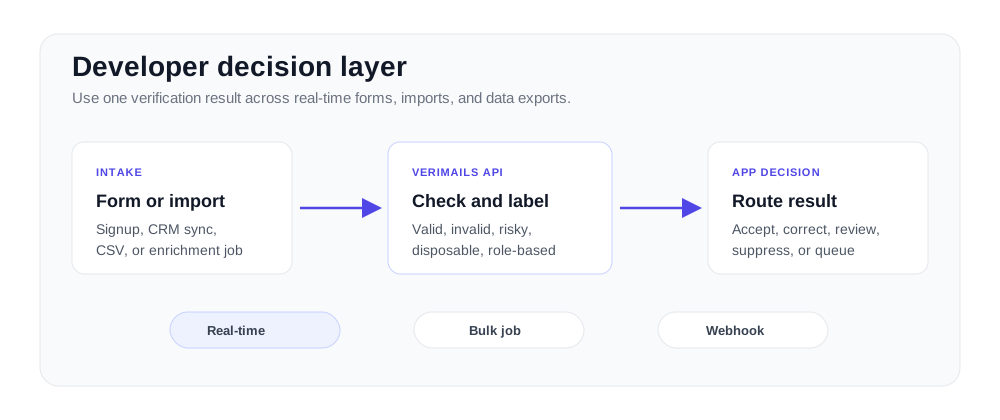
Developer use cases for email verification
Put verification where email quality affects product, sales, or customer workflows.
| Integration point | Verification pattern | Common action |
|---|---|---|
| Signup and trials | Real-time API check before account creation | Accept, ask for correction, or route to review. |
| Lead forms | Verify before writing to CRM or marketing automation | Prevent unreachable leads from entering routing queues. |
| Bulk imports | CSV or background job for large files | Append result labels before import or activation. |
| Data products | API check before export or enrichment delivery | Expose a verification status field to customers. |
Developers usually add verification when email quality affects a product path: trial signup, account creation, lead routing, CRM sync, support intake, or a data export. A format check alone cannot tell you whether an address should move forward. You need a structured result that your application can use without adding a fragile decision tree.
The verification API is designed to stay predictable: send an email address, receive JSON, and handle clear status labels in your own application. Use the result to accept an address, ask for a correction, suppress a risky record, or put a contact into a review state. The API documentation and quickstart cover request structure, authentication, error handling, and response fields.
For large jobs, use bulk verification instead of blocking a user request. Upload a CSV, process it as a background job, and use the downloaded result file or webhook flow to update your database. If you are comparing implementation patterns, start with API vs bulk email verification.
Everything a developer expects
Clear inputs, predictable outputs, and integration paths for real-time and bulk workflows.
Simple REST API
One endpoint, one key, consistent JSON responses. Works with any language or framework that can make HTTP requests.
Complete Documentation
Full API reference with request/response examples, error codes, and integration guides for common frameworks and languages.
Language-neutral integration
Use direct HTTPS requests from Node, Python, PHP, Ruby, Go, Java, or any backend that can parse JSON.
Webhook-ready jobs
Use background workflows for larger files and notify your application when results are ready.
Operational controls
Use documented limits, result handling, and account controls to keep verification predictable in production.
Real-time and batch
Use real-time checks for forms and background jobs for imports, CRM refreshes, and data exports.
One request, one result
A consistent JSON response your application can route on.
"email": "dev@example.com",
"status": "valid",
"score": 94,
"disposable": false,
"catch_all": false,
"role_based": false
}
Implementation checklist
From first request to production result handling.
Register and get your key
Create a free account. Your API key is available instantly in the dashboard -- no review process, no waiting.
Map result states
Decide what your product does with valid, invalid, risky, disposable, role-based, and catch-all statuses.
Ship real-time or bulk
Use the API for inline checks and background jobs for imports, enrichment files, and CRM cleanup.
Build the decision layer once
A good integration does more than call an endpoint. It stores the result, logs the decision, lets users correct addresses when needed, and keeps bulk verification separate from latency-sensitive user flows.
Where verification belongs in your stack
Put the check where a bad address creates work later. Signup forms should catch typos before the account is created. Lead forms should reject disposable domains before the CRM fills with junk. Imports should run in the background so a large CSV does not block the product. Webhooks and job polling make the bulk path predictable when the file is too large for a synchronous request.
A clean result model matters more than a fancy dashboard. Your app needs a status it can act on, plus labels for disposable, role-based, and catch-all detection. Route valid emails forward, ask the user to fix invalid emails, and hold risky rows for review. Start with the API docs, test the verification API, then check pricing before you wire it into production volume.
Frequently asked questions
Common questions from developers integrating VeriMails.