How to Verify Email Addresses in Python
Verifying an email address in Python is straightforward for the easy parts and surprisingly hard for the part that matters most. This guide walks through syntax checks and DNS lookups you can run locally, explains exactly why raw SMTP probes fail in practice, and shows how to get a mailbox-level result with a REST API.
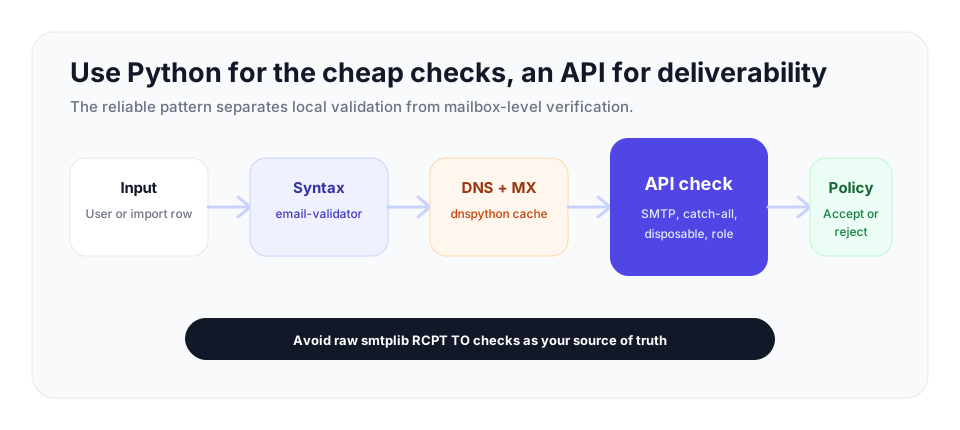
Use Python to reject malformed input and optionally cache DNS/MX checks. Use a verification API for the mailbox-level result, because raw smtplib probes are easy to throttle and often return ambiguous answers.
What "Verifying" an Email Actually Means
Email verification is the process of confirming an address is real and able to receive mail before you send anything to it. It breaks down into a sequence of checks, each one harder than the last: is the address correctly formatted, does its domain accept mail at all, and does the specific mailbox exist. In Python the first two are easy to do well. The third is where most home-grown solutions quietly fail, and understanding why is the most useful thing in this article.
The plan below is layered. Run the cheap, fast checks locally to throw out obviously broken input, then call a verification API for the mailbox-level answer on whether the address can be used. This gives you instant rejection of garbage without an API call, and a clearer result for everything that survives.
Step 1: Syntax Validation
The first check confirms the address is correctly formed. It is tempting to write a regular expression for this, but email syntax is far more intricate than it looks, and hand-rolled regexes are nearly always either too strict or too loose. The reference library for the job is email-validator, which implements the relevant standards properly and is widely used in production.
Install it with pip:
pip install email-validatorThen validate an address. The library raises EmailNotValidError for anything malformed and returns a normalized object for valid input:
from email_validator import validate_email, EmailNotValidError

def check_syntax(address):
    try:
        result = validate_email(address, check_deliverability=False)
        return True, result.normalized
    except EmailNotValidError as error:
        return False, str(error)

ok, value = check_syntax("jane.doe@example.com")
print(ok, value)  # True jane.doe@example.com

ok, value = check_syntax("jane.doe@@example")
print(ok, value)  # False, with a description of the problem
Setting check_deliverability=False keeps this step pure syntax with no network calls, so it is fast enough to run on every keystroke or form submission. Always store the normalized value the library returns rather than the raw user input, since it canonicalizes the address for consistent storage.
Step 2: Domain and MX Checks
A correctly formatted address is still useless if its domain cannot receive email. The next check queries the domain's DNS records and looks for MX records, which name the mail servers responsible for that domain. A domain with no MX records cannot accept mail, so any address on it can be rejected immediately.
The email-validator library can do this for you when you pass check_deliverability=True, which performs the MX lookup as part of validation:
from email_validator import validate_email, EmailNotValidError

def check_domain(address):
    try:
        result = validate_email(address, check_deliverability=True)
        return True, result.domain
    except EmailNotValidError as error:
        return False, str(error)
If you want to run the DNS query yourself, perhaps to cache results across many addresses on the same domain, use the dnspython library directly:
pip install dnspythonimport dns.exception
import dns.resolver
def has_mx_record(domain):
try:
records = dns.resolver.resolve(domain, "MX")
return len(records) > 0
except (dns.resolver.NoAnswer, dns.resolver.NXDOMAIN):
return False
except dns.exception.DNSException:
return False # Treat resolver errors as inconclusive.
print(has_mx_record("gmail.com")) # True
print(has_mx_record("no-such-domain-xyz.invalid")) # FalseThis is genuinely useful. It removes addresses on domains that have expired, never existed, or simply do not handle mail. But notice what it still has not told you: whether someone@gmail.com is a real mailbox. Gmail has MX records, so every Gmail address passes this check, valid or not.
Step 3: The Mailbox Check, and Why Raw SMTP Falls Short
Confirming the mailbox itself requires talking to the receiving mail server. In principle you connect over SMTP, identify yourself, issue a RCPT TO command with the target address, and read the response code: a positive code suggests the mailbox exists, a rejection suggests it does not. Python's built-in smtplib can do this, and the code looks deceptively simple:
import smtplib
import dns.resolver

def naive_smtp_check(address):
    domain = address.split("@")[1]
    mx_host = str(dns.resolver.resolve(domain, "MX")[0].exchange)

    server = smtplib.SMTP(timeout=10)
    server.connect(mx_host)
    server.helo("example.com")
    server.mail("probe@example.com")
    code, message = server.rcpt(address)
    server.quit()

    # 250 and 251 generally mean the mailbox was accepted.
    return code in (250, 251)
This works in a tutorial and fails in production. The reasons are worth knowing in detail, because they explain why no serious verifier relies on a script like this.
IP reputation and throttling
Mailbox providers actively detect verification probes. Run a handful of RCPT TO checks from one server and providers such as Gmail and Outlook will throttle or block that IP within a few attempts. Once throttled, the server returns ambiguous responses no matter whether the mailbox exists, so your results become meaningless. Real verification is done from large pools of properly warmed, well-managed IP addresses for exactly this reason.
Greylisting
Many servers use greylisting, deliberately returning a temporary 4xx failure the first time an unknown sender makes contact. Legitimate mail servers retry later; spammers usually do not. A naive script that does not retry reads that temporary failure as a rejection and marks a perfectly good mailbox as invalid. That is a false negative caused purely by impatience.
Catch-all domains
A catch-all domain accepts mail to every possible address, so RCPT TO returns a positive code for realperson@domain.com and random-string-9f3a@domain.com alike. A raw SMTP check cannot tell a real mailbox from a nonexistent one on these domains. Detecting a catch-all requires sending a second probe to an address that certainly does not exist and seeing whether it is accepted too, which is catch-all detection, not a simple yes or no.
Ambiguous responses from major providers
Some large providers have deliberately made their RCPT TO behavior ambiguous. Certain ones accept every address at the handshake stage and only bounce later, so the SMTP response simply does not carry the information you are asking for.
This is why the maintainers of email-validator deliberately leave SMTP checks out of the library. Their documentation states plainly that there is nothing to be gained from contacting an SMTP server yourself, because servers are good at not revealing whether an address is deliverable, and an address that appears to accept mail can still bounce afterward. The honest takeaway: syntax and MX checks are things you can do well in your own code, but a reliable mailbox check is not.
Step 4: Verifying with the VeriMails API
The practical solution is to let a verification service handle the mailbox check from infrastructure built for it, and to call that service from Python with a single HTTP request. VeriMails exposes a REST API that runs the full pipeline, syntax, MX, DNS, a live SMTP handshake, catch-all detection, disposable detection, and role-based detection, and returns one structured result.
Using the standard requests library, a verification call looks like this. For endpoint details, see the VeriMails API documentation:
import requests

def verify_email(address, api_key):
    response = requests.get(
        "https://api.verimails.com/v1/verify",
        params={"email": address},
        headers={"Authorization": f"Bearer {api_key}"},
        timeout=10,
    )
    response.raise_for_status()
    return response.json()

result = verify_email("jane.doe@example.com", api_key="YOUR_API_KEY")
print(result["status"])      # e.g. "deliverable", "undeliverable", "catch_all"
print(result["disposable"])  # True if a throwaway address
print(result["role_based"])  # True for addresses such as info@ or support@
You can then act on the result. A signup form might accept deliverable addresses, reject undeliverable and disposable ones, and decide its own policy for catch_all:
def is_acceptable_for_signup(address, api_key):
    result = verify_email(address, api_key)

    if result["disposable"]:
        return False, "Disposable addresses are not allowed."
    if result["status"] == "undeliverable":
        return False, "That address does not appear to exist."

    return True, "Address verified."
Because each call returns a clear result, it is fast enough to run inside a form submission without leaving the user waiting. For an existing list of addresses already in your database, bulk CSV verification is the better fit, since uploading one file is far more efficient than looping the single-address endpoint thousands of times.
The recommended pattern for a Python application is to combine both layers: keep the local email-validator syntax check to instantly reject garbage input before spending a credit, then call the API for the authoritative deliverability result on everything that passes. You get fast feedback for obvious mistakes and a trustworthy verdict for real addresses.
Application policy table
| Result | Signup policy | Import or CRM policy |
|---|---|---|
deliverable | Accept and store the normalized address | Keep in the active segment |
undeliverable | Reject with a clear correction message | Suppress before any campaign |
catch_all | Accept or review based on account risk | Segment separately and send conservatively |
disposable | Reject for most products | Suppress from outreach lists |
role_based | Allow only when shared inboxes are acceptable | Review before cold outreach |
API calls versus list jobs
Use the API where an immediate decision matters: signup, checkout, lead forms, invitations, and account changes. Use bulk verification for a CSV export, CRM cleanup, or campaign audience where thousands of addresses need the same review. Both workflows should feed the same suppression rules so an address rejected in one path is not mailed from another tool later.
Putting It Together
A clean implementation has three layers. First, an email-validator syntax check with check_deliverability=False, run locally and instantly to reject malformed input. Second, an optional MX check with dnspython if you want to filter dead domains before calling the API, though the API also covers this. Third, a call to the VeriMails API for the mailbox-level result, including catch-all, disposable, and role-based detection that you cannot reproduce reliably on your own.
The thing to remember is the division of labor. Syntax and DNS are genuinely yours to handle in Python. The live mailbox check depends on IP reputation, greylisting behavior, and catch-all detection that a single script cannot manage, which is why the standard validation library deliberately leaves SMTP probing out. Use local checks for speed, an API for mailbox-level verification, and the pricing page to choose the plan that fits your expected volume.
Frequently Asked Questions
Related Articles
Start with Clean Data
100 free credits on signup. No credit card required. Put the advice into practice today.
Start Free