What Is Email Verification?
Email verification is the process of confirming that an email address is real and able to receive mail before you send anything to it. It checks an address without delivering a message, so you can remove the addresses that would bounce or quietly damage your sender reputation. This guide explains what verification does, how it works, and when to run it.
Email verification checks syntax, DNS/MX records, mailbox reachability, disposable domains, role-based addresses, and catch-all behavior before you send. Use real-time API verification at signup and bulk CSV verification before campaigns so invalid addresses never reach your sending platform.
The Short Definition
Email verification is the practice of determining whether a given email address is valid and deliverable without sending an actual message to it. It answers a simple, practical question before a campaign or transactional email goes out: if we send to this address, will it reach a real, working mailbox, or will it fail.
That question matters because email addresses are entered by people, and people make mistakes. They mistype an address on a signup form. They use a fake or throwaway address to get past a content gate. They change jobs and abandon a work mailbox. They let a personal account lapse. Every one of those situations leaves a dead address in your data, and you have no way to know until you either verify the list or send to it and watch the bounce reports come back.
You will also see the term email validation used in the same context. The two words are often treated as synonyms. Where a distinction is drawn, validation usually refers to the lighter checks that confirm an address is correctly formatted and sits on a domain capable of receiving mail, while verification adds the deeper step of testing whether the specific mailbox actually exists. Most providers, VeriMails included, use verification to describe the full process from format check through to live mailbox test.
How Email Verification Works
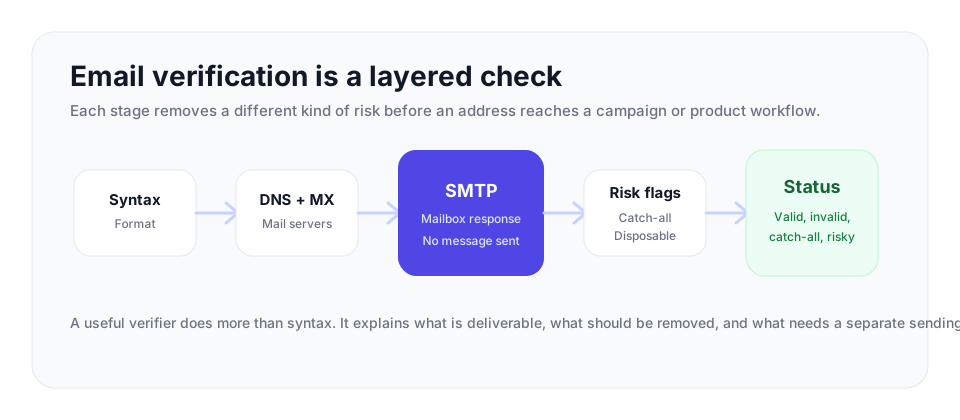
A good verifier checks each address in layers, from the fastest checks to the deeper mailbox signals. An obviously broken address should fail early instead of consuming a full mailbox test. VeriMails checks each address for the signals that decide whether it belongs in your send list, suppression list, or review segment.
| Check | What it answers | What to do with the result |
|---|---|---|
| Syntax | Is the address structurally valid? | Reject malformed addresses immediately. |
| DNS and MX | Can the domain receive email? | Remove domains without working mail records. |
| SMTP handshake | Will the receiving server accept this mailbox? | Keep valid addresses and remove hard invalids before sending. |
| Catch-all detection | Does the domain accept mail to any address? | Segment separately because the individual mailbox was not confirmed. |
| Disposable and role-based labels | Is the address temporary or a group inbox? | Suppress disposable addresses and handle role accounts with your own policy. |
Syntax check
The first check confirms the address is correctly formatted under email standards. It must have a local part and a domain separated by a single at sign, use only permitted characters, and contain no obvious structural errors. Malformed addresses such as jane@@example or john.smith.com are caught here at almost no cost.
MX and DNS checks
Next, the verifier queries the domain's DNS records and performs an MX lookup to confirm the domain publishes valid mail servers. A domain with no MX records cannot receive email at all, so any address on it is rejected without proceeding further. This stage also catches domains that no longer resolve, which is common when a company folds or rebrands.
Live SMTP handshake
For addresses that survive the earlier stages, the verifier performs the live SMTP handshake, which is the heart of verification. It opens an SMTP connection to the recipient's mail server and works through the opening steps of sending a message, identifying itself and presenting the recipient address, then reads the server's response. If the server indicates the mailbox exists, the address is treated as deliverable. If it reports no such user, the address is invalid. The process stops there and never sends an actual message, so the mailbox owner sees nothing.
Catch-all, disposable, and role-based detection
Alongside the handshake, VeriMails performs catch-all detection, which identifies domains configured to accept mail to every possible address and so cannot confirm an individual mailbox. It performs disposable detection for throwaway addresses from temporary-mail services, and role-based detection for generic addresses such as info@, support@, or sales@ that route to a group rather than a person. The combined result is a clear status for each address rather than a vague numeric score.
How to Act on Verification Results
The value of verification comes from the policy you apply after the check. A clean workflow turns every status into a clear action before the address reaches a campaign, a CRM sync, or a signup database.
| Result | Best use | Recommended policy |
|---|---|---|
| Deliverable | Marketing sends, transactional flows, and sales outreach. | Allow the address and keep normal monitoring in place. |
| Invalid | Suppression and cleanup reporting. | Do not send. Add the address to a suppression list so it cannot return through a later import. |
| Disposable | Fraud prevention, lead quality, and trial abuse controls. | Reject at signup or hold for review depending on the form's purpose. |
| Role-based | Shared inbox review for B2B or support workflows. | Allow only when a shared inbox fits your use case; avoid broad cold outreach to these addresses. |
| Catch-all | Separate testing and cautious outreach. | Segment separately because the domain accepts broadly and the individual mailbox was not confirmed. |
For existing databases, apply this policy with bulk verification. For signup, checkout, trial, or lead forms, apply it in real time with the API so bad addresses never become records you need to clean later.
Why Email Verification Matters
Verification is one of the most direct ways to protect email deliverability, because deliverability is governed largely by how mailbox providers judge your sending behavior. Sending to invalid addresses produces hard bounces, and a high hard bounce rate is read by Gmail, Outlook, and Yahoo as a clear signal that you mail unverified, low-quality data. The penalty is reduced inbox placement, with more of your mail diverted to spam, and it affects your entire audience rather than only the bad addresses.
The numbers behind this are not small. B2B email databases decay steadily as people change jobs, domains change, and old mailboxes are retired. A list that was 98% valid in January can fall to around 86% valid by July if nothing is done. Treat the bounce rate as an operating signal: under 3% is generally healthy, 3% to 5% needs cleanup, and above 5% is high risk for your sender reputation. Verification is the most reliable way to stay in the healthy range.
Verification also guards against subtler harm. Removing addresses on dead and abandoned domains lowers the odds of hitting a recycled spam trap, which can lead to blocklisting. Filtering disposable addresses keeps your list reachable and your analytics honest. Flagging role-based addresses lets you treat them with the caution their elevated complaint rates deserve. Every one of these is a deliverability signal that providers weigh, and verification puts you in control of all of them before a send rather than after the damage is done.
There is a clear business case beyond deliverability. Every send to an invalid address wastes part of your sending allowance and, on a paid marketing platform, part of your budget. Verified lists produce more accurate metrics because open and click rates are not diluted by addresses that could never have engaged. And a verified signup flow stops fraudulent and bot registrations before they pollute your data and inflate your costs.
When Should You Verify Email Addresses?
Two moments matter most. The first is the point of capture. Verifying each address in real time as it is entered on a signup, registration, or checkout form means invalid, mistyped, and disposable addresses never enter your list in the first place. This is the cleanest possible approach because it prevents the problem rather than fixing it later. It is done with a verification API call inside the form submission flow.
The second is before a campaign. Verifying an existing list in bulk before a large send catches the addresses that have decayed since they were collected. This matters most for older data, purchased lists, and any list that has not been touched in months. Bulk verification is done by uploading the list as a CSV file and verifying every address against live mail server data.
Many senders do both: an API at the point of signup to keep new data clean, and a periodic bulk check to remove addresses that have gone stale. Because addresses decay continuously, a sensible schedule is to re-verify an active list every 60 to 90 days, and always before a major campaign.
What Verification Cannot Do
No verifier can be perfect, and honest providers say so. Some mail servers are deliberately designed not to reveal whether a mailbox exists. Catch-all domains accept every address during the SMTP handshake, which makes mailbox-level confirmation impossible by SMTP alone. Some servers apply greylisting, returning a temporary failure to unknown senders, which a careless verifier can misread as a rejection. A few large providers have moved toward intentionally ambiguous responses to verification probes.
The right response to these cases is not to guess. A quality verifier reports a catch-all domain honestly as catch-all and an ambiguous result as unknown, rather than inventing a confident answer it cannot support. That is why VeriMails performs catch-all detection and reports those addresses as catch-all instead of forcing them into a valid or invalid bucket. Verification is a powerful filter, but it works best when its limits are stated plainly.
How VeriMails Handles Verification
VeriMails is a dedicated email verification service that runs the complete set of checks on every address: syntax validation, MX and DNS checks, a live SMTP handshake to test the actual mailbox, catch-all detection, disposable detection, and role-based detection. Each address comes back with a clear, deliverability-focused result, so you can decide exactly which addresses to keep, remove, or treat with care.
There are two ways to verify. The REST API checks addresses in real time, which is the right fit for verifying each address as it is entered on a form. Bulk verification lets you upload an entire list as a CSV and clean it before a campaign. VeriMails is built for fast verification at list and API scale, and it handles real-world server behavior such as greylisting so its results reflect genuine deliverability signals.
Pricing is built to make verification easy to start. Verification begins at $0.0019 per email, with 10,000 credits for $19 and volume pricing up to 5 million credits for $1,499. Annual plans start at $12.50/month when billed yearly for senders who verify regularly. Every new account includes 100 free credits on signup, with no credit card required, and those credits never expire, so you can verify a small list or test the API at no cost before committing.
Frequently Asked Questions
Related Articles
Start with Clean Data
100 free credits on signup. No credit card required. Put the advice into practice today.
Start Free