API vs Bulk Email Verification: Which to Use
API and bulk verification are not competing products. They are two delivery methods for the same checks, built for two different moments. The API verifies one address in real time as a user submits it; bulk verification cleans an entire list at once from a CSV. This guide explains which to reach for and why most teams end up using both.
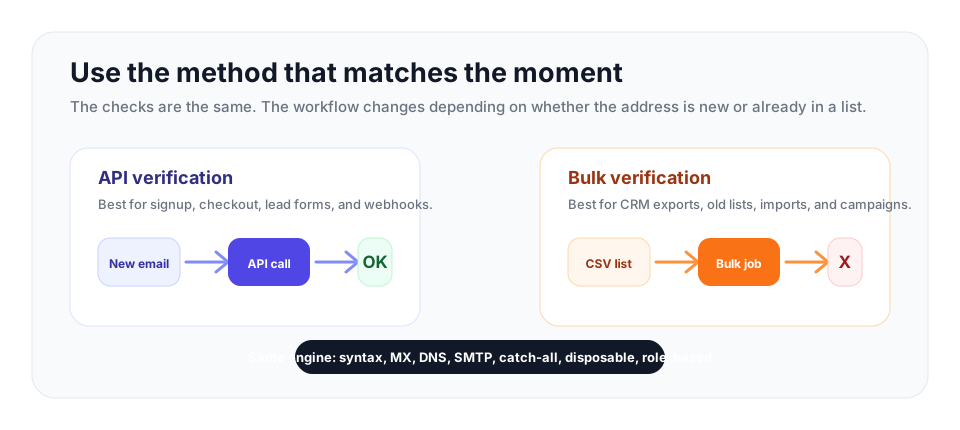
Use the API when an address is entering your system right now. Use bulk verification when the addresses already live in a file, CRM, or marketing platform. Use both when you collect new leads and also run campaigns from existing lists.
Same Checks, Different Delivery
Before comparing use cases, it is worth being clear about what is actually different. On VeriMails, the API and bulk verification run the identical pipeline against live mail servers: a syntax check, an MX lookup and DNS validation, a live SMTP handshake to test the mailbox, catch-all detection, disposable detection, and role-based detection. The verdict for any given address is the same whichever method delivers it.
What differs is the interface. The API accepts one address per request over HTTP and returns a result your application can act on immediately. Bulk verification accepts a file, processes every row, and produces a results file you download. Accuracy is the same, the underlying checks are the same, and both draw from the same credit balance, so the cost per address is identical. The right choice is therefore not about quality. It is about when and how the verification needs to happen.
When to Use the API
The email verification API is the right tool whenever an address arrives one at a time and you need an answer before the user moves on. Its defining quality is that it lets you act in the moment.
Signup and registration forms
This is the most common use of a verification API. When a new user creates an account or subscribes to a newsletter, the API checks the address during form submission. If the address is invalid, the form can show an error and ask the user to correct it. If it is disposable, the form can block it. The bad address never enters your database, which means you never have to clean it out later. This is prevention rather than cure, and it is the cleanest possible approach to list quality.
Checkout and lead capture
An e-commerce checkout collects an address that order confirmations and shipping updates depend on. A typo there means a customer who never hears from you and a support ticket later. A real-time check at checkout catches the typo while the customer is still on the page. The same logic applies to lead capture forms, demo requests, and gated content forms, where a wrong address means a lead you can never reach.
Inside automated workflows
The API also fits anywhere an address enters your systems programmatically: a CRM enrichment step, a webhook from a partner, an import pipeline. Calling the API as part of that flow means addresses are verified the instant they appear, with no separate cleanup job. Because each call returns a clear result, it can sit inside a request without making the user wait.
The trade-off is that the API needs development work. A developer adds an HTTP call to the form or workflow, handles the response, and decides what the application does with each result. For someone familiar with REST APIs this is usually a few hours of work.
When to Use Bulk Verification
Bulk verification is the right tool when you already have a list and need to clean it before you send. Its defining quality is that it handles volume with zero engineering.
Cleaning an existing list before a campaign
The classic case is a list that has been sitting in a marketing platform or spreadsheet for months. Addresses decay continuously, so even a list that was clean when collected has accumulated dead addresses since. Before a major campaign, you export the list as a CSV, upload it, let the service verify every address against live mail servers, and download a results file marking each address as deliverable, invalid, catch-all, and so on. You then suppress the bad ones before the send.
Inherited, purchased, or merged lists
Bulk verification is essential whenever you take on a list whose history you do not know: a list from a previous campaign, a purchased list, or contacts merged from an acquisition or another team. Sending to unverified data like this is the fastest way to a bounce spike. A bulk check tells you the real condition of the list before any of it touches your sending reputation.
Periodic list maintenance
Because addresses decay at roughly 2% per month, even a well-kept list drifts out of date. Running the whole list through bulk verification every 60 to 90 days removes the addresses that have gone stale since the last check. This is housekeeping that keeps bounce rates low without any new engineering.
The advantage of bulk verification is that it requires no development at all. Anyone on the team can export a CSV, upload it, and download the cleaned results. Processing time scales with list size: lists under 10,000 addresses usually finish within minutes, while lists of hundreds of thousands can take a few hours, because every address still requires a live conversation with its mail server.
A Side-by-Side Summary
It helps to line the two methods up directly. The API verifies one address at a time, synchronously, over HTTP. It is best for the point of capture, needs a developer to integrate, and prevents bad data from entering your system at all. Bulk verification processes an entire list at once from a CSV file. It is best for cleaning data you already hold, needs no code, and is run on demand before campaigns or on a maintenance schedule.
One is a gate at the front door; the other is a cleaning crew for the rooms you already have. Neither replaces the other. A signup API keeps new data clean but does nothing for the thousands of addresses already in your database. A bulk check cleans what you hold today but does nothing to stop the next bad address arriving tomorrow.
Decision checklist
| Situation | Best fit | Why |
|---|---|---|
| Signup, checkout, demo, or lead form | API | The user is still present, so you can catch typos, disposable addresses, and invalid mailboxes before saving the record. |
| CSV export from a CRM or marketing platform | Bulk | The addresses already exist, so one upload is faster than building an integration just to clean the current list. |
| Webhook, enrichment job, or partner import | API | Each new address can be verified as it arrives and routed based on the returned status. |
| Quarterly list maintenance or campaign prep | Bulk | List decay is cumulative, so the whole file needs a fresh pass before sending. |
| Growing list plus recurring campaigns | Both | The API keeps new data clean, and bulk verification catches addresses that decay later. |
Why Most Teams Use Both
Because the two methods cover different gaps, the strongest setup combines them. The API runs at every point of capture, so invalid, mistyped, and disposable addresses are turned away before they reach your list. Bulk verification runs periodically and before major campaigns, so any address that has decayed since it was collected is found and removed.
This pairing is straightforward to adopt. A common path is to start with whichever method addresses your biggest problem right now. If you are sitting on a large unverified list, start with a bulk check to clean it. If your list is small but growing fast through web signups, start with the API to keep new data clean from this point on. Then add the second method once the first is in place. Since both draw from the same credit pool, there is no separate billing or plan to manage; you simply use whichever method fits each task.
How VeriMails Supports Both
VeriMails provides a REST API and bulk CSV verification from the same account, running the same checks: syntax, MX, DNS, a live SMTP handshake, catch-all detection, disposable detection, and role-based detection. Results return clear verification statuses with a real-time-friendly response handling, and catch-all domains are reported honestly as catch-all rather than forced into a deliverable or invalid result.
Pricing is shared across both methods. Verification starts at $0.0019 per email, with 10,000 credits for $19 and volume pricing up to 5 million credits for $1,499. Annual plans start at $12.50/month when billed yearly for teams that verify regularly. Every new account includes 100 free credits on signup, with no credit card required, and those credits never expire, so you can test both the API and a bulk upload before deciding how to combine them.
Frequently Asked Questions
Related Articles
Start with Clean Data
100 free credits on signup. No credit card required. Put the advice into practice today.
Start Free