How to Verify Emails in Mailshake
Mailshake powers cold outreach for sales teams who send at real volume, and that volume works better when the underlying list is clean. Verifying your prospects before they reach a campaign helps reduce avoidable bounces before the sequence starts. This guide covers exporting your Mailshake prospects, verifying them with VeriMails, and re-importing valid rows.
TLDR
- Export prospects from the Mailshake campaign group you plan to reuse; selected campaign exports are capped at 20 campaigns at a time.
- Mailshake exports prospects, sent messages, and list-cleaning results separately, so choose Prospects for pre-send cleanup.
- Keep Email, name, company, campaign, source, and custom-field columns required by your Mailshake text replacements.
- Verify the CSV in VeriMails, then upload only valid rows to the next campaign or existing campaign import.
- Hold catch-all and role-based rows in review instead of mixing them into the same campaign audience.
Mailshake Export Decisions
Mailshake exports are campaign-based, so plan the cleanup around the campaign you are preparing instead of exporting every historical prospect at once.
| Decision | Best operating choice | Why it matters |
|---|---|---|
| Export type | Select Prospects, not Sent Messages or List Cleanings. | The prospect export contains the recipient rows and fields you need for verification and re-import. |
| Campaign scope | Export the active or upcoming campaign group, up to 20 campaigns at a time. | Keeps the file manageable and matches Mailshake's export workflow. |
| Filtering | Filter the exported spreadsheet in Excel, Google Sheets, or Numbers if you need a subset. | Mailshake's prospect export is not a filtered-export workflow, so filtering happens after download. |
| Import mode | Use Add only when protecting existing prospect data; use Add and update only when the clean file should overwrite fields. | Prevents a cleaned CSV from unintentionally replacing personalization or CRM fields. |
| Personalization fields | Map all custom fields used as text replacements before confirming the import. | Valid addresses still perform poorly if the campaign copy loses its variables. |
Why Verify Your Mailshake Contacts
Mailshake is a sales engagement platform built around cold email sequences and prospect management. Teams pull prospects from Salesforce exports, lead lists, events, enrichment tools, and older campaign files, then load them into campaigns. The catch is that not every address in those sources is real. Some are typos, some belong to people who left the company, and some were never deliverable to begin with.
The first reason to verify is bounce control. Mailshake sends through your own connected email accounts, so every hard bounce is recorded against your sending domain and your inbox. Mailbox providers treat a rising bounce rate as a list-quality signal, and spam filtering can become more likely when that signal deteriorates.
The second reason is account health. Mailshake monitors deliverability and can pause or restrict campaigns that show poor sending signals. A cleaner list gives those systems fewer avoidable bounce signals to react to, so sequences are less likely to stall because of obvious invalid rows.
The third reason is cost control. Mailshake offers list cleaning as a feature, but it runs as an add-on that consumes its own credits. Verifying with a dedicated tool before you build the campaign gives you a clear status breakdown and one predictable price per address. The fourth reason is campaign measurement. If a fifth of your list never receives the first email, your open rate and reply rate are diluted by addresses that were never going to respond. Verifying first means the numbers you see in Mailshake are less distorted by invalid rows, which makes A/B testing more useful.
What VeriMails Checks
VeriMails puts every address through a layered verification process, so the CSV you import into Mailshake is labeled with actionable statuses. The email verification process explains each layer and how it helps catch addresses before they become bounce or complaint risks.
Syntax validation confirms the address is properly formatted. MX and DNS checks confirm the domain exists and is configured to accept email, which removes typo domains and defunct companies before any deeper check runs. The live SMTP handshake connects to the receiving mail server and checks whether the individual mailbox is accepting mail, which is a strong signal for campaign routing.
VeriMails also performs catch-all detection. A catch-all domain accepts mail for any address at that domain, so the server will not confirm whether one specific mailbox exists. VeriMails reports this as a detection result, not a score, leaving the decision about how to treat those prospects with you. Disposable detection flags temporary inbox domains that indicate a low-value lead, and role-based detection identifies generic addresses such as info@, sales@, and admin@ that tend to perform poorly in one-to-one outreach. VeriMails returns a clear verification result for each address.
Pricing for Mailshake Users
VeriMails pricing is straightforward and fits the rhythm of cold outreach. Verification starts at $0.0019 per email. A 10,000-credit pack costs $19, which covers a healthy run of prospecting for a small sales team, and credit packs scale up to 5 million credits for $1,499 for agencies and large outbound operations. Use the pricing page to size the pack before a campaign build.
For teams that prospect on a steady cadence, annual plans start at $12.50/month when billed yearly and usually cost less than buying separate packs for every campaign. Every new account includes 100 free credits with no credit card required, so you can verify a slice of your Mailshake list and judge the results before you commit. Credits never expire, so anything you buy for one campaign carries over to the next.
It is also worth weighing the cost of verification against the cost of not verifying. A single Mailshake campaign sent to a list with a high bounce rate can create negative signals for a sending domain that took weeks to warm. At $0.0019 per address, cleaning a 5,000-prospect list costs under ten dollars, which is a small price for reducing avoidable bounces before a campaign starts.
Workflow Visual
Use this flow to verify Mailshake prospects before a campaign starts sending.
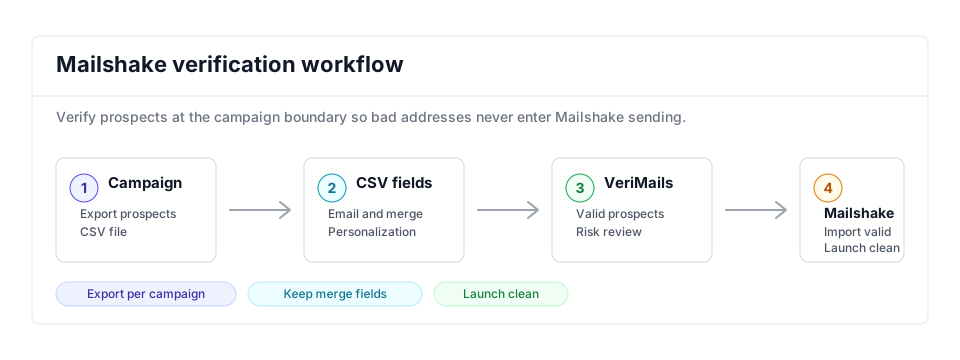
- Export scope: Export the campaign or prospect group you plan to send, since campaign-level cleanup is more actionable than a broad dump; compare similar outbound flows in the Snov.io guide.
- Matching field: Keep email, name, company, and personalization columns required by the Mailshake CSV import while bulk verification runs.
- Result action: Import only valid prospects and review catch-all or role-based contacts before they enter a sequence that could affect your bounce rate.
- Tool comparison: If you are evaluating outbound verification workflows, compare similar cold email stacks in the Woodpecker comparison.
Step-by-Step
Export your prospects from Mailshake as a CSV
Mailshake exports from selected campaigns. Open the Campaigns section, select up to 20 campaigns at once, click Export in the top menu bar, and choose the Prospects option. Mailshake processes the request and produces a CSV file you can download. Repeat for any remaining campaigns and combine the files only when the same cleanup rule applies to all of them. QA the export by checking that Email, campaign name, source, and every personalization field used in text replacements are present.
Upload the CSV to VeriMails
Log in to VeriMails, open the bulk verification tool, and upload your exported file. VeriMails automatically detects and maps the email column, so there is no need to rearrange the spreadsheet. Confirm the mapped column before starting the queued job, and keep the raw Mailshake export unchanged so you can rerun the job if a filter or campaign selection was wrong.
Review your verification results
Once the run finishes, VeriMails groups every address by status: valid, invalid, catch-all, disposable, and role-based. Review the breakdown to gauge the quality of each source, then download the filtered results. Compare the invalid rate by campaign and lead source, and sample a few catch-all rows before deciding whether they deserve a smaller monitored send.
Re-import the cleaned list into Mailshake
Build a new Mailshake campaign and upload the file of valid addresses. Follow Mailshake's CSV best practices: keep the email address in the first column, and make sure any column headings match the merge fields you use in your email body exactly. Preview the first few prospects, confirm custom fields render correctly, and check Mailshake's import counts before activating the campaign.
Verify every list before each campaign
Prospect data ages quickly, so verify each new list before it becomes a campaign and re-verify older lists every few months. Making this a standard step reduces avoidable bounces before prospects reach Mailshake. Teams that build lists continuously can use the Email Verification API to check addresses before they ever reach the campaign CSV.
What to Do With Each Result
Do not upload every VeriMails row back into Mailshake. Split the file first so each status has a clear campaign decision.
- Valid Import into the campaign and map the fields needed for personalization.
- Invalid Exclude from the import and mark the source list for cleanup outside Mailshake.
- Catch-all Keep in a separate review file for lower-volume outreach or account-owner judgment.
- Disposable Remove from outbound campaigns because the inbox is temporary.
- Role-based Review manually; shared inboxes usually need different copy and lower volume.
Frequently Asked Questions
Related Guides
Try VeriMails Free
100 free credits on signup. No credit card required. Put this guide into practice today.
Start Free