VeriMails vs Woodpecker
Woodpecker is a long-established cold email and sales outreach platform known for a deliverability-focused stack: warmup, Bounce Shield, adaptive sending, and free built-in email verification on every plan. Here is how that built-in check stacks up against a dedicated verification layer, and why teams clean their lists with VeriMails before importing them into Woodpecker.
Updated May 24, 2026
At a Glance
| Feature | VeriMails | Woodpecker |
|---|---|---|
| Primary purpose | Dedicated email verification | Cold email sending and sequencing |
| Price | From $0.0019 per email, credits never expire | From $35 per month for the lowest current help-center tier, with annual discounts available |
| Free tier | 100 credits on signup, no card, never expire | Free trial, plus free built-in verification on paid plans |
| Catch-all handling | Explicit catch-all detection and flagging | Free catch-all verification included |
| Verification workflow | Dedicated bulk and API verification with catch-all segmentation | Built into Woodpecker campaigns with Bouncer-powered checks |
| Bulk verification | CSV upload, ~10K rows under 5 minutes, filtered export | Verification on the prospect list inside the campaign |
| Speed | Fast API response | Runs as a step on the prospect list |
VeriMails and Woodpecker do different jobs. The table compares the verification side, not Woodpecker's sending and deliverability features.
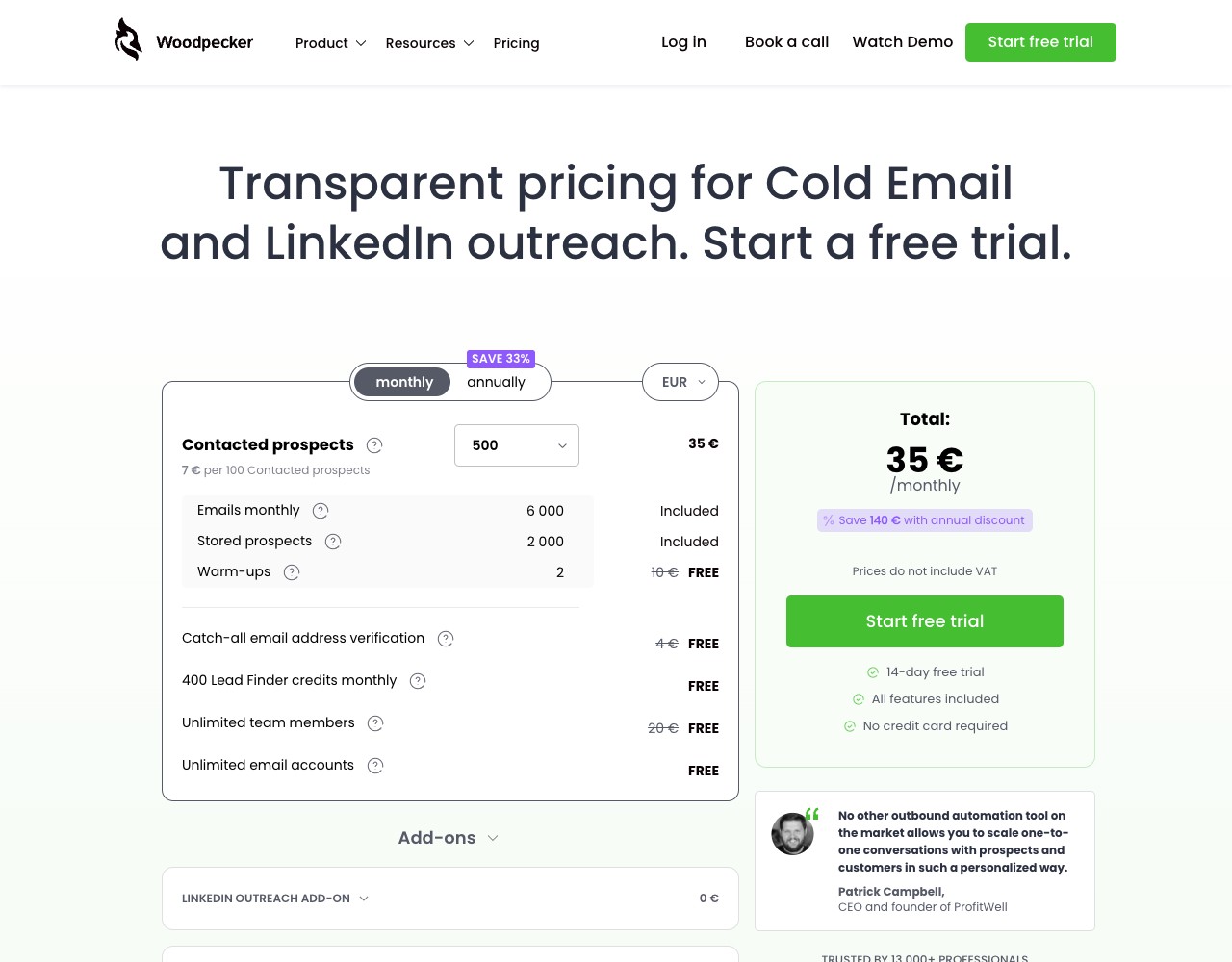
Woodpecker Pricing and Verification Screens
Woodpecker bundles verification into a sending product priced around contacted prospects. That makes it useful inside Woodpecker, but separate pre-send verification still helps keep dead addresses out before prospect capacity is consumed.
Verification Depth
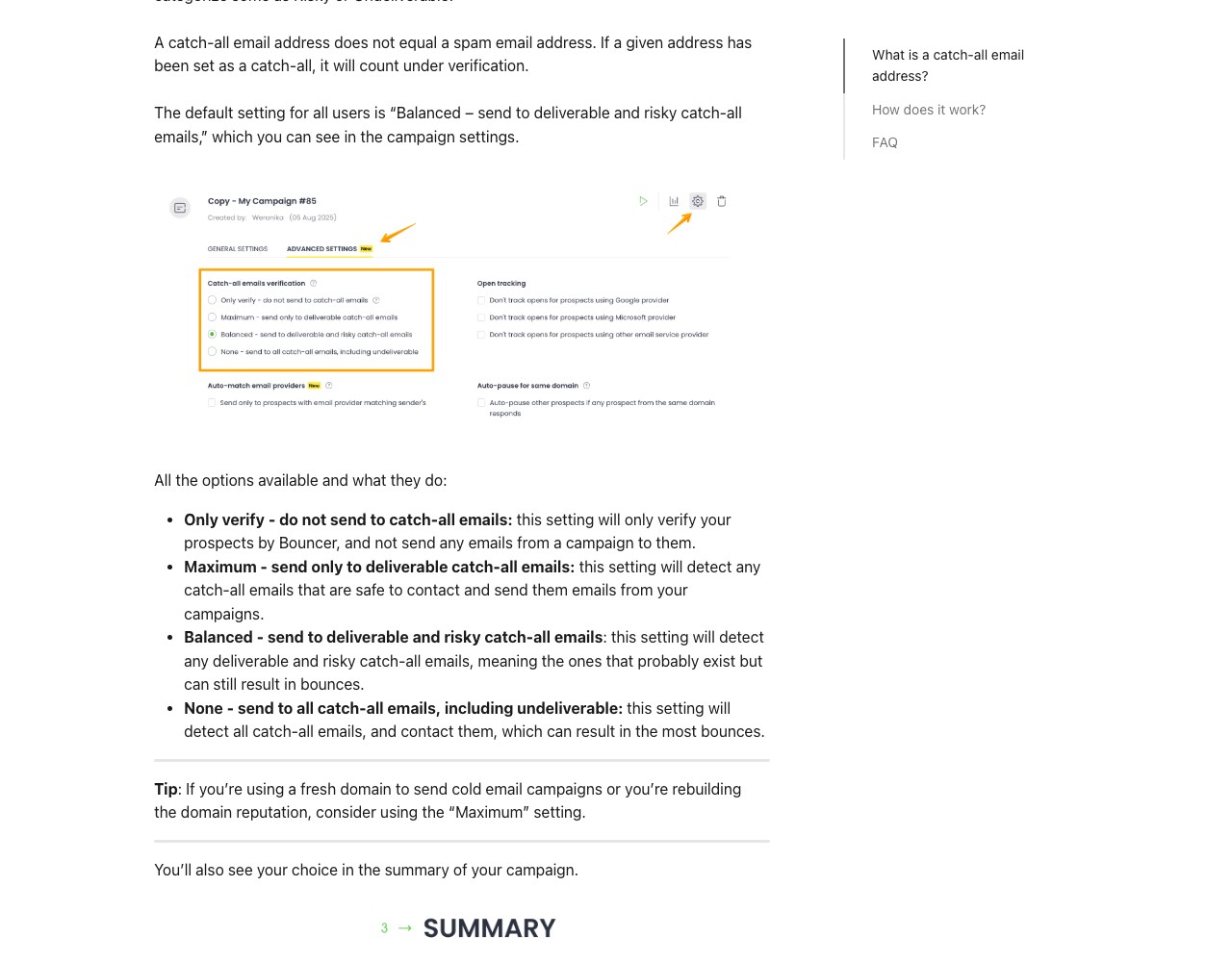
Woodpecker deserves credit here. Among cold email platforms, its deliverability stack is one of the strongest in its price range. It includes free built-in email verification, free catch-all verification, Bounce Shield to keep you under your email provider's sending limits, adaptive sending, and ESP matching, all without an extra charge. Woodpecker describes its verification as removing addresses that are expired, fake, or misspelled, so a meaningful share of obviously bad contacts is filtered before a campaign sends. For many users, that built-in check materially reduces bounce rates with no added cost.
The limitation is the same one every sending tool shares: depth and role. Woodpecker's verification is a feature inside an outreach platform. It is built to clean the prospect lists you intend to run through Woodpecker, not to act as a standalone verification service for a CRM, a website signup form, or a multi-hundred-thousand-record legacy database accessed through a dedicated API. You also have limited visibility into the per-address reasoning behind a pass or a fail, because the verifier is designed to feed the campaign rather than to produce a detailed audit file.
VeriMails is built only for verification. It gives operators a clear status, catch-all segmentation, risk labels, and a downloadable filtered file before the list reaches a sender. It does not run campaigns. Its job is to help decide which addresses are ready for Woodpecker and which should be suppressed or reviewed.
Catch-all Handling
Catch-all domains are hard to evaluate because domain-level behavior can prevent a verifier from confirming one specific inbox. Woodpecker is one of the few sending tools that addresses that risk directly with free catch-all verification on all plans. That is a real advantage over platforms that simply skip the problem.
VeriMails approaches catch-all domains with deliberate honesty through catch-all detection. It identifies which domains on your list are configured as catch-all and labels them clearly in the results file. It does not claim to confirm a catch-all mailbox when address-level certainty is not available. You get an explicit, transparent label on each catch-all domain, so you can keep your confirmed contacts in one segment and route the catch-all contacts into a separate, slower, lower-volume segment. For B2B lists, where a large share of company domains are catch-all, that explicit separation lets you decide the send strategy for those contacts before they ever enter Woodpecker.
Using VeriMails With Woodpecker
VeriMails and Woodpecker are complementary, and they work best in a set order: verify the raw list with VeriMails first, then import the cleaned file into Woodpecker.
The workflow looks like this. You collect a list from a lead source, a data provider, or a CRM export. Before that list reaches Woodpecker, upload the CSV to VeriMails, review the verified, invalid, catch-all, disposable, and role-based segments, then download the filtered result. Import the clean file into Woodpecker as your prospect list and build the sequence there.
This is especially valuable because Woodpecker prices by contacted prospects and unused prospects do not roll over. Every dead address you import is a prospect slot you cannot get back. Verifying first means your Woodpecker allowance is spent only on contacts that can actually be reached. Woodpecker's built-in verification, catch-all verification, and Bounce Shield then act as a second layer of protection on top of an already-clean list, so your bounce rate stays low from the first send and your sending domains stay healthy. Teams with engineering resources can automate the step using the VeriMails REST API, which offers single and bulk endpoints, JSON responses, webhook and batch support, and fast response times.
Pricing and Value
Woodpecker and VeriMails are priced for different jobs, so a head-to-head price is not the right lens. Woodpecker is a monthly subscription priced by contacted and stored prospects rather than by seats. Its current help center says the lowest monthly tier costs $35 and includes up to 500 contacted prospects and 2,000 stored prospects, with annual billing discounts available as volume grows. One important detail: unused prospects do not roll over, so capacity you do not use in a month is gone. That makes it especially worthwhile to avoid spending prospect slots on addresses that were never deliverable.
VeriMails sells verification credits outright. You buy a credit pack, use it whenever you want, and the credits never expire, so there is no lost balance and no monthly commitment for one-time credit packs. For teams that verify large lists in waves, a flat per-credit rate is predictable and usually inexpensive. VeriMails also offers annual plans from $12.50/month when billed yearly if predictable billing suits you better.
VeriMails Credit Pricing
| Credits | VeriMails Price | Price per Email |
|---|---|---|
| 10,000 | $19 | $0.0019 |
| 25,000 | $39 | $0.00156 |
| 50,000 | $59 | $0.00118 |
| 100,000 | $99 | $0.00099 |
| 250,000 | $199 | $0.000796 |
| 500,000 | $349 | $0.000698 |
| 1,000,000 | $499 | $0.000499 |
| 2,500,000 | $999 | $0.0004 |
| 5,000,000 | $1,499 | $0.0003 |
Email Finder costs 20 credits only when VeriMails returns a verified person-level email. At the 10,000-credit pack, that is $0.038 per found email. Monthly plans start at $12.50/mo when billed yearly.
Credits never expire. Credit packs do not require a subscription or monthly fee. New accounts receive 100 free credits on signup.
Who Should Verify Separately
Run VeriMails before Woodpecker if your list comes from third-party data, event exports, or older CRM records, since those lists carry the most dead and stale addresses. Verify separately to protect Woodpecker's contacted-prospect allowance, because every invalid address you import is a non-refundable prospect slot. Verify separately if you send at scale across many domains, where a small bounce rate can hurt placement. Verify separately if your audience is B2B and full of catch-all company domains you want explicitly labeled in a file. And verify separately if you need a clear audit trail of why each address passed or failed, or if you want to feed verification into a CRM or pipeline through a dedicated API.
Who Woodpecker's Built-in Check Is Enough For
Woodpecker's built-in verification is genuinely strong for a sending tool, and for some teams it covers the job on its own. If your lists are modest in size and freshly sourced from reputable providers, the free built-in check and catch-all verification will catch most bad addresses with no extra spend. If you value keeping verification, warmup, Bounce Shield, and sending inside a single tool and a single bill, Woodpecker's bundled stack is a clean fit. The case for a dedicated verifier grows as your volume rises, your lists age, your prospect allowance starts feeling tight, and the cost of a deliverability problem gets larger.
Run the Next Check in VeriMails
Before importing prospects into Woodpecker, verify a sample CSV in VeriMails and keep confirmed, catch-all, and invalid segments separate for your send policy.
Verification Accuracy
Woodpecker sits close to the sending workflow, so its verification value is tied to campaign prep. VeriMails stays independent of the sending tool. You can check the same list before it reaches any sequencer, CRM, or mail-merge workflow.
For accuracy, separate confirmed valid addresses from invalid, disposable, role-based, and catch-all rows before upload. That keeps your sending tool focused on campaign execution instead of cleaning the list after bounces appear.
API and Developer Experience
Woodpecker is useful when the API or integration work belongs inside an outreach stack. VeriMails is useful when verification should happen before data enters that stack.
Check new records through the API, store the status, and pass only the confirmed valid rows into your sequence. Bulk jobs handle older campaign lists before a rep or marketer starts sending.
Who VeriMails Is Best For
Choose VeriMails when verification is the job and you want the result before the send.
- You want to clean contacts before they enter a sequence or mail-merge campaign.
- You want prepaid verification credits that never expire.
- You need API and CSV verification without paying for a larger sales platform.
Frequently Asked Questions
Why teams switch to VeriMails
“Volume pricing is the reason we switched. At 500K credits we pay $0.000698 per email. Nobody else comes close at that scale.”
— Oliver B. — Infrastructure Lead at Email Marketing Platform, United States
“We verified our entire ActiveCampaign list before a product launch. Removed 9K bad addresses from 85K total. Open rate on the launch email was our highest ever.”
— Julia S. — Campaign Manager at Health Tech Company, Denmark
Related Comparisons
Try VeriMails Free
100 free credits on signup. No credit card required. See why teams switch to VeriMails.
Start Free