VeriMails vs Smartlead
Smartlead is a cold email operating system: campaigns, unlimited connected mailboxes, warmup pools, master inbox, client workspaces, deliverability add-ons, and verified prospect email allowances. VeriMails is narrower: it verifies and segments email addresses before they reach a campaign tool. The practical question is not which product is "better"; it is whether your verification should happen inside Smartlead or before import.
Updated May 24, 2026
Quick Verdict
If Smartlead is your sending platform and your list is small, fresh, and already inside your plan's verification allowance, its built-in verification is convenient. If you are importing scraped lists, CRM exports, purchased data, or large batches, verify with VeriMails first. You get lower standalone verification pricing, a file-level catch-all segment, and a clean import into Smartlead without spending campaign-platform verification credits on obvious rejects.
At a Glance
| Decision point | VeriMails | Smartlead |
|---|---|---|
| Best fit | Standalone verification before import | Cold email sending, warmup, inbox rotation, and campaign management |
| Primary pricing model | One-time verification credits from $19 | Monthly plan plus verification add-ons or included verified prospect emails on higher tiers |
| Public monthly plan prices | Verification packs: $19 to $499 | $39 Base, $94 Pro, $174 Unlimited Smart, $379 Unlimited Prime |
| 10,000 email verification cost | $19 | Depends on add-on or plan allowance; public help says verification add-ons start at 6,000 credits for $15 |
| Bulk workflow | Upload CSV, verify, segment, export clean file | Run verification during campaign lead import; cannot verify once campaign is live |
| Catch-all handling | Explicit catch-all flag before upload | Smartlead says verified campaigns send only to valid and catch-all leads |
| API fit | Verification API for real-time and bulk checks | Campaign, lead, mailbox, inbox, and analytics API for outreach automation |
Smartlead annual billing lowers the displayed monthly equivalent. The table uses monthly public plan prices because most buyers compare monthly plan commitments first.
Smartlead Pricing and Verification Add-ons
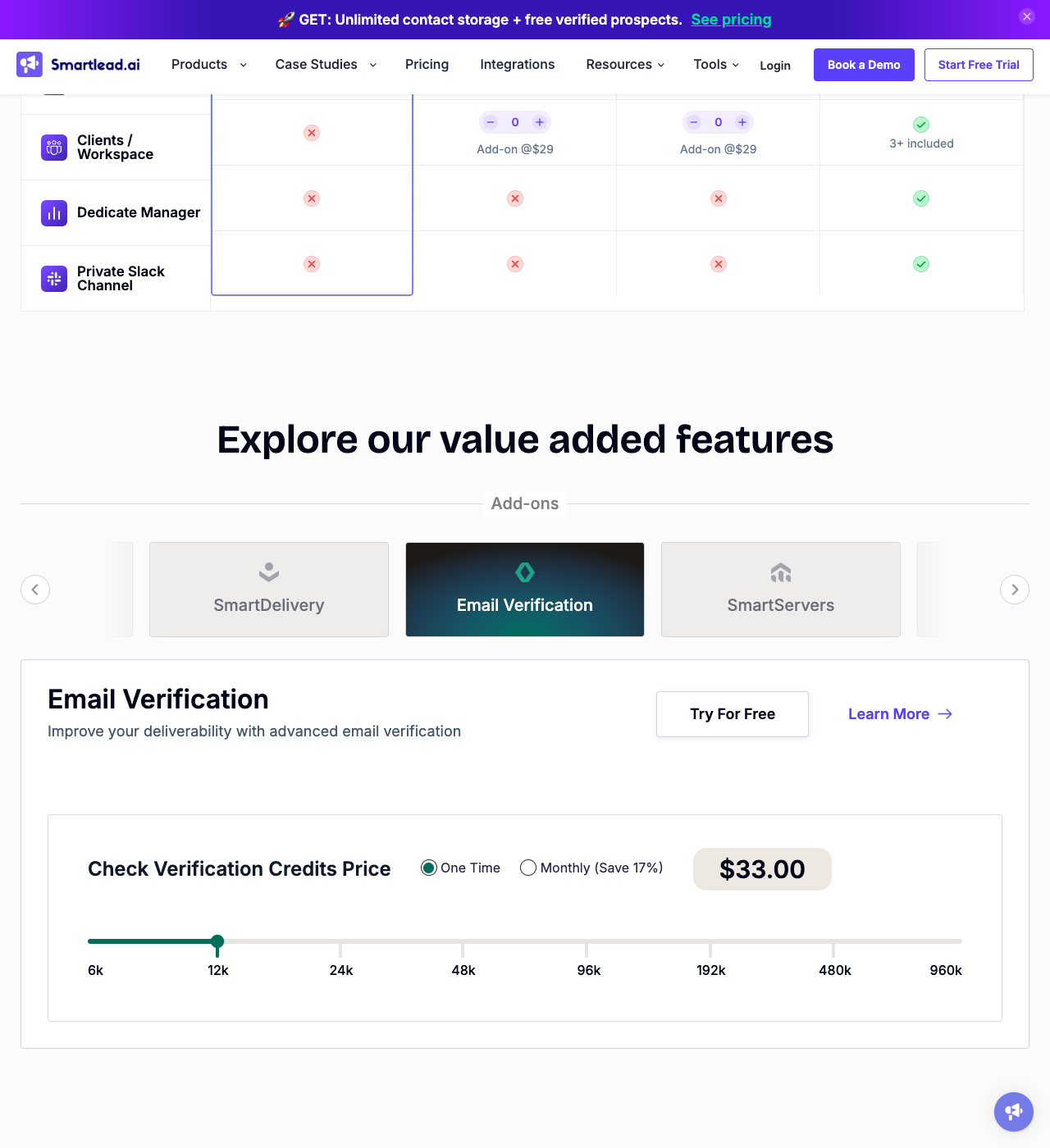
Smartlead's pricing has two layers. First, the core subscription plans: Base at $39/month, Pro at $94/month, Unlimited Smart at $174/month, and Unlimited Prime at $379/month, with annual billing discounts shown on the pricing page. Second, verification is presented as a value-added add-on across plans, with included verified prospect email allowances on the Unlimited tiers.
The lower-plan language is important. Smartlead's help center describes 2,000 verified prospect emails on Base and 30,000 on Pro as add-ons, while Unlimited Smart includes 50,000 verified prospect emails per month and Unlimited Prime includes 170,000. Its lead verification article says email verification add-on service starts from 6,000 credits for $15, and the pricing widget uses a slider for one-time or monthly verification credits.
For a buyer, that means Smartlead verification is convenient but tied to the campaign platform's plan and add-on model. VeriMails is simpler when the job is only list cleaning: buy credits, verify whenever you need, and keep unused credits without expiration.
Pricing and Credit Model
Smartlead and VeriMails should not be compared as two equal line items. Smartlead's subscription buys outreach infrastructure. VeriMails' credit packs buy verification. The relevant cost question is: how many addresses do you need to check outside the campaign platform?
Standalone verification cost
| Verification need | VeriMails | Smartlead public model | Buyer note |
|---|---|---|---|
| Small campaign import | Use part of a credit pack | May fit inside add-on or included verified prospect email allowance | Smartlead is simpler if you are already sending there |
| 10,000 emails | $19 | Add-on pricing depends on the selected credit level | VeriMails gives a clear standalone cost |
| 100,000 emails | $99 | Requires a larger add-on or higher-tier allowance | Pre-cleaning protects Smartlead sends and keeps campaign data cleaner |
| Recurring CRM cleanup | Credits never expire | Plan and add-on based | Use VeriMails when cleanup happens in waves |
VeriMails credit pricing
| Credits | VeriMails price | Price per email |
|---|---|---|
| 10,000 | $19 | $0.0019 |
| 25,000 | $39 | $0.00156 |
| 50,000 | $59 | $0.00118 |
| 100,000 | $99 | $0.00099 |
| 250,000 | $199 | $0.000796 |
| 500,000 | $349 | $0.000698 |
| 1,000,000 | $499 | $0.000499 |
| 2,500,000 | $999 | $0.0004 |
| 5,000,000 | $1,499 | $0.0003 |
Email Finder costs 20 credits only when VeriMails returns a verified person-level email. At the 10,000-credit pack, that is $0.038 per found email. Monthly plans start at $12.50/mo when billed yearly.
VeriMails credits never expire. New accounts receive 100 free credits on signup.
Verification Workflow
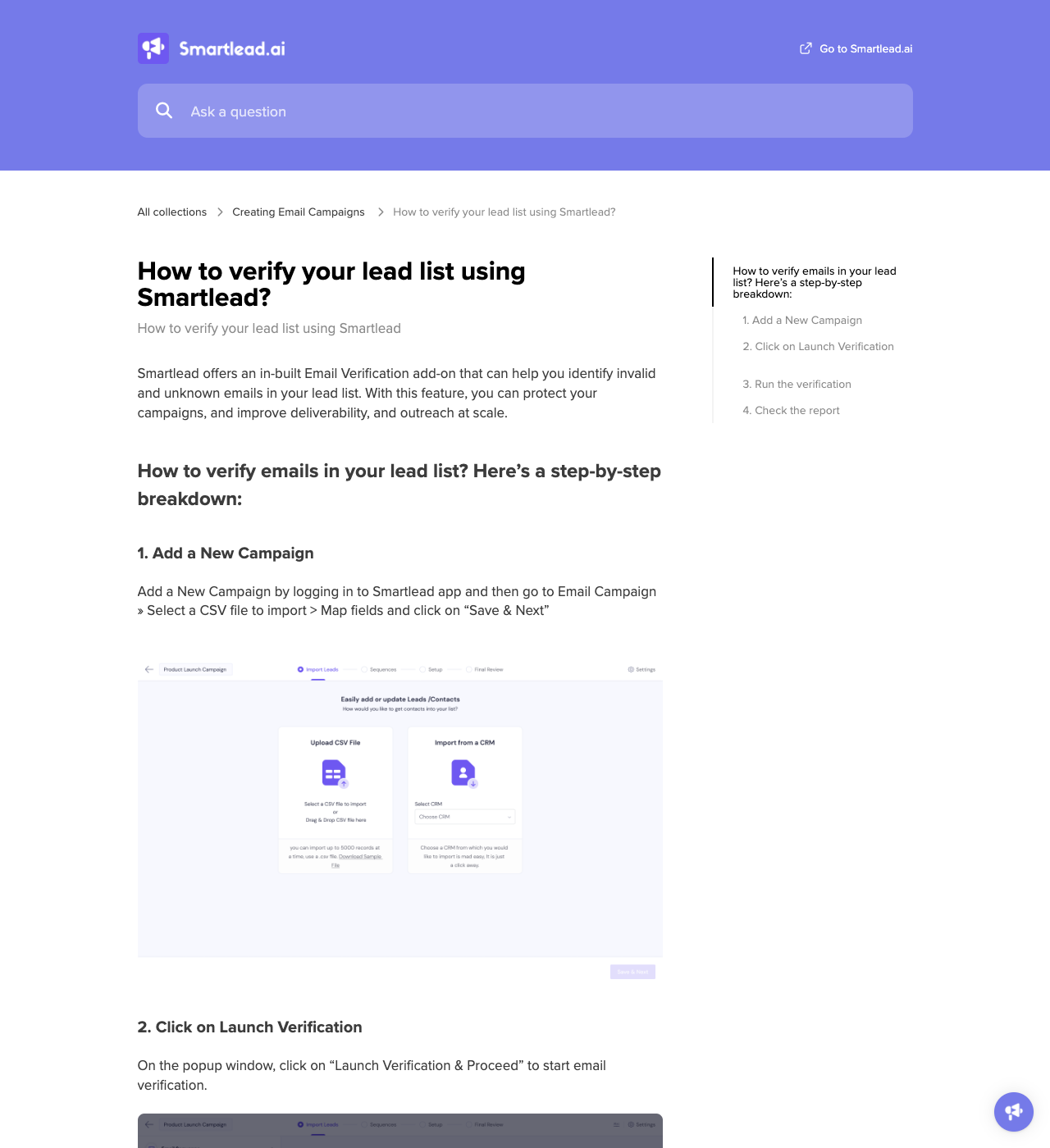
Smartlead's documented workflow runs inside campaign setup. You create or open a campaign, import the CSV lead file, map fields, launch verification, wait for the report, and then launch the campaign or save it as a draft. The same help article says the verified lead list can be downloaded from the Import Lead tab, and it notes that leads cannot be verified once a campaign is live.
That is useful when the list is already destined for a Smartlead campaign. It is less ideal when your data needs to be cleaned before it touches any sender account, pushed into multiple sequencers, synced into a CRM, or checked through an API before a user submits a form.
VeriMails sits one step earlier. Upload the raw CSV, auto-map the email column, run verification, export only the rows you want, and then import the cleaned segment into Smartlead. Developers can use the VeriMails API for real-time signup checks, CRM hygiene jobs, or bulk verification pipelines before the lead ever enters a campaign.
Catch-all Handling
Catch-all domains accept mail for many or all mailbox names, so SMTP checks cannot always prove a specific person exists. Smartlead's public help says that if you launch a campaign after verification, Smartlead will send only to valid and catch-all leads. Its email verifier page also warns that catch-all results require special handling and describes Safe, Risky, Invalid, and Unknown style segmentation.
That is the key operational difference. Smartlead treats catch-all leads as sendable after verification. VeriMails flags catch-all domains before the upload, which lets you decide what "sendable" means for your risk tolerance. Many teams keep confirmed deliverable addresses in the main campaign, then place catch-all leads in a smaller test segment with lower daily volume, stricter personalization, or a different sender pool.
| Catch-all question | VeriMails | Smartlead |
|---|---|---|
| Does the tool identify catch-all domains? | Yes, before export | Yes, as part of verification and segmentation language |
| What happens operationally? | You decide before importing to Smartlead | Verified campaigns send to valid and catch-all leads |
| Best use | Pre-send risk segmentation | Campaign flow convenience |
API and Automation Fit
Smartlead's API is built around outreach automation: campaigns, leads, mailboxes, analytics, inbox activity, and webhooks. That is exactly what a sequencer API should expose. Its public verification docs, however, describe a UI-led lead import and verification workflow rather than a standalone verification API that a product can call before accepting an address.
VeriMails is the better fit when the verification call is part of your own system: signup forms, lead capture, enrichment jobs, CRM cleanup, or pre-import validation. The API and bulk upload use the same verification credit pool, so operations and engineering teams can use one pricing model across manual list cleaning and automated checks.
Who Should Choose Which?
Choose VeriMails if
You need to clean CSVs before campaign upload, verify addresses outside Smartlead, reduce standalone verification cost, keep credits from expiring, or separate catch-all contacts before they touch sender infrastructure.
Choose Smartlead if
You need the campaign platform: inbox rotation, warmup pools, outbound sequences, reply management, client workspaces, deliverability add-ons, and a verification step inside the campaign setup flow.
Best-fit Decision
| Your situation | Better default | Reason |
|---|---|---|
| You already send in Smartlead and have a small fresh list | Smartlead verification | Fewer tools, one campaign flow |
| You bought or scraped a large lead list | VeriMails first | Remove bad rows before they consume campaign-platform verification resources |
| You want a catch-all segment before upload | VeriMails first | Catch-all contacts can be routed to a lower-risk campaign |
| You need sending, inbox rotation, and reply handling | Smartlead | VeriMails does not send campaigns |
| You need API checks in your own app or CRM | VeriMails | The workflow is verification-first rather than campaign-first |
Run the Next Check in VeriMails
The fastest way to evaluate the difference is to verify a real sample from the same kind of list you plan to upload into Smartlead.
Verification Accuracy
Smartlead sits close to the sending workflow, so its verification value is tied to campaign prep. VeriMails stays independent of the sending tool. You can check the same list before it reaches any sequencer, CRM, or mail-merge workflow.
For accuracy, separate confirmed valid addresses from invalid, disposable, role-based, and catch-all rows before upload. That keeps your sending tool focused on campaign execution instead of cleaning the list after bounces appear.
Who VeriMails Is Best For
Choose VeriMails when verification is the job and you want the result before the send.
- You want to clean contacts before they enter a sequence or mail-merge campaign.
- You want prepaid verification credits that never expire.
- You need API and CSV verification without paying for a larger sales platform.
Frequently Asked Questions
Why teams switch to VeriMails
“We verify every checkout email through the API. Catches typos and disposable addresses before they become customer records. Setup took half a day.”
— Nina F. — Product Manager at Subscription Box Company, Germany
“The catch-all detection is what sold us. Our old tool marked 30% of our B2B list as unknown. VeriMails tells us which catch-all addresses to keep and which to skip. That's the difference between guessing and knowing.”
— Stephanie W. — Demand Gen Manager at Cybersecurity Company, United States
Related Comparisons
Try VeriMails Free
100 free credits on signup. No credit card required. Clean a sample list before your next Smartlead import.
Start Free