How to Verify Emails in Shopify
Shopify customer exports often include email addresses from past checkout records, customer accounts, and marketing signups. Over time those lists can pick up typos and stale inboxes that bounce. Batch verification is most useful before marketing campaigns, lifecycle flows, and customer-list syncs; it does not validate new checkout email capture unless you add real-time validation at the point of entry.
TLDR
- Export Shopify customers to CSV and verify the file with bulk email verification before seasonal campaigns, lifecycle flows, local market launches, or marketing syncs.
- Use the result file to keep reachable customers in your email audience while moving invalid, disposable, and review-needed addresses out of campaign sends.
- For new checkout or signup entries, pair batch cleanups with API verification so typos are caught before they reach your customer list.
Why Verify Your Shopify Contacts
Shopify stores use email across many customer touchpoints, but this guide focuses on exported customer records and marketing syncs. A batch cleanup can help with stored addresses used by lifecycle emails, retention campaigns, and connected email platforms. Live transactional checkout mail needs capture-time validation if you want to catch typos before the order is submitted.
Stored customer records need a cleanup path
A customer record can keep the same typo or abandoned inbox long after the original order. When that record is later used for an account update, lifecycle message, or marketing platform sync, the stale address can bounce. Verifying exported customer records gives operators a status file to decide which addresses stay in marketing audiences and which ones move to review.
Lifecycle campaigns need reachable audiences
Abandoned cart, winback, and post-purchase sequences can be valuable because the recipient has already shown purchase intent. The campaign only has a chance to work when the stored address is usable. A verification pass on the customer export helps reduce avoidable bounces before a campaign or sync, while capture-time validation is still needed for new checkout entries.
Cleaner exports support future marketing sends
Mailbox providers such as Gmail, Yahoo, and Outlook watch bounce rates closely. When bounce rates climb, providers can throttle mail or route more of it to spam. Customer email addresses naturally decay as people change jobs and abandon old inboxes, so a Shopify export that looked clean last year may need a fresh review before a major send. Shopify's customer export documentation frames CSV exports as useful for spreadsheet review or connecting the store to CRM systems, which is exactly the moment to run a verification pass before the data moves downstream.
Marketing spend goes to reachable customers
If you sync Shopify customers into an email marketing tool that charges by contact, stale addresses can become contacts you pay to store but cannot use effectively. Cleaning the list before the sync helps your budget focus on customers that are more likely to be reachable.
What VeriMails Checks
VeriMails runs a layered set of checks on every address in your Shopify export and returns a clear result for each one, with layered deliverability checks.
The process starts with syntax validation to catch malformed addresses, including typos from past signup or checkout records. It then runs MX and DNS checks to confirm the customer's email domain exists and is set up to receive mail. A live mailbox-level check evaluates whether that exact mailbox appears able to accept mail, without sending anything to the customer.
Three further checks classify the harder cases. Catch-all detection identifies domains that accept mail for any address, so you know when an individual mailbox cannot be confirmed. This is detection of a server configuration, not a quality score. Disposable detection flags throwaway inbox providers, which sometimes appear when shoppers use a temporary address to grab a discount code. Role-based detection spots shared addresses such as info@ or support@ that are usually not the right target for a marketing list.
Pricing for Shopify Users
You can start with no commitment. Every new VeriMails account includes 100 free verification credits, with no credit card required, and those credits never expire. That free balance is enough for a small store to verify a starter list or for any store to test the workflow.
For a full customer base, credit packs start at 10,000 credits for $19, which is $0.0019 per email, and scale up to 5 million credits for $1,499. Because credits never expire, a Shopify store can buy a pack, verify the list before a seasonal campaign, and keep the remaining balance for the next one. Stores that verify on a regular cadence can instead choose a monthly subscription, with annual plans from $12.50/month when billed yearly. One credit covers one verified address, so a Shopify customer export of any size has a clear, predictable cost.
Workflow Visual
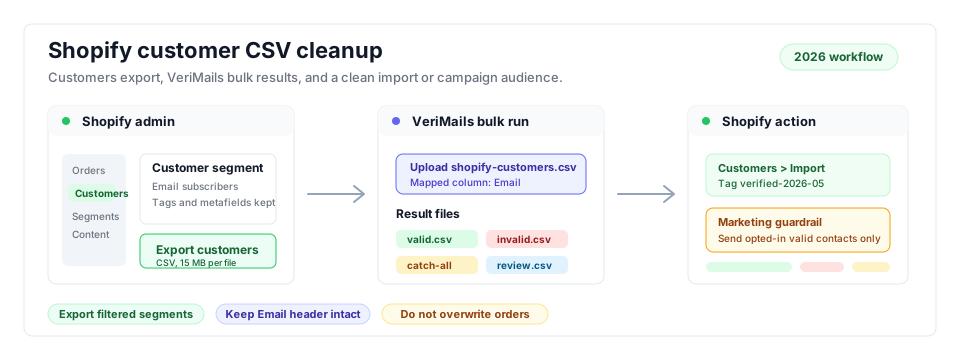
The Shopify cleanup flow starts with the customer export, separates valid contacts from risky results, and gives your marketing tool a cleaner audience for the next campaign.
- Store lifecycle sends: Tie verified Shopify contacts into the broader ecommerce email verification workflow.
- Bulk list cleanup: Use bulk verification before seasonal campaigns, product drops, and large list syncs.
- Adjacent store guide: For WordPress stores, compare the WooCommerce customer export workflow.
Step-by-Step
Export the exact customer group
In Shopify admin, open Customers and apply filters if the cleanup is for a segment such as recent buyers, wholesale customers, email subscribers, or one regional market. Click Export, then choose the current page, all customers, selected customers, or the customers matching your filters. Select the spreadsheet-friendly CSV format if you plan to inspect the file before upload. Shopify documents that exports up to 50 customers download in the browser, while larger exports are emailed to you, and exported customer CSV files are limited to 15 MB.
Check the CSV before upload
Confirm the file includes the Email column and any fields you need later, such as customer tags, accepts marketing, total spent, customer state, country or region, and market-specific tags. Do not edit the header names unless you need a smaller file for verification. Keep segmentation columns intact so a valid result can return to the right audience after cleanup.
Upload the CSV to VeriMails
Create a VeriMails account or log in, open bulk verification, and drag in the Shopify CSV. The uploader detects the email column automatically. The expected output is a completed verification run with downloadable result files for valid, invalid, catch-all, disposable, and role-based addresses.
Decide the action for each status
Use valid contacts for the campaign or email platform sync. Keep invalid contacts out of regular marketing sends because they are likely to bounce. Put catch-all, disposable, and role-based results in review tags or lower-priority segments instead of mixing them into the main campaign audience.
Bring the cleaned list back
Download the valid-only CSV and use it for your next email tool import or Shopify customer update. If you update Shopify directly, keep the Email column stable and preserve customer tags or metafields you still need. Add a dated tag such as verified-2026-05 so future segments can target recently verified customers.
Verify the send segment
Before launching the campaign, compare the original export count with the valid result count and the final send segment count. A healthy output is a campaign audience made from valid contacts only, with invalid and risky rows excluded or clearly tagged for review.
Shopify Export and Localization Plan
International Shopify stores should not clean one broad customer export and then push every valid row into every market. Shopify Markets can define customer groups by region and customize currency, product availability, and theme experience for those markets, while Shopify's localization tools support market-specific languages, domains, and URLs. If the store uses separate local audiences, the verification workflow should preserve that structure instead of flattening it.
Use the table below as a practical localization plan before regional campaigns, new market launches, and local-currency promotional sends.
| Decision | Shopify export choice | Verification and localization action |
|---|---|---|
| Market scope | Filter customers by market, country or region, customer tag, or the audience feeding a local campaign. | Verify that segment separately so invalid and risky rows do not contaminate other regional audiences. |
| Language context | Keep language, locale, source, and tag fields if your store uses localized domains, subfolders, or campaign tags. | Return valid contacts to the same language audience, then suppress invalid rows in that local email tool or segment. |
| Currency and checkout market | Preserve country, default address, market, and total-spent fields when local currency or regional pricing matters. | Review high-value catch-all or role-based customers manually before removing them from local-currency lifecycle flows. |
| Consent fields | Keep email marketing consent fields and any newsletter tags used by the campaign platform. | Verification does not replace consent. Only send to contacts that are both deliverable and eligible for that market's campaign policy. |
| Regional launch timing | Export the launch audience before translating flows, warming a local sender, or syncing a new regional ESP segment. | Tag valid rows with a dated verification tag such as verified-eu-2026-05 or verified-us-2026-05 so local teams know which segment is campaign-ready. |
For source checks, use Shopify's customer export documentation for CSV limits and export behavior, then align regional segmentation with Shopify's Markets overview and localization guidance for language, currency, and domains. The verification step should sit between those two operations: after the customer export is scoped, but before a localized campaign or CRM sync uses the list.
Operator Checklist
Use this quick check before the cleaned Shopify audience is used for a campaign or synced into an email platform.
- Export scope: The CSV matches the business goal: all customers for a hygiene pass, or a filtered customer segment for one campaign.
- Required fields: Email is present, and customer tags, country or region, language, market, or marketing consent fields are retained if you need them for segmentation.
- Verification output: Valid, invalid, catch-all, disposable, and role-based results are downloaded separately, not merged back into one unchecked list.
- Shopify update: Valid contacts receive a dated verification tag, while invalid and risky addresses are excluded from campaign sends.
- Final count: The final campaign or sync segment is smaller than the raw export by the number of contacts you intentionally removed or held for review.
Frequently Asked Questions
Related Guides
Try VeriMails Free
100 free credits on signup. No credit card required. Put this guide into practice today.
Start Free