How to Avoid Spam Traps in Cold Email
Spam traps are the silent killers of cold email deliverability. You never see the damage happen, only the results. This guide explains what traps are, the three types you can hit, and the practical habits that keep them off your list.
Avoid unknown-origin lists, verify before every campaign, and remove inactive contacts before they age into risk. Verification cannot name every hidden trap, but it removes many of the addresses and list habits that lead to trap hits.
What a Spam Trap Is
A spam trap is an email address that exists for one purpose: to catch senders with poor list practices. Mailbox providers, internet service providers, and anti-spam organizations operate these addresses. From the outside, a spam trap looks like an ordinary email address. It is not. No real person reads it, and no legitimate sender should ever have it on a list.
That is the entire point. A legitimate sender builds a list from people who knowingly handed over their address, and a legitimate sender removes addresses that go quiet. Under those practices, a spam trap address can never end up on the list, because nobody ever opted it in. So when a message arrives at a spam trap, the operator draws a logical conclusion: this sender either obtained addresses without consent or failed to clean stale ones. Either way, the sender's reputation takes a hit.
Cold email is especially exposed. By definition, cold outreach goes to people who never opted in, and cold lists are built from exactly the sources, scraping and third-party databases, that spam traps are designed to catch. Understanding the traps is the first step to staying out of them.
The Three Types of Spam Trap
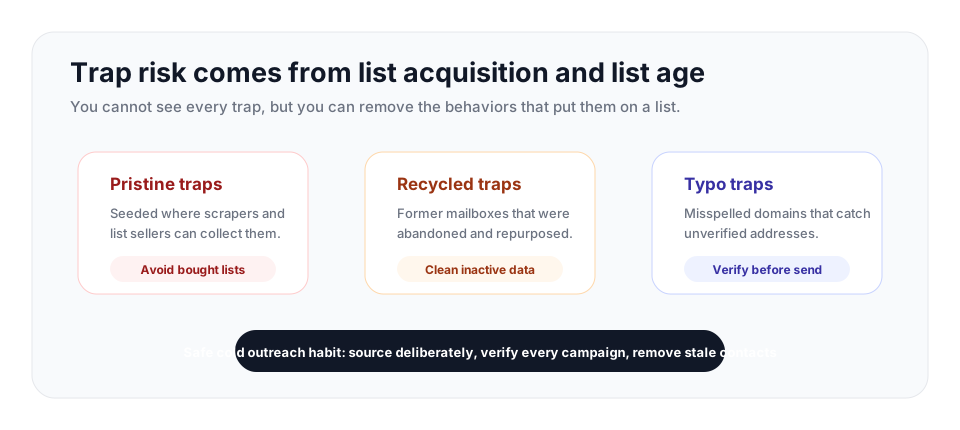
Spam traps come in three forms, and each one tells the operator something different about the sender who hit it.
Pristine traps
A pristine trap is an address that has never belonged to a real person. Anti-spam organizations create these addresses and seed them quietly across the web, on pages, in directories, in places where a scraper would pick them up but a human never would. Because a pristine trap was never a real mailbox, there is no legitimate way it could end up on a permission-based list. Hitting one is a strong signal that you scraped the web, bought a list, or pulled addresses from an unverified source. Pristine traps are the clearest evidence of no permission, and they carry the heaviest penalty.
Recycled traps
A recycled trap was once a real, working address that belonged to a real person. The person abandoned it, the mailbox went dormant, and after a long period of inactivity the provider reclaimed the address and converted it into a trap. Recycled traps catch a different failure: poor list hygiene. If you are mailing an address that has been dead long enough to be recycled, you have not cleaned your list, and you are still sending to contacts who stopped engaging long ago. Hitting recycled traps signals that you do not maintain your list.
Typo traps
A typo trap, also called a malformed trap, is built from a common misspelling of a popular domain. Think gnail.com, gmial.com, or hotnail.com instead of the real thing, or a common top-level-domain typo where .com was intended. People mistype their own address all the time, and those mistyped addresses get captured at signup and on web forms. Anti-spam operators register the misspelled domains and turn them into traps. Hitting a typo trap signals one specific failure: you did not verify your addresses before sending. A verification step would have caught the bad domain.
What Happens When You Hit One
The danger of spam traps is that the damage is invisible while it happens. There is no bounce, no error, no notification. The trap address accepts your message just like a real mailbox would. You find out only later, when your deliverability has already dropped.
Hitting a spam trap damages your sender reputation. The mailbox providers and anti-spam organizations that run traps share their findings, and a trap hit feeds the reputation scores that decide where your future mail lands. Hit enough traps, or hit a pristine trap, and your sending domain or IP can end up on a blocklist. A blocklisting is severe, because many providers consult the same blocklists, so the consequence is not isolated to one inbox provider. Your messages start landing in the spam folder across a wide swath of the email ecosystem at once.
This is especially dangerous in 2026 because of how new domains are treated. Mailbox providers now evaluate fresh sending domains closely during their first campaigns, when there is no established reputation to fall back on. A spam trap hit in those early sends tells the provider that your acquisition process is poor, and your mail gets filtered immediately. A new cold email domain can be compromised before it ever gets a fair chance.
How to Keep Traps Off Your List
Avoiding spam traps is not about a single trick. It is about removing the conditions that let traps onto a list in the first place. A few consistent habits do almost all the work.
Never buy or scrape lists
Purchased lists and scraped lists are the single biggest source of pristine traps, because seeding traps where scrapers and list sellers will find them is exactly how pristine traps are deployed. There is no way to buy a list and be confident it is trap-free. Build your contact data from sources you control instead, and source prospects from intent-driven, identifiable channels rather than bulk dumps of unknown origin.
Verify every address before every campaign
Verification is the direct defense against typo traps and a strong defense against recycled traps. A typo trap address lives on a misspelled domain, and an MX and DNS check will show that the domain is not a legitimate mail destination. A recycled trap usually has a long history of inactivity, and verification helps surface the invalid and abandoned addresses that cluster around it. Running your list through verification before you send strips out these risky addresses before they can do harm.
Clean inactive contacts regularly
Recycled traps exist because addresses go dormant and stay on lists. Audit your list every three to six months, depending on how often you send, and remove contacts that have shown no engagement over a long period. An address that has not engaged in many months is a candidate to become a recycled trap, and continuing to mail it is a risk with no upside.
Verify at the point of capture
The most efficient defense against typo traps is to catch the misspelling the moment it is typed. Real-time verification on a signup or lead form checks the address as the visitor submits it, so a typo-domain address is rejected before it ever enters your database. The bad address is never stored, so it can never end up in a future campaign.
Scale sending slowly and watch your reputation
Increase volume gradually rather than blasting a new list at full speed, and monitor your sender reputation through tools like Google Postmaster Tools. A sudden drop in inbox placement is often the first visible sign of a trap problem, and catching it early lets you stop and clean before the damage compounds.
Pause risky imports before sending
If you inherit a list, import an enriched file, or merge contacts from multiple tools, treat the first campaign as high risk until the addresses are cleaned. Run the file through bulk verification, remove invalid and disposable addresses, then watch your early bounce pattern against bounce rate benchmarks before increasing volume.
Trap prevention checklist
| Control | Use it when | Trap risk reduced |
|---|---|---|
| Reject bought or scraped files | A list's origin is unclear or cannot be audited | Pristine traps seeded into open web pages and sold lists |
| Verify before every campaign | A list was built, imported, enriched, or reused | Typo domains, invalid mailboxes, and stale addresses near recycled traps |
| Remove long-inactive contacts | Contacts have not opened, clicked, replied, or converted for months | Recycled traps created from abandoned mailboxes |
| Verify at capture | A form, checkout, or lead magnet collects addresses | Typo traps before they ever reach the database |
| Ramp new domains gradually | A new sending identity has little history | Fast reputation loss from early trap hits |
What to Do if You Suspect a Trap Hit
You usually discover trap damage indirectly: inbox placement drops, domain reputation falls, or spam-folder placement rises even though the campaign looked normal. Treat that as a stop-and-clean moment.
| Step | Action | Why it helps |
|---|---|---|
| Pause the risky segment | Stop sending to the list or source that changed most recently. | More volume can turn a small reputation hit into a broader deliverability problem. |
| Check bounce bands | Compare the last campaign to the under 3%, 3% to 5%, and above 5% bounce-rate bands. | A spike often points to stale or unverified addresses around the same list-quality problem. |
| Verify and suppress | Run the remaining file through bulk verification and remove invalid, disposable, and high-risk rows. | Cleaning removes the surrounding address risk before you test again. |
| Restart smaller | Resume only with verified, tightly targeted contacts and conservative daily volume. | Mailbox providers respond better to steady, relevant mail than sudden recovery blasts. |
For a broader recovery plan, pair this with the cold email deliverability guide and keep the next send intentionally small until engagement and reputation stabilize.
How VeriMails Reduces Trap Risk
No verification service can label every hidden pristine or recycled trap, because a well-built trap is designed to be indistinguishable from a real mailbox. Any service that claims to catch all of them is overpromising. What verification does is far more valuable in practice: it removes the conditions that lead to trap hits.
VeriMails runs a layered check on every address. Syntax validation and the MX and DNS lookup catch typo-domain addresses, the foundation of typo traps, by confirming whether the domain is a legitimate mail destination at all. The live SMTP handshake identifies invalid and non-responsive addresses, the kind that cluster around recycled traps and reveal a list that has not been maintained. Catch-all detection, disposable domain detection, and role-based detection flag other addresses that need cautious handling. The check is built for reliable list cleaning and returns a clear result for each address.
Verify a whole prospect list with bulk CSV verification before a campaign, or verify addresses one at a time through the REST API as they enter your tools. Check current VeriMails pricing when you are choosing between one-time credit packs and monthly plans.
Frequently Asked Questions
Related Articles
Start with Clean Data
100 free credits on signup. No credit card required. Put the advice into practice today.
Start Free