Cold Email Deliverability: A Complete Guide
Cold email only works if it reaches the inbox. This guide covers everything that determines whether it does in 2026: domain setup, authentication, warmup, list quality, and the sending discipline that keeps you out of the spam folder.
Cold email deliverability comes from five controls working together: separated sending domains, SPF/DKIM/DMARC, gradual warmup, verified lists, and tight daily sending discipline. Do not launch until each control has an owner, a pass/fail check, and a stop rule for bounces or complaints.
Why Deliverability Is the Whole Game
Cold email is a numbers business, but the most important number is not your reply rate or your open rate. It is the share of your messages that actually land in the inbox. A campaign with a brilliant subject line and a sharp offer is worthless if mailbox providers route it to spam, because nobody opens what they never see. Deliverability is the foundation everything else sits on.
The bar has risen sharply. Since February 2024, Google and Yahoo have enforced stricter requirements on senders, and through late 2025 the major providers continued to tighten filtering. The era of buying a domain, loading a list, and blasting it is over. Cold email that reaches the inbox in 2026 is the product of deliberate infrastructure, clean data, and disciplined sending. This guide walks through each of those in turn.
Domain and Inbox Setup
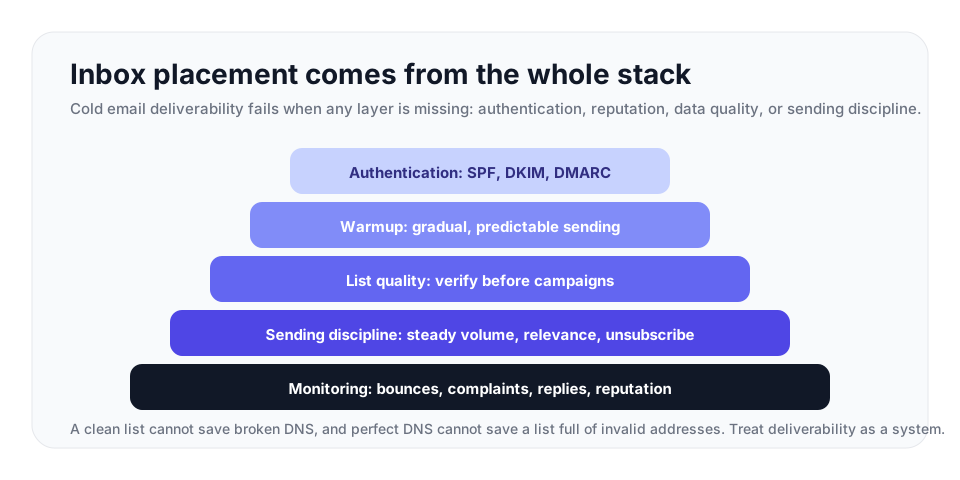
| Layer | What good looks like | Risk if skipped |
|---|---|---|
| Domain separation | Use dedicated outreach domains and low-volume mailboxes. | A bad campaign can damage the domain used for customers and transactional mail. |
| Authentication | SPF, DKIM, and DMARC are configured before production sends. | Messages are more likely to be rejected or filtered. |
| Warmup | Increase volume gradually from a low baseline. | Sudden spikes make a new domain look risky. |
| List quality | Verify every prospect list before import. | Invalid mailboxes create hard bounces and reputation damage. |
| Monitoring | Track bounces, complaints, replies, and domain reputation. | Problems compound quietly until inbox placement drops. |
The first decision is which domain to send from. Do not send cold email from your primary company domain. Cold outreach carries reputation risk, and if a campaign goes wrong, you do not want the fallout to reach the domain your customers and your transactional email depend on. The standard practice is to register separate domains dedicated to outreach, and to send from a subdomain or a lookalike of your brand so the sending identity stays clearly separated from your main domain.
Each sending domain should host only a small number of mailboxes, and each mailbox should send a modest daily volume. Spreading sends across several domains and mailboxes keeps the per-mailbox volume low, which is what healthy senders look like. Concentrating thousands of sends on a single mailbox is what spammers look like.
Set up each sending mailbox properly before it ever sends a campaign. That means configuring authentication, which is the next and most important step.
Authentication: SPF, DKIM, and DMARC
Three DNS records are non-negotiable for cold email in 2026. All three must be configured and confirmed working before a single production message goes out. Google and Yahoo require bulk senders to authenticate with all three, and a message that fails authentication is far more likely to be filtered or rejected outright.
SPF
SPF, the Sender Policy Framework, is a DNS record that lists the IP addresses and services authorized to send email on behalf of your domain. When a receiving server gets a message claiming to be from your domain, it checks the SPF record to confirm the message came from an authorized source. If it did not, that is a red flag.
DKIM
DKIM, DomainKeys Identified Mail, attaches a cryptographic signature to every message you send. The receiving server uses a public key published in your DNS to verify that signature. A valid DKIM signature proves the message genuinely came from your domain and was not altered in transit. In 2026, mailbox providers effectively require DKIM, and a message without it is treated with suspicion.
DMARC
DMARC, Domain-based Message Authentication, Reporting and Conformance, ties SPF and DKIM together. It is a DNS record that tells receiving servers what to do with a message that fails authentication, and it gives you reporting on how your domain is being used. Start your DMARC policy at p=none, which monitors without affecting delivery, and only move to a stricter policy after you have confirmed your SPF and DKIM alignment is correct. Moving to enforcement too early can block your own legitimate mail.
VeriMails offers free generator tools for SPF, DKIM, and DMARC records that produce correctly formatted entries you can publish to your DNS, which removes a common source of setup errors.
Warming Up the Domain
A brand-new sending domain has no reputation. To a mailbox provider, it is an unknown, and unknown senders that suddenly start sending high volume look exactly like spam operations spinning up. Warmup is the process of building sender reputation gradually so the domain earns trust before it carries real campaign volume.
Plan for a minimum of three weeks of warmup, and four to six weeks is safer. Start a new domain at a low volume, around 5 to 10 emails per day, and increase the daily volume gradually and steadily. The key word is predictable. Mailbox providers reward consistent, gradually rising volume and punish sudden spikes. A domain that sends 8 emails on Monday and 8,000 on Tuesday is announcing that it is not a normal sender.
During warmup, the messages should generate positive engagement, replies and opens, which tells providers that real people want this mail. Skipping warmup is one of the single fastest ways to destroy deliverability on a fresh domain, and a domain burned this way is often easier to abandon than to rehabilitate. Treat warmup as mandatory, not optional.
- Week 1: prove the setup. Send only a few messages per mailbox each day and confirm SPF, DKIM, DMARC, tracking, and reply handling work.
- Week 2: raise volume slowly. Increase daily sends in small increments and keep the same schedule every weekday.
- Week 3: add realistic campaign content. Use the actual audience and message style at low volume so filtering behavior is visible before launch.
- Week 4 and beyond: scale only clean segments. Increase volume only for verified lists with low bounces, low complaints, and normal engagement.
List Quality: The Highest-Impact Step
You can do everything else right and still fail if your list is bad. List quality is the biggest controllable move in cold email deliverability, and it is the one most teams underinvest in.
Cold email lists average a 7% to 8% bounce rate, roughly four times the rate of permission-based lists. The reason is the data source. Cold lists are assembled from scraping, prospecting databases, and third-party data providers, none of which confirm that an address is currently active. People change jobs constantly, companies rebrand and retire domains, and an address that was valid when a database was last refreshed is often dead today. An unverified cold list is a pile of educated guesses, and a high share of them are wrong.
A high bounce rate is poison for deliverability. Mailbox providers read it as a clear sign of a low-quality list and the kind of sender they should filter. A campaign that bounces at 8% is telling Gmail and Outlook that you do not know who you are emailing.
The fix is to verify the list before every campaign. VeriMails verification removes invalid addresses before they ever reach a provider and gives you clearer risk buckets before import. The check is layered: syntax validation, MX and DNS lookup, a live SMTP handshake, plus catch-all detection, disposable domain detection, and role-based detection. You can clean an entire prospect list with bulk CSV verification, or verify addresses one at a time through the REST API as they are added to a sequencing tool. Verification starts from $0.0019 per email, with 10,000 credits at $19 and packages up to 5 million credits for $1,499, and monthly annual plans from $12.50/month when billed yearly. Every account starts with 100 free credits, no card required, that never expire.
Sending Discipline and Engagement
Good infrastructure and a clean list get you to the inbox. Staying there depends on how you send and what you send.
Keep your spam complaint rate low. Google and Yahoo expect bulk senders to stay below a 0.3% complaint rate, and for high-volume senders to Gmail the practical threshold is around 0.1%. These are very low ceilings, and the only sustainable way to stay under them is to email people for whom your message is genuinely relevant. Tight targeting is a deliverability tactic, not just a conversion tactic. A precisely targeted list of 500 prospects will outperform a broad list of 5,000 on every metric that matters, including inbox placement.
Include a clear, working unsubscribe option. Marketing-style bulk messages now require a one-click unsubscribe, and honoring opt-outs promptly is both a compliance requirement and a way to keep complaint rates down, since a recipient who can easily unsubscribe is far less likely to hit the spam button.
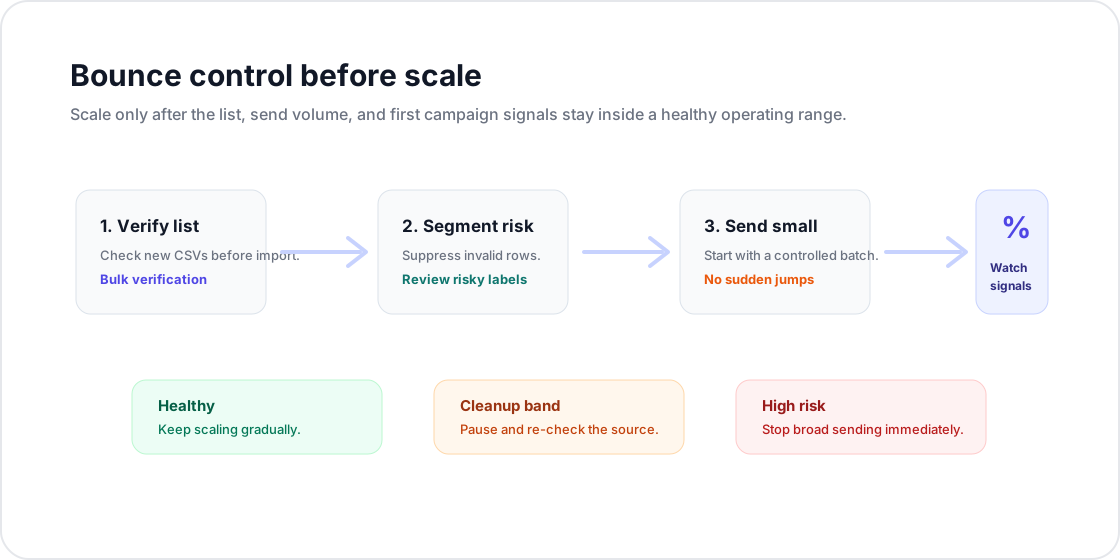
| Signal | Healthy operating range | Stop rule |
|---|---|---|
| Total bounces | Under 3% is healthy; 3% to 5% needs cleanup; above 5% is high risk. | Pause the campaign if bounces enter the cleanup band, then verify the remaining list before resuming. |
| Hard bounces | Low and stable after list verification. | Suppress immediately and investigate the list source if hard bounces cluster in one segment. |
| Spam complaints | Well below provider thresholds. | Stop broad sending, tighten targeting, and review offer fit before any restart. |
| Reply quality | Replies show the audience understands why they were contacted. | If replies are confused or negative, narrow the segment and rewrite the opener. |
| Domain reputation | Stable or improving across the warmup period. | Hold volume steady or reduce it until reputation recovers. |
Keep daily volumes steady even after warmup, monitor your sending reputation through tools like Google Postmaster Tools, and watch your bounce and complaint rates campaign over campaign. Deliverability is not a setup task you finish once. It is an ongoing discipline, and the senders who treat it that way are the ones whose cold email keeps landing in the inbox.
Launch Checklist Before the First Send
Use this final check before a new domain, mailbox, or prospect source goes live.
| Area | Ready when | Do not launch if |
|---|---|---|
| Authentication | SPF, DKIM, and DMARC pass from the actual sending tool. | Any record is missing, misaligned, or still waiting on DNS propagation. |
| Warmup | Volume has increased gradually and reputation signals are stable. | The domain is new and has not sent low-volume mail yet. |
| List quality | The campaign file has been verified and invalid, disposable, and risky rows are handled. | The list is old, sourced externally, or imported without verification. |
| Stop rules | The owner knows exactly what to do at under 3%, 3% to 5%, and above 5% total bounces. | No one is watching campaign signals during the first send. |
For list-specific steps, use the email list cleaning workflow before you import the campaign file.
Frequently Asked Questions
Related Articles
Start with Clean Data
100 free credits on signup. No credit card required. Put the advice into practice today.
Start Free