How to Verify an Email Address Without Sending
You do not need to email someone to find out whether their address is real. Several techniques confirm an address using the mail system itself, and this guide explains each one, where it works, and where it falls short.
You can verify an email address without sending by checking its format, confirming the domain has mail servers, then running an SMTP handshake that stops before message delivery. The reliable version is not a manual command-line probe; it is a layered verification API or bulk verification workflow that also handles catch-all, disposable, and role-based results.
Why Verify Without Sending
The obvious way to test an email address is to email it and see whether it bounces. That works, but it is the worst possible method. A bounce only happens after the message has already reached a mailbox provider, which means the failure is already counted against your sender reputation. If you test a list this way, you have learned which addresses are bad by damaging your standing in the process. You also cannot test quietly, because real recipients receive a real message.
Verifying without sending flips this around. It confirms whether an address can receive mail before you commit a single campaign to it. Nothing reaches an inbox, nothing bounces, and your reputation is untouched. This is possible because the mail system is built on a protocol that lets servers ask each other questions, and a verifier can ask those questions without following through with a delivery.
There are several methods, ranging from a simple format check to a full conversation with the receiving server. Each answers part of the question, and understanding what each one does, and does not, tell you is the key to using them well.
| Method | What it proves | Main limitation |
|---|---|---|
| Syntax check | The address is shaped correctly. | It cannot prove the domain or mailbox exists. |
| MX lookup | The domain publishes mail servers. | It says nothing about the specific mailbox. |
| SMTP handshake | The server response for that recipient address. | Catch-all domains, greylisting, and throttling can make the result ambiguous. |
| Verification service | A layered deliverability result with risk categories. | Uncertain server behavior still needs honest labels, not guesses. |
Method 1: Syntax Validation
The fastest check is purely structural. Email address format is governed by a specification called RFC 5322, which defines exactly what a legal address looks like: a local part, an @ symbol, and a domain, with rules about which characters are allowed and where.
Syntax validation tests an address against those rules. It catches addresses with no @ symbol, with spaces or illegal characters, with a missing or malformed domain, or with a local part that breaks the specification. It requires no network connection at all, so it is instant and free, and it filters out a meaningful share of bad addresses, most of them simple typos made during data entry.
The limitation is fundamental. Syntax validation only proves that an address is shaped correctly. It cannot prove the address exists. The address valid.but.fake@gmail.com is perfectly legal syntax and almost certainly not a real mailbox. Treat syntax validation as a first filter, never as a verdict.
Method 2: Domain and MX Record Lookup
The next step moves from the address to its domain. Every domain that can receive email publishes DNS records called MX records, short for Mail Exchanger. These records name the servers responsible for accepting mail on behalf of the domain.
An MX lookup queries DNS for the domain's MX records. If the domain has valid MX records, it is configured to receive email, and a connection point exists. If the domain has no MX records, it cannot receive mail at all, and every address on it is invalid regardless of spelling. This step is excellent at catching dead domains, which appear constantly on older lists as companies fold or rebrand.
The limitation is that a domain check operates at the wrong level. Confirming that gmail.com has MX records tells you Google can receive mail. It tells you nothing about whether one specific Gmail mailbox exists. Domain and MX validation narrows the field, but it cannot resolve an individual address.
Method 3: The SMTP Check, or Pinging
This is the method that actually examines a specific mailbox without sending to it. It is often called pinging an email address, though that name is misleading. It has nothing to do with the ICMP ping command used for network diagnostics. In email verification, pinging means holding an SMTP conversation with the receiving server.
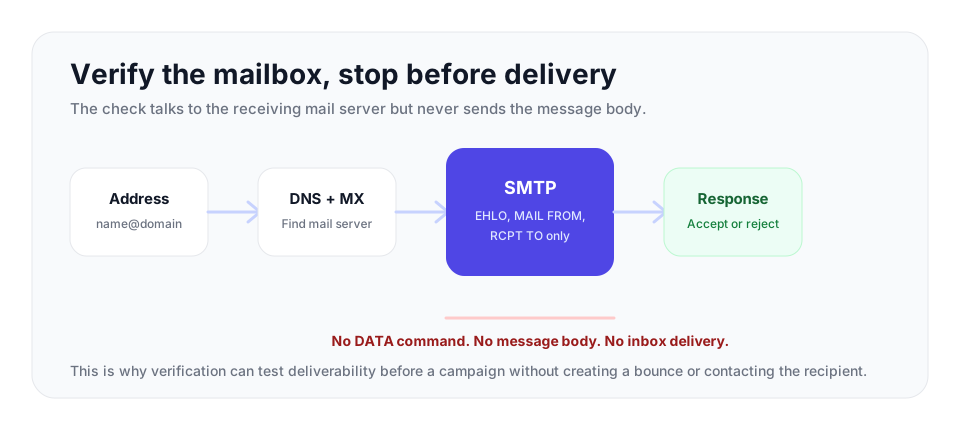
SMTP, the Simple Mail Transfer Protocol, is the language mail servers use to hand messages to one another. A normal delivery follows a fixed sequence of commands. The SMTP check walks through that sequence but stops one step early.
It works like this. The verifier opens a connection to the recipient's mail server, the one found in the MX lookup. It exchanges greetings with EHLO or HELO, identifying itself. It declares a sender with the MAIL FROM command. It then issues RCPT TO, naming the exact address being verified. The receiving server responds with a status code. A 250 code means the server will accept mail for that address. A 550 code means it is rejecting the address, usually because the mailbox does not exist. The verifier reads that code and then issues QUIT to close the connection. It never sends the DATA command. DATA is the step where the actual message body would be transmitted, and because the conversation ends before DATA, no email is ever delivered. The mailbox has been checked, and the recipient has received nothing.
This is the heart of verifying without sending. It is also where the real complications begin.
Where SMTP Checks Run Into Trouble
An SMTP check sounds definitive, but several common server behaviors make a raw, manual check unreliable.
Catch-all domains
Some domains are configured as catch-all, meaning the server accepts mail for every possible address at the domain whether or not the mailbox exists. A catch-all server returns a 250 code for a real address, a misspelled address, and a completely random address alike. An SMTP check against a catch-all domain therefore tells you nothing definitive at the mailbox level, because the answer is always yes. Detecting a catch-all requires probing the domain with a random address and observing that it too is accepted. This is detection, not a quality score, and it tells you the address cannot be confirmed individually.
Greylisting
Some servers deliberately return a temporary failure code the first time they see an unfamiliar sender, expecting a legitimate mail server to retry shortly. A naive check that reads this temporary code as a permanent failure will wrongly mark a perfectly good address as invalid. Correct handling means recognizing temporary codes and not treating them as a final answer.
Probe blocking
This is the practical killer for manual checks. Major providers such as Google and Microsoft monitor for repeated SMTP probing from a single IP address and treat it as reconnaissance, the kind of behavior a spammer uses to mine for valid addresses. Their response is to block the probing IP outright. So if you try to verify a list by running manual SMTP checks from your own server or a Telnet session, you will get a handful of answers and then find your IP blocked, with the remaining checks failing for the wrong reason. Manual SMTP verification does not scale, and at volume it does not work at all.
Method 4: A Dedicated Verification Service
The methods above each verify one piece of the puzzle, and each has a real weakness on its own. A dedicated verification service exists to run all of them together, handle the edge cases correctly, and operate at a scale that manual checks cannot.
VeriMails layers every check on each address. It runs syntax validation against RFC 5322, performs the MX and DNS lookup, and conducts the live SMTP handshake described above, all without delivering a message. On top of that base it adds catch-all detection, so accept-all domains are correctly identified rather than reported as falsely valid, disposable domain detection, so temporary throwaway addresses are flagged, and role-based detection, so addresses like info@ and support@ are labeled. It recognizes greylisting and other temporary responses and classifies them correctly instead of forcing a false invalid. And it runs from infrastructure designed for verification, so the probe-blocking problem that defeats manual checks does not stop it.
The result is practical verification with no email ever sent. You can use the REST API to verify a single address in real time, ideal for checking a signup form submission as it happens, or bulk CSV verification to clean an entire list before a campaign. Pricing starts from $0.0019 per email, with 10,000 credits at $19 and packages up to 5 million credits for $1,499, and monthly annual plans from $12.50/month when billed yearly. Every account gets 100 free credits on signup, no credit card required, and they never expire, so you can verify a real list without sending a real email and see the difference for yourself.
Frequently Asked Questions
Related Articles
Start with Clean Data
100 free credits on signup. No credit card required. Put the advice into practice today.
Start Free