Email Bounce Checker
Check whether an address is likely to bounce before it reaches a campaign, CRM import, newsletter send, or sales sequence.
100 free credits. No credit card required.
TL;DR
- Use this bounce checker to decide whether one address should be sent, reviewed, or suppressed before a message goes out.
- Under 3% bounce rate is healthy, 3-5% needs cleanup and attention, and above 5% is high risk for a sending workflow.
- For a whole CSV or CRM export, run bulk verification before importing the list into your email platform.
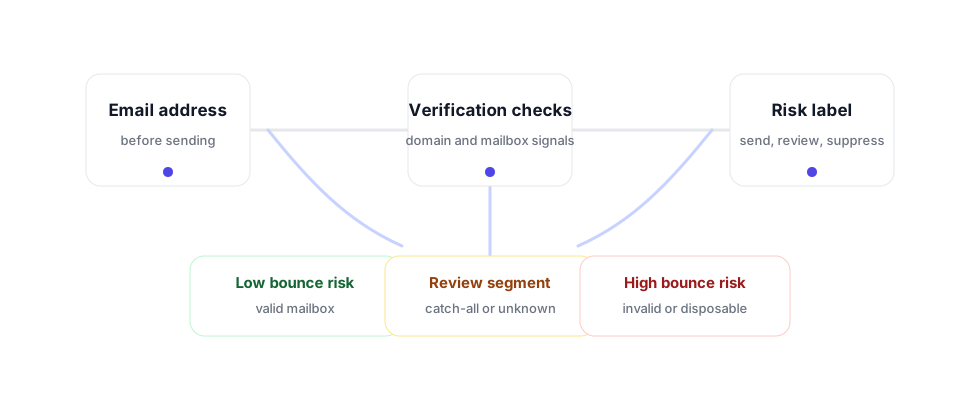
Why bounce checking matters before sending
A bounce is more than a failed message. Mailbox providers watch sender behavior over time, and repeated hard bounces tell them that a sender is using stale, guessed, scraped, or poorly maintained data. That can make future messages harder to place, even when the next recipient is legitimate and interested.
A good email bounce checker helps you avoid that pattern before the campaign starts. It checks whether the address is shaped correctly, whether the domain can receive mail, whether the mailbox appears reachable, and whether the result needs special handling. The goal is not to turn every address into a binary answer. The goal is to create a practical sending decision that protects the list, the campaign, and the domain behind it.
Check one address here before you send. For the broader result label, run the free email verifier. For product checks, connect the verification API. For newsletters or lifecycle campaigns, clean the whole list with email list cleaning.
Hard bounce
The address or domain cannot receive the message. These records should be removed before sending.
Soft bounce
The inbox or server may be temporarily unavailable. Watch repeated soft bounces before deciding what to suppress.
Catch-all review
The domain accepts broadly, so the address should be reviewed separately instead of mixed into the main list.
How to use bounce risk in a campaign workflow
Check bounce risk at the point where a contact is about to become sendable. For cold outreach, that is before the lead is loaded into a sequencer. For newsletters, that is before a reactivation or imported list campaign. For recruiting, that is before a candidate source list is added to an outbound workflow. For product-led growth, that is before automated emails are sent to addresses collected from signups, trials, or enrichment flows.
- Check individual addresses when a contact looks important but uncertain.
- Suppress invalid, disposable, and high-risk records before the first send.
- Keep catch-all and unknown records in a review segment.
- Use verification result codes to map each label to your CRM, ESP, or sequencer.
- Re-check lists that have been sitting unused, because email data decays over time.
The most important operational rule is simple: never let a risky list become a sending problem. A few minutes of verification before the campaign is cheaper than repairing sender reputation later.
Where bounce checking fits
Bounce checking should happen before a list is activated, not after the campaign reports damage. For outbound teams, that means checking the list before it enters Instantly, Smartlead, Outreach, Salesloft, or any other sequencer. For marketing teams, it means checking imported subscribers before they enter Mailchimp, Klaviyo, HubSpot, ActiveCampaign, or a similar email platform. For agencies, it means building verification into the client handoff so the sender is not blamed for source-data quality problems later.
Use the result to create a clean operating rule. Valid records can move forward. Invalid and disposable records should be removed. Catch-all and unknown records should sit in a review segment where the team can decide whether to test, throttle, or suppress them. That segmentation keeps a list usable without pretending every address carries the same risk.
This also makes reporting cleaner. Instead of explaining a bad campaign after it happened, you can show the input quality before the campaign starts: how many addresses were ready, how many were suppressed, and how many needed review. That turns bounce control into a repeatable pre-send checklist rather than a reactive deliverability cleanup project.
FAQ
What is an email bounce checker?
An email bounce checker tests whether an address is likely to bounce before a campaign sends by looking at format, domain, mailbox, disposable, role-based, and catch-all signals.
What bounce rate is healthy?
Under 3% is healthy, 3-5% needs cleanup and attention, and above 5% is high risk. Hard bounces should be removed before sending.
What is the difference between hard bounce and soft bounce?
A hard bounce usually means the address or domain cannot receive the message. A soft bounce is temporary, such as a full inbox, server delay, or temporary rejection.
Should I send to catch-all addresses?
Catch-all addresses should be reviewed separately. The domain may accept broadly, so the specific inbox is less certain than a normal valid result.
When should I check bounce risk?
Check bounce risk before importing a list, launching an outbound sequence, restarting an old campaign, or sending to contacts that have not been verified recently.
Check the full list before you send
Start with 100 free credits. No credit card required.
Start FreeRelated Tools & Resources
Last updated: March 2026
Check Thousands at Once
Bulk verify entire lists in minutes. 100 free credits on signup — no credit card required.
Create Free Account