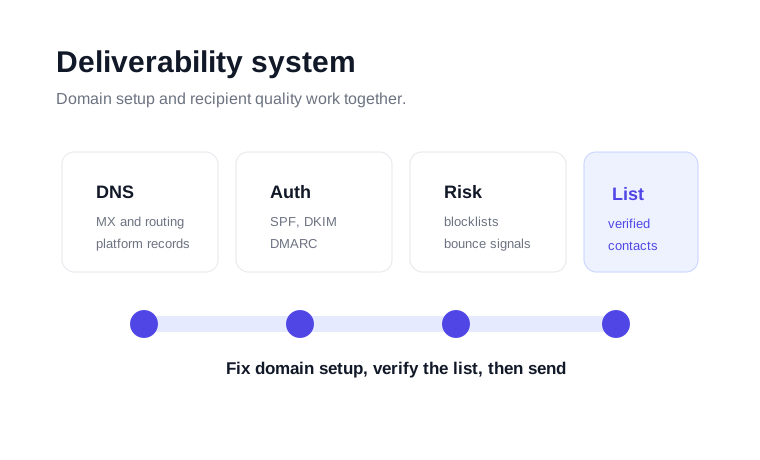
What this deliverability checker measures
Email deliverability is the practical ability to reach inboxes instead of spam folders, blocks or bounces. No single check can predict every provider's decision, but visible domain checks are a good first diagnostic layer. If MX, SPF, DKIM, DMARC or blocklist signals are broken, every campaign sent from that domain starts with unnecessary friction.
This tool checks the pieces you can inspect publicly: MX records for mail routing, SPF records for authorized senders, DMARC records for policy and reporting, an optional DKIM selector, and a common blacklist signal. After those checks, the next layer is list quality. A clean domain still suffers if the campaign is sent to invalid, stale or risky addresses.
How to read the results
MX records
MX records show whether the domain can receive mail. They also help confirm that replies and operational messages route to the expected mail provider. If MX is missing or pointed at the wrong host, fix it before a campaign goes out.
SPF and DKIM
SPF authorizes sending services for the domain. DKIM attaches a cryptographic signature from the sending platform. Together, they help mailbox providers identify whether a message is aligned with the domain it claims to represent.
DMARC
DMARC tells receivers how to evaluate authentication failures and where to send reports. A domain can start with monitoring, then move toward stricter policies after legitimate sending sources are aligned.
Blacklist status
A blacklist result is a warning sign that should trigger root-cause review. Look at recent campaigns, bounce rates, list source, form abuse and authentication. A delisting request is more effective after the cause has been corrected.
A practical deliverability workflow
Run the tool and fix missing MX, SPF, DKIM or DMARC records before sending more volume.
Use bulk verification to remove invalid addresses. Under 3% bounce is healthy, 3-5% needs cleanup, and above 5% is high risk.
Separate catch-all, role-based or low-confidence records when a campaign has strict sender-reputation requirements.
Review bounce codes, replies, complaints and engagement after each campaign. Deliverability is maintained through repeated clean sends.
When to use VeriMails alongside this checker
Use this checker to confirm the domain is ready, then use VeriMails to confirm the list is ready. The free email verifier is useful for one-off checks. The bulk verification workflow is better for CSV exports. The Email Verification API fits signup forms, lead capture and automated workflows where bad addresses should be stopped before they enter your CRM or email platform.
That order keeps the process clear: first fix the sending domain, then clean the recipient list, then send with controlled volume and monitor results.
When teams skip that order, troubleshooting becomes messy. A campaign can fail because SPF is missing, because the list is stale, because volume jumped too fast, or because a previous send created complaints. Running the domain check first gives you a clean baseline before you spend time rewriting copy or changing targeting.
For recurring campaigns, make the checker part of a pre-send routine. Confirm the domain, verify the file, segment risky records, then review bounce results after the send. That routine is especially useful when multiple people can export contacts or change DNS records.
For developer-led workflows, the same principle applies inside the product. Validate the domain records when a customer connects a sending domain, then verify new addresses before they enter lifecycle messages, sales queues or notification lists.