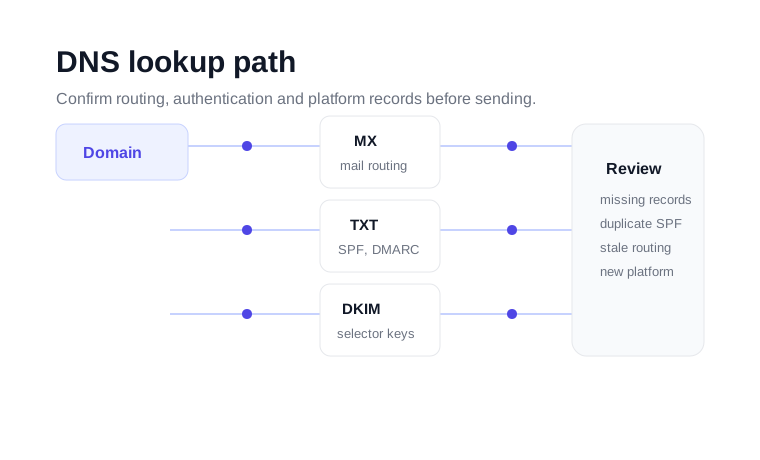
What this DNS checker helps you inspect
DNS is the public instruction layer for a domain. When a mailbox provider receives or evaluates an email, it looks at DNS to understand whether the domain is configured correctly, whether authentication records exist, and where replies or inbound mail should route. A small DNS mistake can create a large deliverability issue because the problem is visible to every receiving server.
This checker is useful when you are connecting a new email platform, checking whether an SPF or DMARC record has propagated, confirming that MX records still point to the right mail host, or reviewing a domain before a campaign. It is not a replacement for bulk email verification, but it helps confirm that the domain infrastructure behind a campaign is not working against you.
Which DNS records matter for email?
MX records
MX records tell the internet which servers receive mail for a domain. If MX records are missing, inbound mail may fail. If they point to an old provider, replies, password resets or operational messages can land in the wrong place. For sales and marketing teams, that can quietly break reply handling even when outbound mail still appears to send.
TXT records
TXT records usually hold SPF and DMARC records. SPF lists the services allowed to send mail for the domain. DMARC tells receiving systems how to evaluate messages that fail authentication. A domain can only have one SPF record, so duplicate SPF records are a common reason otherwise normal campaigns start failing authentication checks.
DKIM selector records
DKIM records are stored under selector-specific names such as selector._domainkey.example.com. They prove that a sending platform signed a message for the domain. If your email platform asks you to publish a DKIM selector, use the DNS checker to confirm the record exists after the change has propagated.
A, AAAA, CNAME and NS records
A and AAAA records map a name to an IP address. CNAME records point one hostname to another. Nameserver records show which DNS provider controls the domain. These records matter when a sending platform asks you to connect tracking domains, branded links or return-path records.
A practical DNS troubleshooting workflow
Confirm the domain still points to the expected DNS provider and mail host. This catches migrations that were only half completed.
Look for SPF and DMARC. If the domain has multiple SPF records, merge them before sending from multiple platforms.
Confirm DKIM selectors, branded tracking domains and verification tokens are visible before you rely on the sending platform.
Once the domain setup is clean, use email verification or bulk verification to remove invalid recipient addresses.
When to use this tool
Use the DNS checker before launching a new sending domain, after changing email providers, when a deliverability checker reports missing authentication, or when a support team asks you to prove that a DNS record is live. It is also useful for agencies managing multiple client domains because it gives a fast, repeatable way to confirm whether the required records exist.
If the DNS layer looks correct but campaigns still bounce, move from domain setup to list quality. A healthy outbound process checks both sides: the sending domain must authenticate properly, and the recipient list must contain reachable addresses.
For teams managing several sending domains, keep a short record of expected MX, SPF, DKIM and DMARC values. That makes it easier to spot unexpected changes after a provider migration, agency handoff or DNS cleanup project.