DMARC Record Checker
Look up and parse a domain's DMARC policy so you can see enforcement, reporting, and alignment settings before sending at volume.
TL;DR
- Use the DMARC checker to confirm the TXT record exists at
_dmarc.yourdomain.com. - Review the policy, report addresses, percentage rollout, and alignment settings before campaigns go out.
- If no record is found, create one with the DMARC generator after SPF and DKIM are in place.
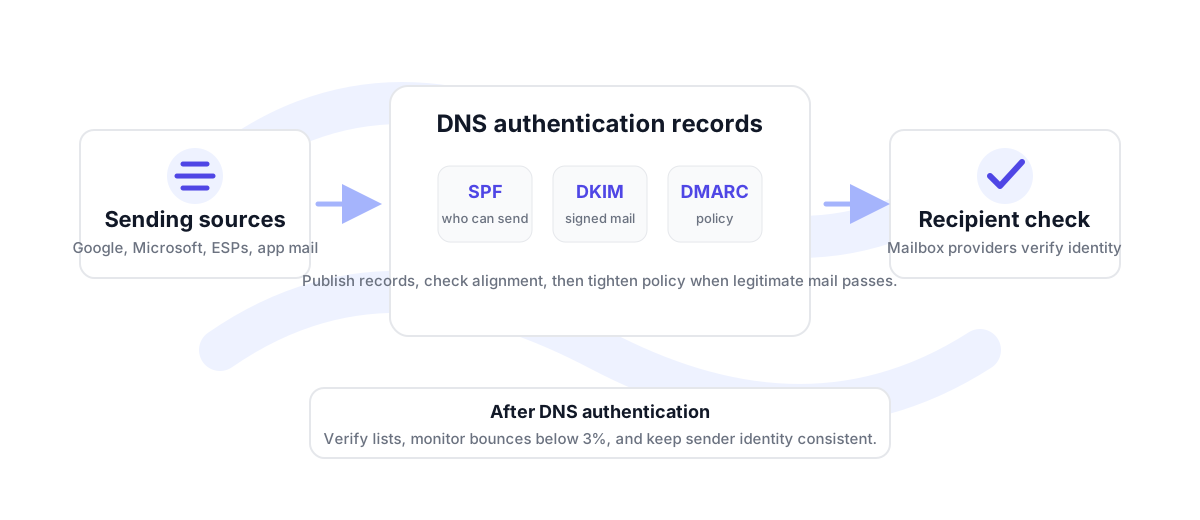
What a DMARC check tells you
A DMARC check confirms whether a domain has a TXT record at the expected _dmarc host. When the record is present, the checker parses the main tags so you can see whether the domain is monitoring only, quarantining failures, or rejecting failures. It also shows reporting addresses and rollout settings when they are published.
The policy value matters because it tells mailbox providers what the domain owner wants to happen when authentication fails. p=none is for monitoring. p=quarantine asks providers to treat failures suspiciously, often by sending them to spam. p=reject asks providers to block failing mail. Move carefully because a strict policy can affect legitimate mail if SPF or DKIM is not aligned.
Alignment settings are also important. Relaxed alignment allows a subdomain relationship to count as aligned. Strict alignment requires an exact domain match. Relaxed is common for operational sending, while strict can be useful for tightly controlled sender setups.
Confirm the record exists and whether the domain is monitoring, quarantining, or rejecting failures.
Look for aggregate reporting addresses so authentication failures can be monitored over time.
Check SPF and DKIM alignment before tightening policy or sending larger campaigns.
When to re-check DMARC
Re-check DMARC any time a new sending tool is added, a subdomain starts sending, DKIM keys rotate, or SPF includes change. A domain can appear healthy for normal inbox mail while a marketing platform or sales tool still fails alignment. Checking DMARC before a launch gives you time to fix authentication before reputation signals start accumulating.
For the broader sending workflow, pair this checker with the SPF checker, DKIM checker, and email health check. For the recipient side, use bulk verification before sending to exported CRM, newsletter, or prospecting lists.
How to use DMARC checks in a sending workflow
Check DMARC before a new domain is warmed, before a new sending platform is connected, and before a high-volume campaign is launched. The goal is to catch mismatches while the send is still easy to fix. If DMARC is missing, publish a monitoring policy first. If DMARC exists but shows strict alignment, make sure each sender uses the exact domain or subdomain expected by the policy.
For established domains, compare the policy against real campaign behavior. A brand may use one domain for employee mail, another subdomain for lifecycle email, and a separate subdomain for outbound sales. Each path should have authentication that matches how mail is actually sent. When a path changes, check the DNS records again rather than relying on last quarter's setup.
DMARC also helps protect brand identity, but it is not the only pre-send check. Review SPF and DKIM, verify addresses before upload, and watch bounce rate after every campaign. Under 3% is healthy, 3-5% needs cleanup and attention, and above 5% should trigger a deeper list-quality review before more volume is sent.
If the checker returns a strict policy, slow down before connecting a new sender. Confirm that the sender can pass DKIM or SPF alignment with the exact visible From domain. If it cannot, fix authentication first or send from a properly configured subdomain.
If the checker returns monitoring only, the domain may still be usable, but it is not asking receivers to quarantine or reject failing messages. Treat monitoring as a visibility phase, not the final state for a mature sending domain.
DMARC checker FAQ
Why is my DMARC record missing?
It may not be published at _dmarc.yourdomain.com, it may not have propagated, or the TXT record may not start with v=DMARC1.
Is p=none enough for production sending?
p=none is useful for monitoring, but it does not ask receivers to quarantine or reject failures. Move to stricter policies after legitimate mail is aligned.
What is DMARC alignment?
Alignment checks whether the authenticated SPF or DKIM domain matches the visible From domain closely enough to satisfy the DMARC policy.
Should I check DMARC before sending a campaign?
Yes. Check DMARC, SPF, DKIM, and list quality before sending to a large list, especially from a newer domain or a recently changed setup.