Email Verification for Lead Generation Agencies
Turn sourced contacts into client-ready lead lists. VeriMails verifies addresses before delivery, so you can reduce bounces, segment risky records, and report verified counts with confidence.
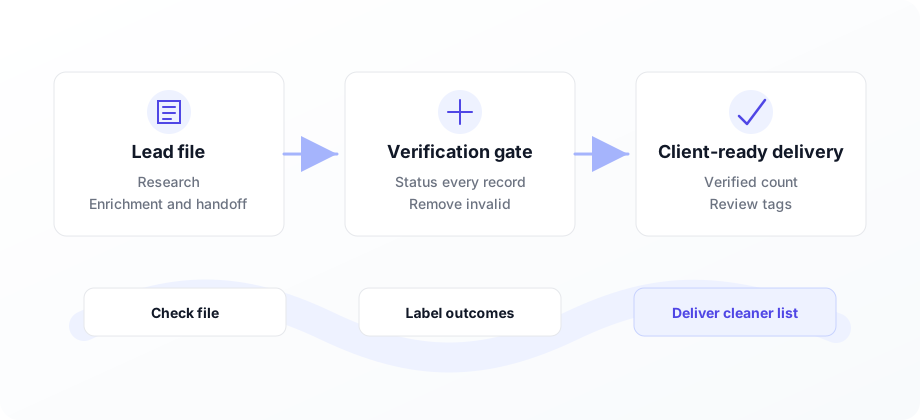
Make verified leads the thing you deliver.
Lead generation agencies win on list quality. Use VeriMails to clean bulk CSVs, verify new leads through the API, and separate valid, invalid, catch-all, role-based, and disposable records before a client ever sends.
For a lead generation agency, the email address is not a small field in the spreadsheet. It is the part of the lead your client actually uses. A list can look large, targeted, and well enriched, but if the addresses bounce, the client experiences it as wasted budget and avoidable risk.
VeriMails fits between sourcing and delivery. Upload a CSV through bulk verification, or verify leads through the email verification API as they enter your workflow. The output gives your team a practical status for each record, so invalid addresses can be removed and risky records can be reviewed before handoff.
That makes verification part of the product you sell. Instead of reporting raw row counts, you can report usable contacts, filtered records, and a clean list your client can move into cold email, CRM enrichment, or sales follow-up.
Why lead gen agencies verify before delivery
Verification turns a sourced list into a stronger deliverable and gives account teams a cleaner story to tell clients.
Deliver usable contacts
Remove addresses that are invalid, disposable, or clearly not fit for outreach before they reach the client.
Protect sender reputation
A cleaner file helps clients avoid avoidable bounces and keeps outreach domains healthier over time.
Report verified counts
Share the verified count, removed count, and risk segments so clients understand the quality of what they received.
Manage many clients
Run a separate verification job per client or campaign while keeping credit management simple.
Verify at intake
Use the API to check leads as they enter your enrichment, routing, or delivery workflow.
Segment risky records
Catch-all, role-based, and disposable flags help decide what to include, suppress, or review manually.
Where verification fits in a lead delivery workflow
Use VeriMails at the points where bad email data becomes expensive.
| Moment | Risk | VeriMails use case | Business outcome |
|---|---|---|---|
| List build | Newly sourced contacts include typos, stale roles, and risky generic inboxes. | Verify at intake or upload the first CSV draft. | Bad records are filtered before enrichment and review time is wasted. |
| Pre-delivery review | A large file can look complete while hiding addresses that will fail on first send. | Run bulk verification and export filtered results. | The client receives a cleaner deliverable with a defensible verified count. |
| Client handoff | Clients need to know which rows are safe to send and which require caution. | Include status fields for valid, invalid, catch-all, role-based, and disposable records. | Sales teams can load only the records that match their risk tolerance. |
| Replacement policy | A bounce replacement promise is hard to support without a quality gate. | Verify before delivery and keep the results file with the job. | Support requests are easier to resolve and the offer feels more credible. |
Lead list quality checklist
Run this before a list leaves your agency.
How it works
From sourced lead file to client-ready deliverable in three steps.
Upload or connect
Upload a CSV lead list, or connect the API to check new leads as they enter your workflow.
Review statuses
Use the results to remove invalid addresses and segment catch-all, role-based, and disposable records.
Deliver with context
Export the clean file and report verified counts so the client understands exactly what is ready to use.
Clear VeriMails use cases for lead gen agencies
Use verification anywhere a contact moves from raw data to a client-facing asset.
Pre-sale sample lists
Verify a sample before a sales call so prospects see quality, not just volume.
Monthly client deliveries
Run each recurring delivery through bulk verification and keep the export attached to the account record.
Lead routing pipelines
Verify leads before enrichment, scoring, assignment, or CRM sync so bad records do not spread.
A better agency promise: deliver contacts a client can use, not rows a client has to clean.
Frequently asked questions
What lead generation teams ask before adding verification to delivery quality checks.