Email Verification for Appointment Setting Companies
Appointment setting depends on inbox capacity. VeriMails cleans prospect lists before sequences launch so more sends reach real buyers and fewer bounces put domains at risk.
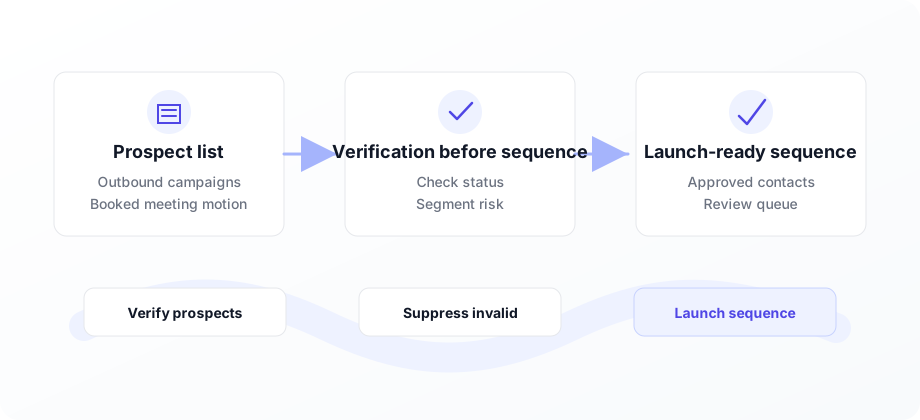
Keep the inbox fleet healthy before the first send.
Use VeriMails to verify client prospect lists, suppress invalid records, and segment risky addresses before they enter your sequencer. Cleaner lists mean better capacity, cleaner reporting, and more meetings from the same campaign volume.
Appointment setting is a throughput business. You are paid to turn prospect lists into conversations, and the whole model depends on sends reaching real inboxes. When a list contains invalid addresses, every bounce wastes capacity and creates a deliverability problem for future sends.
VeriMails gives appointment setting teams a simple quality gate before launch. Upload prospect CSVs with bulk verification, or use the API to verify contacts as they are added to campaigns. The result is a clean, practical status on each address before it touches the sequencer.
That matters for operators and clients. Operators protect the sending setup, while clients see a cleaner path from list volume to booked meetings. Verification does not replace targeting or copy, but it removes the bad addresses that make both harder to measure.
Why appointment setters verify every prospect list
Booked meetings come from real delivered emails, not raw rows loaded into a sequence.
More real sends
Removing invalid addresses means a larger share of your daily capacity reaches actual prospects.
Protect sending domains
Cleaner campaign lists help keep the inbox fleet stable across client launches.
Improve meeting math
When dead addresses are removed, reply and booking rates reflect real prospects instead of list defects.
Separate client jobs
Verify each client list as its own job so quality checks, reporting, and follow-up stay organized.
Recheck paused lists
Lists decay while campaigns wait. Reverify older segments before reactivation.
Check leads continuously
Use API checks for new prospects added by forms, data vendors, or enrichment tools.
Where verification protects appointment setting campaigns
Add a verification gate anywhere prospects move toward a live sequence.
| Moment | Risk | VeriMails use case | Business outcome |
|---|---|---|---|
| New client onboarding | The first list sets the health baseline for the whole account. | Run a bulk verification job before the first sequence is built. | Launch starts with cleaner data and fewer avoidable bounces. |
| Daily list imports | Small bad imports compound across many inboxes and domains. | Verify each CSV before it enters the sequencer. | Operators keep capacity focused on reachable prospects. |
| Follow-up sequences | Risky addresses can keep bouncing across multiple touches. | Suppress invalid records and segment catch-all or role-based addresses. | Follow-ups are reserved for prospects worth continuing to contact. |
| Reactivation campaigns | Older no-reply and paused lists decay quietly. | Reverify dormant lists before restarting outreach. | Old segments can be relaunched without carrying stale records forward. |
Pre-launch checklist for appointment setters
Use this before a campaign goes live.
How it works
From raw prospect list to cleaner sequence launch.
Upload the prospect list
Add the CSV from your data provider, CRM, or research team.
Filter by status
Remove invalid records and decide how to handle catch-all, role-based, and disposable addresses.
Launch with cleaner data
Load the verified segment into your sequencer and keep the results file for reporting.
Clear VeriMails use cases for appointment setting
Verification supports the operating moments that determine capacity and booked meetings.
Client onboarding checks
Verify the first list before copy, inboxes, and daily volume are committed.
Paused list reactivation
Recheck dormant lists before they are moved back into active sending.
Real-time intake checks
Verify new prospects from forms, vendors, or enrichment tools before assignment.
Operational rule: clean the list before you judge the copy, the offer, or the appointment setter.
Frequently asked questions
What appointment setting teams ask before verifying prospect lists.