Email Verification for PPC Agencies
First-party audiences only work when the email data is usable. VeriMails verifies customer lists, lead form exports, and CRM segments before they feed paid media campaigns.
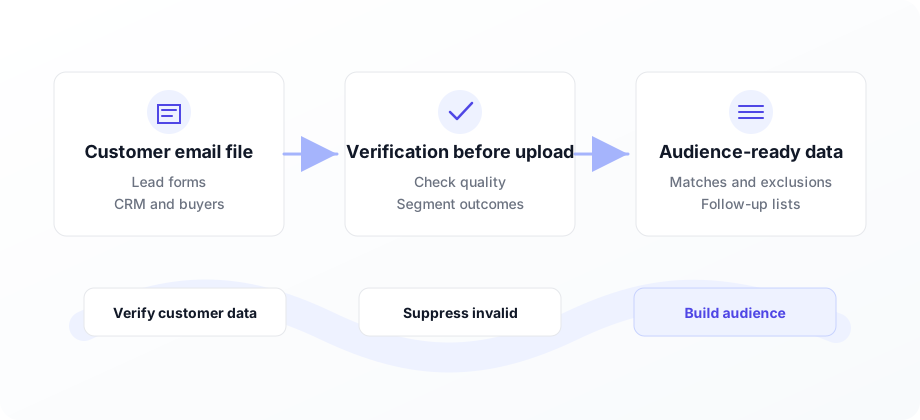
Clean customer data before it becomes an audience.
PPC agencies use emails for Customer Match, Custom Audiences, retargeting, exclusions, and lead follow-up. VeriMails verifies those records before upload so invalid addresses do not dilute audience quality or follow-up performance.
PPC agencies increasingly depend on first-party data. Customer Match, Custom Audiences, lead form follow-up, exclusions, and lifecycle campaigns all start with email addresses. If the list is full of invalid or stale records, the audience is smaller, noisier, and harder to optimize.
VeriMails gives paid media teams a verification step before upload. Use bulk verification for customer CSVs and CRM exports, or use the API to check lead form submissions before they move into sales follow-up.
That makes email verification useful beyond deliverability. Cleaner customer data helps PPC teams build better audiences, avoid wasting upload volume on records that cannot match, and keep nurture sends from bouncing after the ad click.
Why PPC agencies verify customer lists
Paid media performance depends on the quality of the first-party data you feed into platforms and follow-up workflows.
Improve audience quality
Remove invalid addresses before Customer Match or Custom Audience uploads.
Clean lead form exports
Verify emails from Google, Meta, LinkedIn, or landing page forms before follow-up.
Refresh CRM segments
Old customer exports need cleanup before remarketing, exclusions, and lifecycle work.
Protect nurture sends
Lead follow-up and post-click nurture work better when bad addresses are removed first.
Document audience quality
Show clients what was verified, suppressed, and uploaded.
Verify new leads
Use the API to check submissions before assigning them to sales or automations.
Where verification fits in PPC workflows
Use VeriMails before email data becomes an audience, exclusion, or follow-up sequence.
| Moment | Risk | VeriMails use case | Business outcome |
|---|---|---|---|
| Customer Match upload | Invalid emails cannot become useful platform matches. | Verify the customer CSV before hashing and upload. | A cleaner file feeds a stronger audience build. |
| Meta Custom Audience | Old customer exports include stale and mistyped addresses. | Run bulk verification and suppress invalid records. | Audience quality improves before spend is attached. |
| Lead form follow-up | Ad platform forms still collect typos and low-quality submissions. | Use API verification before CRM routing or nurture. | Sales and email teams receive cleaner leads. |
| Remarketing exclusions | Bad records weaken suppression and lifecycle logic. | Verify CRM segments before upload. | Budgets are protected from avoidable audience noise. |
PPC audience quality checklist
Run this before customer data reaches an ad platform or nurture workflow.
How it works
From customer export to cleaner paid media audience.
Export the list
Pull customer, lead, exclusion, or CRM segments as a CSV.
Verify and filter
Run verification, remove invalid records, and review risk segments.
Upload or route
Use the clean file for ad platforms, CRM sync, nurture, or reporting.
Clear VeriMails use cases for PPC agencies
Verification supports every paid media workflow that depends on email identifiers.
Customer Match prep
Verify customer lists before platform upload and matching.
Lead form cleanup
Check submissions before sales follow-up, nurture, or CRM sync.
Audience refreshes
Reverify recurring CRM exports before monthly remarketing updates.
Paid media rule: do not optimize around an audience file until the email data behind it has been cleaned.
Keep paid lead forms from filling the CRM with waste
Every paid form submission has a real acquisition cost. When the email is fake, mistyped, disposable, or unreachable, the campaign report still shows a lead but sales cannot work it. Verify the address before it reaches the CRM, then use the result to decide whether the record should sync, route to sales, or move into a review queue.
This is especially useful for high-intent search campaigns, lead magnets, webinar funnels, and landing pages with broad targeting. Connect VeriMails through the API or a workflow tool, clean older exports in bulk, and compare verifier cost on the pricing page. If a channel sends cheap but invalid leads, the verification breakdown makes the quality problem visible before budget shifts.
Frequently asked questions
What paid media teams ask before verifying customer lists.