How to Verify Emails in Flodesk
Flodesk is the email platform of choice for creators, coaches, and small brands who care about beautiful campaigns. But beautiful design does not reach the inbox if your subscriber list is full of dead and mistyped addresses. Verifying your Flodesk list before your next send keeps bounce rates down and your sender reputation intact. This guide walks through the export, verify, and re-import flow.
TLDR
- Export your Flodesk segment or full subscriber list, then run the CSV through bulk email verification before the next campaign or Workflow.
- Keep deliverable active subscribers in your re-import, and leave bounced, disposable, and other risky addresses out of the audience you plan to mail.
- Use the 100 free credits to test a creator-sized list, then check pricing for the credit pack that fits your next cleanup.
Why Verify Your Flodesk Contacts
Flodesk's flat-rate pricing means you are not penalized by list size the way you are on contact-based platforms, and that can quietly encourage list bloat. There is no billing pressure to remove dead addresses, so they accumulate. That makes a deliberate verification habit even more important for Flodesk users than for everyone else.
Form fills carry typos and fake addresses
Most Flodesk subscribers arrive through opt-in forms and full-page sign-up forms tied to a lead magnet. People rushing to download a freebie mistype their address or enter a junk address to grab the download without joining the list. Flodesk stores exactly what was typed, so addresses such as "name@yaho.com" or disposable inboxes sit in your audience until they bounce.
Bounces hurt the reputation of every creator on shared infrastructure
Mailbox providers judge senders on bounce rate. Anything above a five percent bounce rate signals a poor list and pushes your campaigns toward the spam folder. For a creator whose entire business depends on the newsletter landing in the inbox, even one send to an uncleaned list can dent open rates for months afterward.
Imported lists from a previous platform are decaying
Many people come to Flodesk from Mailchimp, ConvertKit, or Substack and import an existing list. Email lists decay by roughly 20 to 25 percent a year as subscribers change jobs and abandon old inboxes. The moment you import an aged list into Flodesk is the moment to verify it, before you send your welcome email to addresses that have gone cold.
Flodesk Workflows amplify a bad list
Flodesk Workflows send automated sequences to subscribers as they join segments. If a bad address enters a multi-email Workflow, it bounces on every step of that sequence, multiplying the reputational damage. Verifying before subscribers reach a Workflow stops that compounding effect at the source.
What VeriMails Checks
VeriMails applies a full chain of checks to each address in your Flodesk export, so you know precisely which subscribers are safe to keep mailing. Every address is tested as follows:
Syntax validation confirms the address is structurally correct before any network lookups. MX and DNS records are checked to confirm the domain exists and can actually receive mail. A live SMTP handshake connects to the mailbox provider to confirm the specific inbox accepts mail, without ever sending a message. Catch-all detection identifies domains that accept every address, so those contacts can be handled with care. Disposable detection flags temporary inbox domains that should be kept off any newsletter. Role-based detection identifies generic addresses like hello@, info@, and admin@ that tend to engage poorly.
VeriMails verification is built for reliable list cleaning and returns a clear result for each address. Catch-all domains are reported as a clear detection so you can decide what to do, never as a vague score.
Pricing for Flodesk Users
Verifying a Flodesk list with VeriMails costs a fraction of the revenue lost to spam folder placement. Credit packs start at $0.0019 per email, and 10,000 credits cost $19, which covers most creator and small-business lists comfortably. Larger credit packs scale up to 5 million addresses for $1,499.
For ongoing list hygiene, annual plans start at $12.50/month when billed yearly. Every new account receives 100 free credits on signup with no credit card required, and credits never expire, so unused credits stay available for your next quarterly clean.
Workflow Visual
Use this flow to clean a Flodesk segment before a visual campaign or automation relies on it.
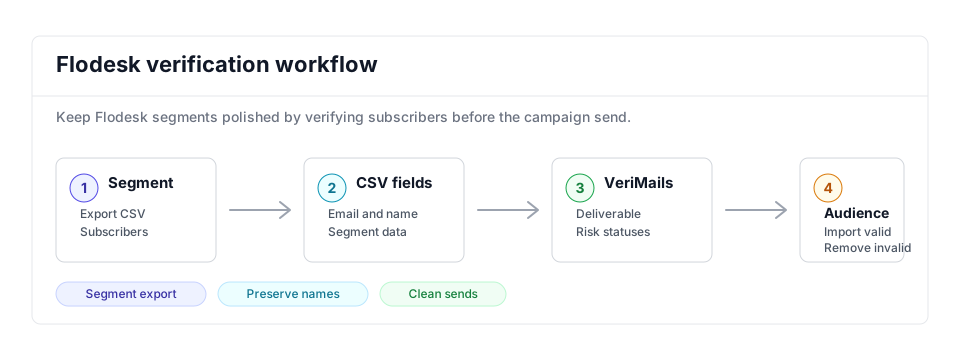
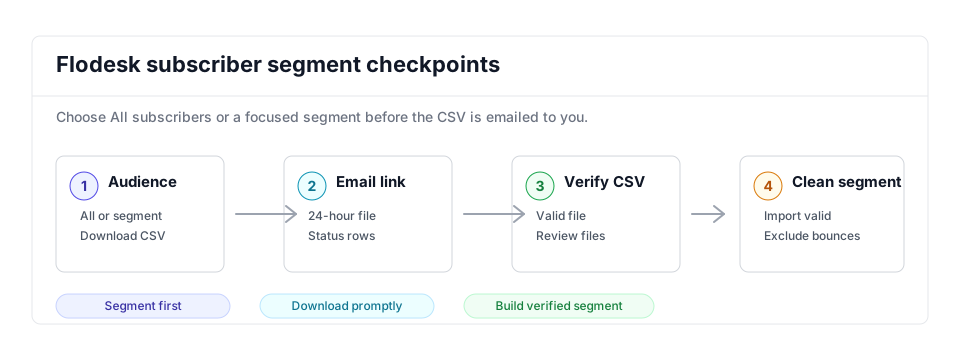
- Export scope: Start with the segment or All subscribers export that maps to the campaign you are preparing.
- Matching field: Keep email, name, and segment context so the clean import can rebuild the audience accurately.
- Result action: Import deliverable subscribers and remove or quarantine invalid, disposable, and risky rows before sending.
Step-by-Step
Export a CSV of your Flodesk subscribers
In Flodesk, open Audience and go to Segments. Hover over the segment you want to verify, or over All subscribers, and click the three dots in the top-right corner of the card. Select Download CSV. Flodesk emails a download link to your account login email. Open that email and download the file. The link expires after 24 hours, so do not delay.
Upload the CSV to VeriMails
Sign in to VeriMails and open Bulk Verification. Upload the CSV file you downloaded from Flodesk. VeriMails automatically detects and maps the email column, so there is no need to reformat the file or strip out the first-name and other subscriber fields Flodesk includes.
Run verification and review results
Start the verification job. The job runs as a queued bulk verification and shows downloadable filtered results when it completes. When the job completes, review the breakdown: deliverable addresses are safe, undeliverable and invalid addresses should be dropped, and disposable and role-based addresses are flagged for your call. Catch-all addresses are labeled so you can choose how to handle them.
Build a clean import file
Download the verified results and keep only the deliverable addresses, plus any catch-all contacts you decide to retain. Remove the undeliverable, invalid, bounced, and unsubscribed rows. Keep the original Flodesk columns such as first name so the re-import maps cleanly to your audience fields.
Re-import the clean list into Flodesk
In Flodesk, open Audience and use the Import option to upload your cleaned CSV. Map the email and name columns to the matching Flodesk fields, and add the contacts to a new segment such as "Verified" so future campaigns and Workflows target only clean subscribers. Leave the bad addresses out of your active sending segments.
Flodesk Cleanup Checklist
Use this checklist before a launch campaign, lead magnet sequence, or Workflow. It keeps the cleanup focused on the segment that will actually send.
| Check | What to do | Why it matters |
|---|---|---|
| Segment export | Export the exact segment, form source, or All subscribers list that maps to the campaign. | Flodesk exports can include unsubscribed, bounced, and spam-marked contacts, so scope matters. |
| Column retention | Keep email, first name, segment name, source, and fields used for personalization. | Preserves the data needed to rebuild beautiful campaigns without manual field repair. |
| Clean import | Import valid rows into a new Verified segment and keep the original campaign segment unchanged until the new audience is reviewed. | Keeps the old audience available while giving operators a clean segment for the next send. |
| Risk handling | Do not import invalid, disposable, bounced, or unsubscribed rows into active sending segments. | Prevents old suppression problems from reappearing inside Workflows. |
| Workflow gate | Point launch emails and automations at the Verified segment after reviewing catch-all and role-based rows. | Stops multi-email sequences from amplifying one bad address across several sends. |
Frequently Asked Questions
Related Guides
Try VeriMails Free
100 free credits on signup. No credit card required. Put this guide into practice today.
Start Free