How to Verify Emails in Substack
Substack publishers are judged by Gmail and other inbox providers on the quality of their list. A list full of mistyped, abandoned, or imported addresses drives bounces, pushes your posts into spam, and quietly shrinks your real reach. Verifying your Substack subscribers keeps your bounce rate low and your newsletter in the inbox. This guide covers the export, verify, and clean-up flow.
Export your Substack subscriber CSV, verify it with bulk verification, and use the invalid, disposable, catch-all, and role-based files as a cleanup queue. Substack cleanup is more manual than a typical ESP import, so keep the raw export, remove carefully, and combine verification with the engagement process in the email list cleaning guide.
Why Verify Your Substack Contacts
Substack handles the sending side for you, but it does not police the quality of every address that joins your publication. The way subscribers arrive on Substack creates specific risks that build up over time and eventually show up as a deliverability problem.
Imported lists arrive without any quality check
Most established writers move to Substack from Mailchimp, Ghost, beehiiv, or another platform and import a list. Substack accepts that import as-is. If the original list was never verified, every old job address and abandoned inbox comes along with it. Email lists decay by roughly 20 to 25 percent a year, so an imported list is almost always carrying dead addresses on day one.
Sign-up forms and embeds collect typos
Substack subscribers also come through the subscribe button, embedded forms, and shared subscribe links. Readers mistype their address, especially on mobile, and Substack stores whatever was entered. Addresses like "reader@gmial.com" sit in your list and bounce the first time you publish.
Bounces decide whether Substack reaches Gmail at all
Inbox providers watch your bounce rate as a trust signal. A bounce rate under two percent is healthy. Above five percent, providers begin filtering your posts into spam or rejecting them. For a Substack writer, that means your work simply does not appear in front of the readers you worked to earn.
Inflated lists hide your true paid conversion rate
If you sell paid subscriptions, your free-to-paid conversion rate is one of your most important numbers. Dead and invalid addresses pad your free subscriber count and make that conversion rate look worse than it really is. Verifying the list gives you an honest denominator and a clearer read on what is actually working.
What VeriMails Checks
VeriMails applies a full chain of checks to each address in your Substack export, so you know exactly which subscribers can receive your posts. Every address is tested as follows:
Syntax validation confirms the address is correctly formed before any network lookups. MX and DNS records are queried to confirm the domain exists and is configured to receive mail. A live SMTP handshake connects to the mailbox provider to confirm the specific inbox accepts mail, without sending a message. Catch-all detection identifies domains that accept every address sent to them, so those subscribers can be handled with care. Disposable detection flags temporary inbox domains that should not be on a newsletter list. Role-based detection identifies generic addresses such as info@, editor@, and admin@ that tend to engage poorly.
VeriMails verification runs layered checks and returns a clear result for each address. Catch-all domains are reported as a clear detection so you can decide what to do, never as a vague score.
Pricing for Substack Users
VeriMails pricing keeps Substack list hygiene practical for imports, launch checks, and regular audience cleanup. Credit packs start at $0.0019 per email, and 10,000 credits cost $19, which covers most independent newsletters. Larger credit packs scale up to 5 million addresses for $1,499 for large publications.
For ongoing list hygiene, annual plans start at $12.50/month when billed yearly. Every new account receives 100 free credits on signup with no credit card required, and credits never expire, so unused credits remain available for your next import or quarterly clean.
Workflow Visual
Use this flow to identify dead Substack subscriber addresses before newsletter delivery suffers.
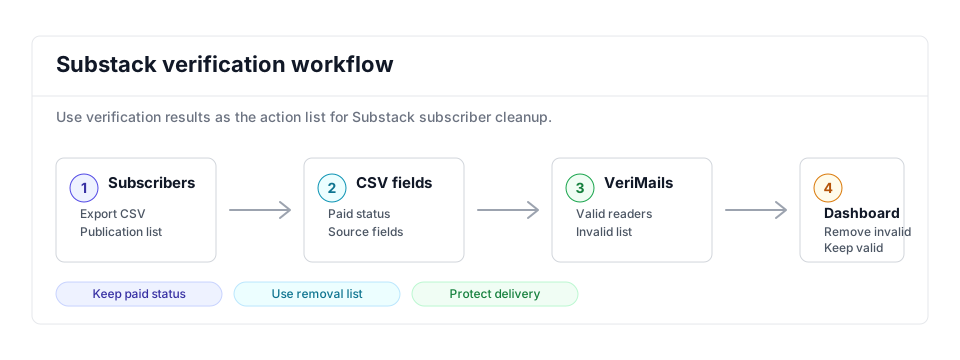
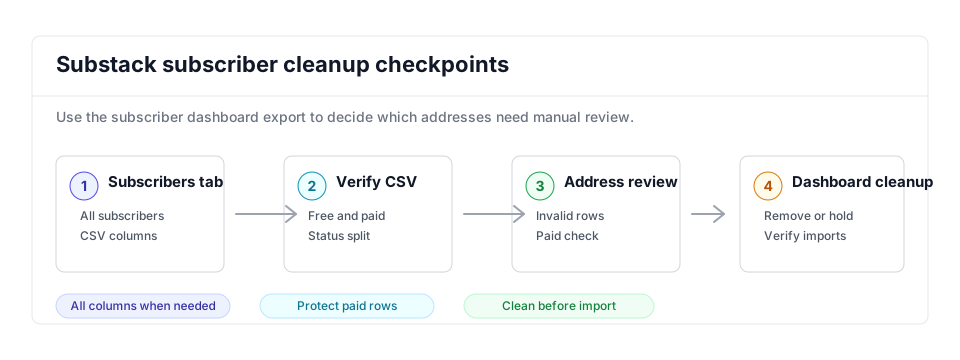
- Export scope: Start from the subscriber export for the publication you need to clean.
- Matching field: Keep email, subscription type, paid status, and source fields so important readers are reviewed carefully.
- Result action: Use invalid and disposable files as the removal list, while valid subscribers remain eligible for newsletter sends.
Step-by-Step
Export your subscriber list from Substack
In Substack, open your Subscribers page and scroll down to All subscribers. Click the three dots above the subscriber list and select Export, then click Download last export to get the CSV. Alternatively, go to Settings, click Exports in the left sidebar, and create a new export, which generates a zip file containing your subscriber CSV. Substack emails you when the export is ready.
Upload the CSV to VeriMails
Sign in to VeriMails and open Bulk Verification. Upload the subscriber CSV from Substack. VeriMails automatically detects and maps the email column, so you do not need to reformat the file or remove the subscription status and date columns Substack includes.
Run verification and review results
Start the verification job. The job runs as a queued bulk verification and shows downloadable filtered results when it completes. When the job completes, review the breakdown: deliverable addresses are safe, undeliverable and invalid addresses are the ones to act on, and disposable and role-based addresses are flagged for your judgment. Catch-all addresses are labeled so you can decide how to treat them.
Identify the addresses to remove
Download the verified results and isolate the rows marked undeliverable or invalid. This list is your evidence for which subscribers cannot receive your posts. Keep it open in a spreadsheet so you can match those addresses against your Substack subscriber dashboard in the next step.
Clean your publication in the Substack dashboard
Substack does not let you re-upload a corrected CSV, so use the subscribers dashboard to act on your results. Substack provides tools to remove imported readers who have not engaged, and you can remove or unsubscribe individual addresses. Work through the undeliverable addresses from your VeriMails results and remove them so your future sends go only to reachable readers.
Substack Cleanup Checklist
Use this checklist after importing a list or before a major post. Substack cleanup is usually actioned in the dashboard, so the verification output needs to become a clear removal and review queue.
| Check | What to do | Why it matters |
|---|---|---|
| Export choice | Export all subscriber columns when paid status, source, comped status, or engagement fields matter. | Preserves the context needed to review important readers before removal. |
| Removal list | Use invalid and disposable VeriMails rows as the first dashboard cleanup queue. | Targets addresses that are most likely to bounce or distort reach. |
| Paid review | Review paid, comped, and recently engaged subscribers before removing any address with a non-valid result. | Protects subscriber revenue and avoids removing readers who need manual handling. |
| Catch-all handling | Keep catch-all rows separate from the removal list unless they also show other risk signals. | A catch-all label means the mailbox cannot be confirmed, not that the subscriber is definitely bad. |
| Metric check | After cleanup, compare total subscribers, free-to-paid conversion, and recent open-rate denominator. | Shows whether the list now reflects reachable readers instead of inflated historical signups. |
Frequently Asked Questions
Related Guides
Try VeriMails Free
100 free credits on signup. No credit card required. Put this guide into practice today.
Start Free