How to Verify Emails in Ghost
Ghost gives publishers full control of their newsletter, which also means full responsibility for list quality and sender reputation. Because Ghost sends through a connected provider like Mailgun, a list full of dead addresses puts both your inbox placement and your Mailgun account at risk. Verifying your Ghost members keeps bounces low and deliverability healthy. This guide covers the export, verify, and re-import flow.
Export members from Ghost Admin, upload the CSV to bulk verification, and re-import or tag the valid rows before newsletter sends. Keep invalid and disposable rows out of Mailgun-backed campaigns, review catch-all and role-based addresses separately, and check paid member rows before removing anything. Use this alongside broader newsletter list hygiene.
Why Verify Your Ghost Contacts
Ghost is self-managed publishing software, so list hygiene is entirely in your hands. There is no platform team quietly suppressing your worst addresses for you. The way members join a Ghost site, combined with how Ghost delivers email, makes verification a practical necessity rather than an optional polish.
Ghost sends through Mailgun, and Mailgun penalizes bounces hard
Most Ghost sites send newsletters through Mailgun. Mailgun tracks bounce rates closely, and a sustained high bounce rate can trigger sending limits or an account suspension. If your Mailgun account is throttled, your newsletter stops going out entirely. Verifying members before they enter Ghost protects the email infrastructure your whole site depends on.
Signup forms and the membership portal collect typos
Members join a Ghost site through the built-in subscribe portal, custom signup forms, and free or paid membership tiers. Readers mistype their address or use a throwaway address to access free content. Ghost stores exactly what was entered, so addresses like "member@hotmial.com" sit in your member list and bounce on the next newsletter.
Migrated lists from Substack or Mailchimp arrive unverified
Many publishers move to Ghost from Substack, Mailchimp, or another platform and import their members. Ghost imports that list as-is, with no quality check. Email lists decay by roughly 20 to 25 percent a year, so an imported list almost always contains addresses that have already gone cold.
Bounces undermine inbox placement for paying members
Inbox providers judge senders on bounce rate. Once you cross a five percent bounce rate, providers start filtering your newsletter into spam. On Ghost that hurts everyone, but it especially hurts the paying members who are entitled to receive what they bought. A clean member list keeps your paid newsletter landing where it should.
What VeriMails Checks
VeriMails runs a complete chain of checks on each address in your Ghost members export, so you can see exactly which members are safe to keep mailing. Every address gets checked for the signals that decide whether it belongs in your next send.
Syntax validation confirms the address is correctly structured before any network checks. MX and DNS records are queried to confirm the domain exists and can receive mail. A live SMTP handshake connects to the receiving server to confirm the specific mailbox accepts mail, without sending anything. Catch-all detection identifies domains that accept every address sent to them, so those members can be treated carefully. Disposable detection flags temporary inbox domains used to grab free content. Role-based detection identifies generic addresses like info@, hello@, and admin@ that usually engage poorly.
VeriMails verification runs layered checks and returns a clear result for each address. Catch-all domains are reported as a clear detection so you can decide how to treat them, never as a vague score.
Pricing for Ghost Users
VeriMails pricing keeps Ghost member-list hygiene practical for imports, regular cleanup, and Mailgun-backed newsletter sends. Credit packs start at $0.0019 per email, and 10,000 credits cost $19, which covers most independent Ghost publications. Larger credit packs scale up to 5 million addresses for $1,499 for big sites and agencies running Ghost for clients.
For ongoing hygiene, annual plans start at $12.50/month when billed yearly. Every new account receives 100 free credits on signup with no credit card required, and credits never expire, so unused credits stay available for your next import.
Workflow Visual
Use this flow to clean Ghost members before newsletter delivery or a membership migration.
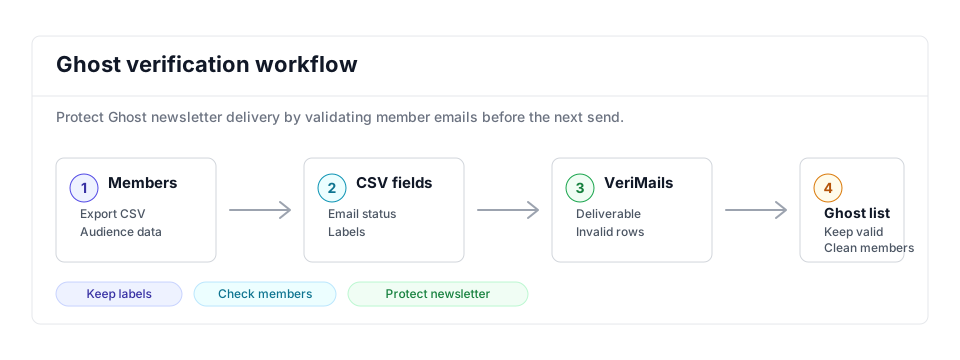
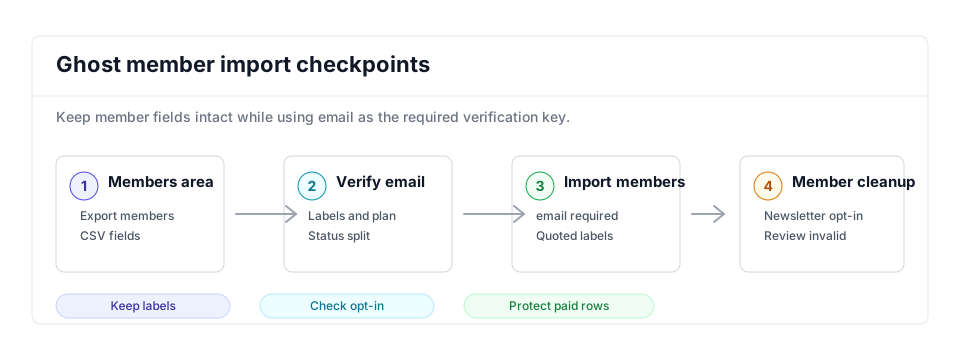
- Export scope: Use the Ghost members export when newsletter sends, paid member updates, or migration work needs clean email data.
- Matching field: Keep email, subscription status, labels, and member type so cleanup does not lose audience context.
- Result action: Import valid rows or update members manually, then remove invalid and disposable addresses from future newsletters.
Step-by-Step
Export your members from Ghost
In Ghost Admin, open the Members area, click the settings icon, and select Export all members. Ghost generates a CSV with fields including id, email, name, note, subscribed_to_emails, created_at, and labels. If you only want a subset, filter your members first, then click the bulk action menu and choose to export the filtered selection.
Upload the CSV to VeriMails
Sign in to VeriMails and open Bulk Verification. Upload the members CSV you exported from Ghost. VeriMails automatically detects and maps the email column, so you do not need to reformat the file or strip out the name, label, and subscription columns Ghost includes.
Run verification and review results
Start the verification job. The job runs as a queued bulk verification and shows downloadable filtered results when it completes. When the job finishes, review the results: deliverable addresses are safe to keep, undeliverable and invalid addresses should be removed, and disposable and role-based addresses are flagged for your decision. Catch-all addresses are labeled so you can choose how to handle them.
Build a clean import file
Download the verified results and keep only the deliverable addresses, plus any catch-all members you decide to retain. Remove the undeliverable and invalid rows. Keep the original Ghost columns such as name and labels so the re-import maps cleanly back into your member fields.
Re-import the clean list into Ghost
In Ghost Admin, use the member import option to upload your cleaned CSV, since Ghost member exports use the same format the import accepts. Apply a label such as "verified" during import so you can target clean members in your newsletters. For the undeliverable addresses, use the bulk action menu to unsubscribe or remove them so they no longer reach Mailgun.
Ghost Cleanup Checklist
Use this table before a newsletter send, paid-member update, or migration. It keeps Ghost member cleanup tied to Mailgun deliverability and member status.
| Check | What to do | Why it matters |
|---|---|---|
| Member scope | Export all members for a full hygiene pass or filter first when only a newsletter segment needs cleanup. | Prevents paid, free, complimentary, and inactive members from being handled without context. |
| Fields to preserve | Keep email, name, subscribed_to_emails, complimentary_plan, labels, created_at, and Stripe customer ID when present. | Ghost imports use member context, and paid or complimentary members deserve careful review. |
| Verified label | Import valid rows with a label such as verified-2026-05 or add that label during cleanup. | Makes it easy to target clean members for newsletters and migration QA. |
| Mailgun protection | Remove or unsubscribe invalid and disposable rows before the next newsletter goes through Mailgun. | Reduces the hard-bounce signal that can affect the sending account behind Ghost. |
| Paid review | Review catch-all, role-based, and paid-member rows manually before removing access or email eligibility. | Protects revenue and member experience while still separating uncertain addresses from normal sends. |
Frequently Asked Questions
Related Guides
Try VeriMails Free
100 free credits on signup. No credit card required. Put this guide into practice today.
Start Free