How to Verify Emails in beehiiv
beehiiv newsletters live or die on inbox placement, and inbox placement depends on a clean subscriber list. Free sign-up forms, recommendations, and the beehiiv Boost network all add subscribers quickly, and not every one of those addresses is real. Verifying your beehiiv list before your next send keeps bounce rates low and your sender reputation strong. This guide covers the export, verify, and re-import flow.
Run a Quick or Full beehiiv subscriber export, verify the email column with bulk verification, and use the result files to tag or re-import only the clean audience. Keep invalid and disposable addresses out of sponsor sends and growth campaigns, and use engagement data from beehiiv alongside the technical results. The same cleanup logic applies when moving between beehiiv and Substack.
Why Verify Your beehiiv Contacts
beehiiv is engineered for growth, and its strongest features all push fresh subscribers into your publication at speed. That growth is exactly why list quality needs active attention. The faster a list grows, the faster bad data accumulates if nothing is checking it.
Boosts and recommendations bring in addresses you did not collect yourself
The beehiiv Boost network and the recommendation engine route subscribers to your newsletter from other publications. You did not see those people type their address, and you cannot vouch for how carefully it was entered. Some of those addresses are mistyped, abandoned, or low-intent. Verifying the list confirms which of these acquired subscribers can actually receive your newsletter.
Bounce rate decides whether your newsletter reaches Gmail and Outlook
Mailbox providers treat bounce rate as a core trust signal. A bounce rate under two percent is healthy. Cross five percent and providers begin routing your newsletter to spam or rejecting it. For a beehiiv publisher, that means the issue you spent hours writing never gets seen, no matter how good it is.
beehiiv plans scale with subscriber count
beehiiv plan tiers are tied to active subscriber count. Dead and invalid addresses can inflate that count while adding zero opens, zero clicks, and zero revenue. Verifying the list and removing or marking undeliverable addresses according to beehiiv's rules tightens your active subscriber number and may support a subscriber-tier change only when the plan settings actually change.
Inflated lists distort the metrics advertisers pay for
If you monetize through sponsorships or the beehiiv Ad Network, advertisers buy against your subscriber count and open rate. Invalid addresses suppress your open rate and overstate your reach, which can cost you sponsorship revenue and trust. A verified list gives advertisers honest numbers and gives you stronger negotiating ground.
What VeriMails Checks
VeriMails runs a complete chain of checks on each address in your beehiiv export, so you can see exactly which subscribers are safe to keep mailing. Every address gets checked for the signals that decide whether it belongs in your next send.
Syntax validation confirms the address is correctly structured before any network checks. MX and DNS records are queried to confirm the domain exists and is set up to receive mail. A live SMTP handshake connects to the receiving server to confirm the specific mailbox accepts mail, without sending anything. Catch-all detection identifies domains that accept every address sent to them, so those subscribers can be treated carefully. Disposable detection flags temporary inbox domains that have no place in a newsletter list. Role-based detection identifies generic addresses like info@, team@, and admin@ that usually engage poorly.
VeriMails verification runs layered checks and returns a clear result for each address. Catch-all domains are reported as a clear detection so you can decide how to treat them, never as a vague score.
Pricing for beehiiv Users
VeriMails pricing keeps beehiiv list hygiene practical for newsletter imports, advertiser reporting, and regular cleanup. Credit packs start at $0.0019 per email, and 10,000 credits cost $19, which covers most growing newsletters. Larger credit packs scale up to 5 million addresses for $1,499 for big publications and newsletter networks.
If you want predictable billing, annual plans start at $12.50/month when billed yearly. Every new account gets 100 free credits on signup with no credit card required, and credits never expire, so you can verify a list now and keep the rest for your next growth push.
Workflow Visual
Use this flow to clean a beehiiv subscriber export before a newsletter send or list migration.
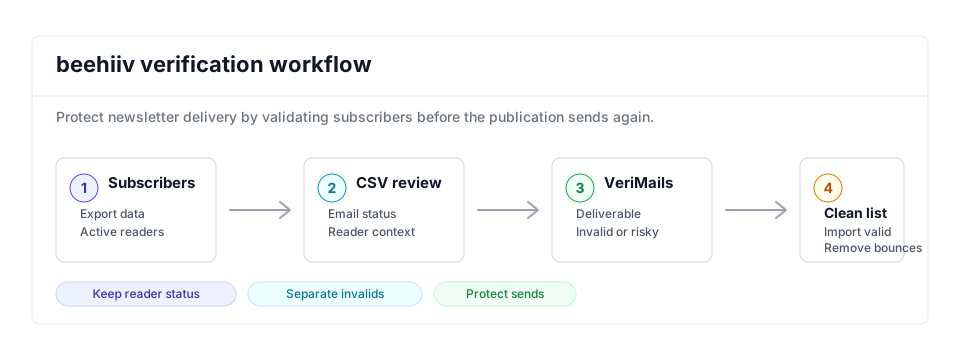
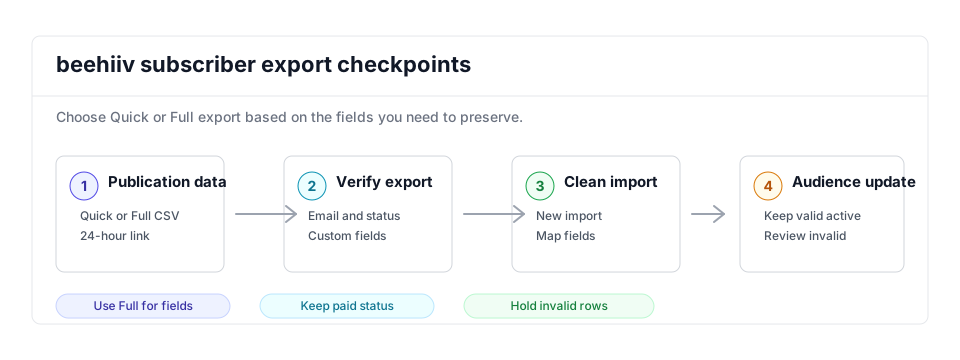
- Export scope: Start with the subscriber export that matches the publication or segment you are preparing to mail, then run the CSV through bulk verification.
- Matching field: Keep email, subscription status, and any fields needed to identify paid, free, imported, or tagged readers.
- Result action: Use valid rows for the clean import and keep invalid or disposable rows out of newsletter sends.
Step-by-Step
Export your subscriber data from beehiiv
In beehiiv, open your Dashboard, scroll down to Settings, and click Export Data. Under Export Subscribers, click either Export All Basic Subscribers for the Quick version or Export All Subscribers for the Full version. beehiiv processes the export and emails you a download link when it is ready. You can also find the file under Historical Exports. Download links are valid for 24 hours.
Upload the CSV to VeriMails
Sign in to VeriMails and open Bulk Verification. Upload the CSV you downloaded from beehiiv. VeriMails automatically detects and maps the email column, so you do not need to reformat the file or remove the status, tier, and custom field columns beehiiv includes.
Run verification and review results
Start the verification job. The job runs as a queued bulk verification and shows downloadable filtered results when it completes. When the job finishes, review the results: deliverable addresses are safe to keep, undeliverable and invalid addresses should be removed, and disposable and role-based addresses are flagged for your decision. Catch-all addresses are labeled so you can choose how to handle them.
Build a clean import file
Download the verified results and keep only the deliverable addresses, plus any catch-all subscribers you decide to retain. Remove the undeliverable and invalid rows. Keep the original beehiiv columns intact so the re-import maps cleanly back to subscriber tier and any custom fields.
Re-import the clean list into beehiiv
In beehiiv, use the subscriber import flow to upload your cleaned CSV and map the email and custom field columns. For the addresses verification flagged as undeliverable, unsubscribe or remove them from your publication so they no longer count toward your subscriber total or drag down your open rate.
beehiiv Cleanup Checklist
Use this checklist before a sponsored issue, growth push, or migration. It turns the export and bulk verification run into clear subscriber actions.
| Check | What to do | Why it matters |
|---|---|---|
| Export version | Use the Full export when custom fields, tags, referral source, or subscriber statistics need to survive cleanup. | Protects the context you need for sponsorship reporting, paid/free segmentation, and source analysis. |
| Audience split | Separate paid subscribers, high-engagement readers, imported subscribers, and Boost or recommendation subscribers before acting on risky statuses. | Prevents an automated cleanup from treating valuable paid readers the same as low-intent growth sources. |
| Valid import | Use the valid file as the send-ready audience and retain the original beehiiv columns for mapping. | Keeps publication metadata intact while removing rows that would bounce. |
| Risk review | Remove invalid and disposable rows; review catch-all and role-based rows, especially if they are paid or recently engaged. | Balances deliverability protection with subscriber revenue and audience quality. |
| Reporting check | Compare subscriber count, paid/free mix, and open-rate denominator after cleanup. | Gives advertisers and operators cleaner audience metrics after the list is verified. |
Frequently Asked Questions
Related Guides
Try VeriMails Free
100 free credits on signup. No credit card required. Put this guide into practice today.
Start Free