How to Verify Emails in Make
Make scenarios route contacts between the forms, CRMs, and email tools that power your marketing, so they are the natural place to catch bad addresses before they spread. With the HTTP module you can call the VeriMails API mid-scenario, verify every contact in real time, and use a router to send each result where it belongs. This guide walks through that build.
TLDR
- Add VeriMails API verification after the Make trigger and before any module creates a lead, subscriber, or CRM contact.
- Use a Router to send deliverable contacts forward while logging invalid, disposable, catch-all, and unexpected results for review.
- Keep high-volume imports on the bulk workflow, and use real-time scenario checks for new contacts as they arrive.
Make Scenario Setup Checklist
Plan the scenario as a gate: trigger data comes in, VeriMails checks the email address, and Router filters decide what is allowed to move forward.
| Decision | Make setup | Operator note |
|---|---|---|
| Trigger scope | Start with the module that first receives the contact bundle: a form watcher, custom webhook, CRM record, or sheet row. | Map the raw email value before formatter or enrichment modules change the data shape. |
| HTTP request | Add the HTTP module after the trigger, send the email to the VeriMails endpoint, and store the API key in the module connection or secure credential setup available in your account. | Keep the API verification call before any module that creates a subscriber, lead, or audience member. |
| Router design | Create one route for deliverable contacts, one route for rejected contacts, and a fallback route for unexpected or empty statuses. | Make routes are filtered independently, so label each route by outcome and keep the fallback visible during testing. |
| Held-record log | Write invalid, disposable, and catch-all contacts to a sheet, data store, or notification with source and reason fields. | A simple log makes noisy lead sources obvious and gives operators a rollback trail. |
| Activation test | Run once with sample bundles that exercise every route before scheduling or activating the scenario. | Review the scenario history so you can see the parsed VeriMails response and the route that handled it. |
Why Verify Your Make Contacts
Make connects the apps that capture and use your contact data, which puts it at the exact point where a verification step does the most good. Checking an address inside the scenario keeps every connected app downstream from inheriting bad data.
Scenarios push contacts into systems that send and bill
A typical Make scenario takes a new form entry or CRM record and pushes it into an email platform, an ad audience, or a sales tool. If the contact is invalid, that bad address now lives in a system that will bill you for it or attempt to send to it. A VeriMails HTTP module placed before the create step keeps each connected app clean.
Form and webhook triggers carry the most errors
The most common scenario triggers, such as new form submissions, webhook payloads, and new spreadsheet rows, are also the noisiest sources of email data. Typos, abandoned addresses, and fake entries arrive constantly. A verification module on the trigger output catches them at the entry point of your automation.
Real-time verification keeps lists permanently clean
Verifying inside a scenario means each contact is checked the moment it flows through, not weeks later in a bulk export. Your lists stay clean continuously, your bounce rate has no chance to climb, and you avoid sending to addresses that were wrong from the start.
Bad addresses still bounce and damage sender reputation
However many modules sit between the form and the inbox, an invalid address eventually bounces. Bounce rates above five percent push your campaigns toward spam across the whole list. A VeriMails step in the scenario removes that risk at the source rather than leaving your email platform to absorb it.
What VeriMails Checks
When an HTTP module calls the VeriMails API for a contact, VeriMails runs a full chain of checks and returns a structured result your router can branch on. Every address is tested as follows:
Syntax validation confirms the address is correctly formed. MX and DNS records are queried to confirm the domain exists and can receive mail. A live SMTP handshake connects to the receiving mail server to confirm the specific mailbox accepts mail, without sending anything. Catch-all detection identifies domains that accept every address sent to them. Disposable detection flags temporary inbox domains. Role-based detection identifies generic addresses like info@, sales@, and support@.
VeriMails returns clear verification results with fast response times, fast enough to sit inline in a real-time scenario. Catch-all domains are reported as a clear detection so your router filters can treat them deliberately, never as a vague score.
Pricing for Make Users
A real-time verification scenario draws down VeriMails credits as new contacts pass through it, so you pay only for the addresses you verify. Credit packs start at $0.0019 per email, and 10,000 credits cost $19. Larger credit packs scale up to 5 million addresses for $1,499 for high-volume scenarios.
If you prefer predictable billing for a steady contact flow, annual plans start at $12.50/month when billed yearly. Every new account gets 100 free credits on signup with no credit card required, and credits never expire, so you can build and test your scenario before committing.
Workflow Visual
Use this flow to add VeriMails as a quality gate inside a Make scenario.
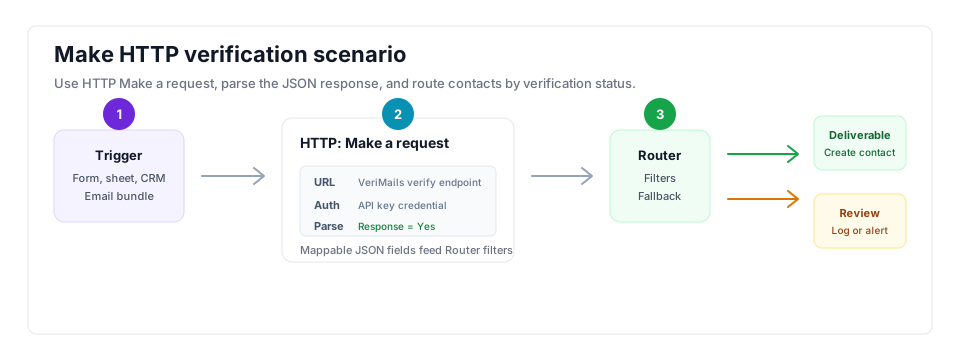
- Trigger scope: Map the email field immediately after the form, sheet, webhook, or CRM module creates the contact bundle.
- API step: Store the VeriMails key securely and map the API response fields into the scenario for routing.
- Result action: Send deliverable contacts down the create/update route and log invalid or disposable contacts for review.
Step-by-Step
Set the trigger module for new contacts
Create a new scenario and add the trigger module that brings contacts in, such as a watch-form-submissions module, a custom webhook, a new CRM record, or a new spreadsheet row. This trigger outputs the email address that the rest of the scenario will verify and route.
Add an HTTP module to call the VeriMails API
Add the HTTP module and configure it to make a request to the VeriMails verification endpoint. Map the email field from the trigger into the request, include your VeriMails API key for authentication, and enable response parsing so Make maps the JSON verification fields for use by later modules.
Add a Router to branch on the result
Place a Router after the HTTP module. The Router splits the scenario into separate routes, each with its own filter. Set one route to run only when the VeriMails result is deliverable, and add another route for undeliverable, disposable, or catch-all results. You can also configure a fallback route for anything that does not match.
Route deliverable contacts to your destination app
On the deliverable route, add the module that creates or updates the contact in your email platform, CRM, or ad audience. Only verified, deliverable addresses travel down this route, so the lists and audiences in those connected apps stay clean automatically.
Handle the bad addresses and activate the scenario
On the non-deliverable route, add a module that logs undeliverable and disposable addresses to a sheet or sends a notification so you can review them. Run the scenario once with sample data to confirm each route behaves correctly, then schedule or activate it so every new contact is verified in real time.
What to Do With Each Result
Make scenarios are easiest to operate when every verification status has an explicit route. Do not let a missing or risky result fall through to the same modules as verified contacts.
- Deliverable: Send to the create/update module for the CRM, email tool, or ad audience and optionally write a verified date field.
- Undeliverable: Stop the clean route and write the record to a suppression or cleanup table.
- Catch-all: Send to a cautious review route. These contacts may be useful for high-value sales follow-up, but they should not mix into normal campaign volume.
- Disposable: Keep out of lifecycle campaigns and tag the lead source for inspection.
- Role-based: Route based on the workflow goal. A shared inbox can be valid for operations messages but poor for personalized outreach.
- Fallback or error: Notify an operator and stop downstream writes until the request or mapping issue is fixed.
Frequently Asked Questions
Related Guides
Try VeriMails Free
100 free credits on signup. No credit card required. Put this guide into practice today.
Start Free