How to Verify Emails in Salesloft
Salesloft cadences send on a fixed schedule, so an unverified People list can turn into a wave of bounces the moment a cadence starts. Because hard bounces can hurt sender reputation signals, the smart sequence is to verify People before they enter a cadence. This guide covers exporting People to CSV, cleaning the list with VeriMails, and re-importing only valid rows.
TLDR
- Filter Salesloft People to the exact account, owner, list, or cadence audience you plan to use.
- Export People to CSV and keep email, name, company, title, owner, CRM ID, and cadence/list context.
- Verify the CSV in VeriMails before cadence enrollment.
- Import valid rows only, then add a clean list or verification-date field before reps enroll contacts.
- Hold catch-all, role-based, disposable, and invalid rows outside the main cadence audience.
Salesloft Export Decisions
Salesloft is cadence-driven, so every cleanup decision should protect the exact People records that will receive the first step.
| Decision | Best operating choice | Why it matters |
|---|---|---|
| Export source | Use filtered People, an account segment, a list, or the People tab inside a cadence. | Salesloft honors active filters, so the exported CSV can match the operational audience. |
| Identity fields | Keep Email, Person ID, CRM ID, account, owner, name, title, and company. | Prevents duplicate people and supports clean CRM reconciliation after import. |
| Cadence context | Keep cadence, stage, or list fields when cleaning people already associated with outreach. | Helps sales operations avoid re-enrolling the wrong contacts. |
| Import mode | Decide whether the valid file should create new People, update existing People, or just feed a list. | Avoids unintended field overwrites in a production sales workspace. |
| Rep visibility | Add a verified status, clean list, or verification-date field if your workspace supports it. | Makes the cleanup visible to reps before cadence enrollment. |
Why Verify Your Salesloft Contacts
Salesloft is a sales engagement platform, which means its job is to send a high volume of email consistently and on cadence. That is exactly why list quality matters so much. A cadence does not pause to check whether each person record points to a live mailbox. It sends, and an address that does not exist hard bounces. The more cadences you run, the more a single dirty import can cost you.
Cadences send to every person record without re-checking it
When you add People to a Salesloft cadence, each step fires emails on the schedule you defined. If a portion of those records carries dead addresses, that portion can bounce on every step until the cadence completes. Verifying the People list before you add it to a cadence removes high-risk rows one time, so they are not sent repeatedly.
Person records drift out of date between import and send
People records pulled into Salesloft from a CRM sync, an enrichment tool, an event list, or an older outbound file may have been usable when sourced but can quietly go stale. An address that worked last quarter can bounce this quarter. Verifying right before a cadence launch catches that drift.
Bounce rate is a reputation signal shared across all your cadences
Mailbox providers read bounce rate as a measure of list quality. A rate above common operator benchmarks can make filtering more likely, including for messages to valid People in other cadences. Cold outreach teams often aim to stay under a low bounce-rate threshold; the bounce rate benchmarks explain why verification belongs before cadence enrollment.
Catch-all and role-based addresses overstate your cadence reach
A meaningful share of B2B domains are configured as catch-all, accepting any address whether or not a mailbox exists behind it. Salesloft cannot distinguish a catch-all from a confirmed inbox, so those People look like genuine reach. Role-based addresses such as info@ or sales@ rarely land with a decision-maker. Verification flags both categories so you can choose how to cadence them.
What VeriMails Checks
VeriMails runs every address from your Salesloft export through a layered set of checks, each one targeting a different category of bad email, and returns a clear status for each person rather than an ambiguous score.
It starts with syntax validation to catch malformed addresses and the typos that slip into manual person records. MX and DNS checks then confirm the domain exists and is configured to receive mail. A live SMTP handshake opens a real connection with the receiving mail server to confirm the specific mailbox will accept a message, without ever sending one, so your People see nothing.
VeriMails additionally runs catch-all detection to identify domains that accept all addresses, disposable detection to flag throwaway inboxes, and role-based detection to surface generic addresses like support@ or admin@. Catch-all status is reported as a clear detection result, never a vague rating, so you keep full control over those records. Across all of these checks VeriMails returns clear verification results that work well in live workflows.
Pricing for Salesloft Users
Verification is priced to suit a sales org that loads fresh People lists regularly. VeriMails credits start at $0.0019 per email, so a 10,000-person list costs about $19 on the entry pack. Credit packs scale up to 5 million verifications for $1,499, and credits never expire, so an unused balance carries forward to your next cadence build.
For teams with steadier verification needs, annual plans start at $12.50/month when billed yearly. Every new VeriMails account includes 100 free credits with no credit card required, enough to verify a small People export and see the result before committing. A reliable habit is to verify every People list immediately before adding it to a Salesloft cadence.
Workflow Visual
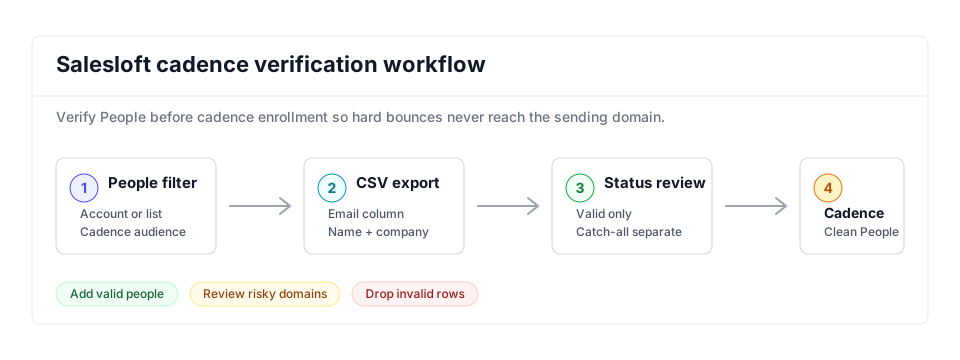
Salesloft cadences should receive a verified People list, not a raw export. Keep the CSV simple, verify the email column with bulk verification, and keep catch-all or invalid rows out of the cadence audience.
- Cadence hygiene: Use this alongside the cold email verification workflow for outbound campaigns.
- Shared sales workflows: Compare Salesloft with the Outreach guide if your team runs both platforms.
- Risk handling: Route catch-all and role-based rows through catch-all detection decisions before cadence enrollment.
- Continuous capture: Use the Email Verification API when new People records need to be checked before they reach a CSV export.
Step-by-Step
Filter the People page and export to CSV
In Salesloft, open the People page and apply filters to narrow the list to the exact contacts you intend to verify, for example by account or list. Click the Export button in the top right corner. Salesloft honors the active filter, so the export contains only the filtered People. You can also export from the People tab inside a cadence.
Confirm the CSV contains the email column
Open the exported CSV and confirm it includes the email address column along with name and company fields. Salesloft includes the standard person fields in the export. No reformatting is required because VeriMails reads the file exactly as it is.
Upload the People CSV to VeriMails for bulk verification
Sign in to VeriMails, open bulk verification, and upload the Salesloft CSV. VeriMails automatically detects the email column, so there is no manual mapping. The job runs as a queued bulk verification while the syntax, MX, DNS, SMTP, catch-all, disposable, and role-based checks run.
Review the valid, invalid, catch-all, and risky results
VeriMails groups every address by status. Valid addresses are the best candidates for cadence enrollment. Invalid addresses carry high bounce risk and should be removed. Catch-all results are flagged so you can decide whether to include them. Disposable and role-based addresses appear separately. Download the filtered set of valid results for your Salesloft import.
Re-import the cleaned list into Salesloft
Use the Salesloft Import People from a CSV flow to create or update person records from the verified file. Map the email column and the name fields during import. With only recently verified valid rows entering your cadences, the first step starts from a cleaner audience and lower avoidable bounce risk.
What to Do With Each Result
Salesloft cadence enrollment should happen only after the result file is split by status.
- Valid Import or update the People record and add the person to the clean list for cadence enrollment.
- Invalid Exclude from cadences and send the row to CRM cleanup.
- Catch-all Route to a smaller review list when the account is important and volume can stay low.
- Disposable Remove from sales engagement because the inbox is temporary.
- Role-based Review manually; shared inboxes usually do not belong in person-level cadences.
Frequently Asked Questions
Related Guides
Try VeriMails Free
100 free credits on signup. No credit card required. Put this guide into practice today.
Start Free